I use the Streaming Audio File Player in Gig Performer with pre-made click tracks. I also use several connected external keyboards and internal instrument plug-ins. I would now like to trigger an automatic sound change within a song in a plug-in using a program change command. With external keyboards, this can be done using actions assigned to markers in the Streaming Audio File Player. How does this work with internal plug-ins? I can’t find any information on this.
Many thanks in advance,
Jürgen
If you add a widget and assign it to the PC parameter of a MIDI In block that is connected to your plugin, then you can trigger that widget with a marker in the SAFP. You’ll have to assign handles to the SAFP and widget (if you haven’t already), and also scale the widget to send the correct PC message.
I have no experience with widgets because i used Gig Performer always in “automated mode” which was fine for me. I used the Panel only with Buttons to start the Click-Track and other Playbacks …
Which kind of widget is the best for Program changes what about the handles? I have no idea how to implement it. Please excuse my ignorance, but is there perhaps a tutorial or sample file where something like this has been implemented?
Thank you very much for your quick replies. Let me explain briefly: “Automated mode” means that I have been using Gig Performer to play click and backing tracks and automatically select sounds in keyboards and plug-ins for each song. I know what widgets are, but I have hardly used them except for buttons that sent start or stop commands. I work almost exclusively with the “Wire” interface and hardly ever use the panel interface.
My question was which widget is best suited for programme change commands.
Best regards,
Jürgen
Sorry you had to spend so long. That said, you marked your answer as a solution but you didn’t share your solution with us. Can you, so that others can benefit?
I proceeded as suggested by edm11, but first had to work my way through several tutorials and the manual.
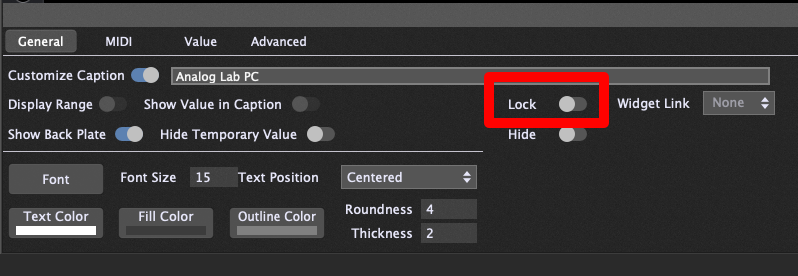
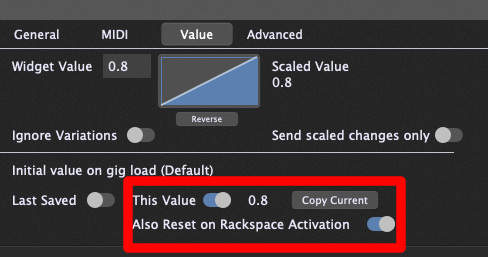
I have now used simple text labels as widgets for the programme changes. However, it is important to note that the values only range from 0 to 100, but there are 127 MIDI values for programme changes, so you have to work with decimal values or numbers followed by an ‘m’.
On one blog-site i found a page for the ‘handles’ that are required ( What is a handle and how to use it - Gig Performer® ). Edm11 had mentioned this, and at first I didn’t know how to use them. Now it’s clear.