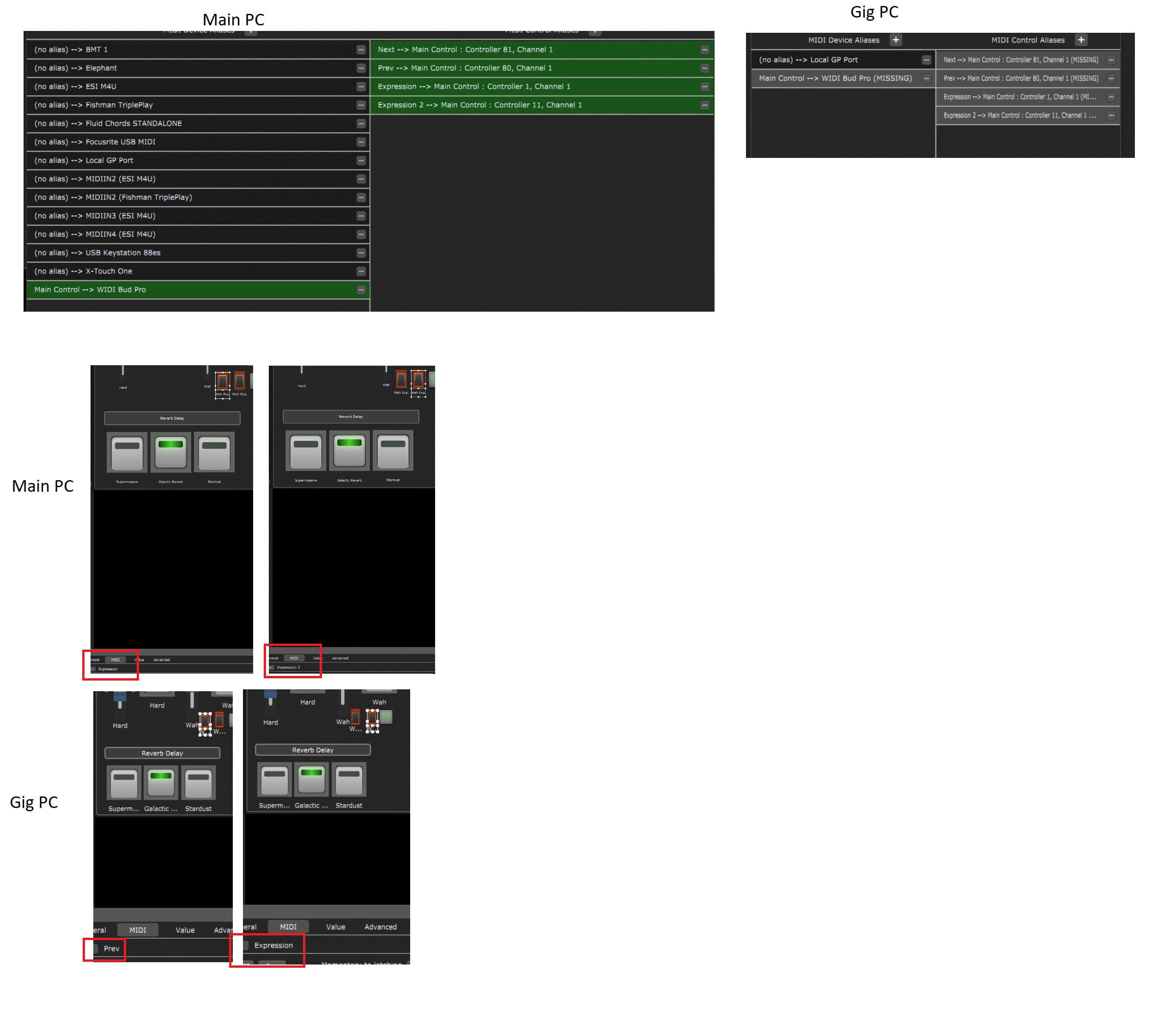
I have aproblem with gig perfromer that looks very strange to me.
Well I have two PCs. MainPC is the powermachine which I use at home. GigPC is an convertible.
So what I do is edit a gigfile on MainPC and when it works as needed just copy the gigperfromer file to the other machine and use it.
Now I have detected a problem with this.
On the screenshots at the end you can see the Rig Manager configuration(s). Well I am new here and only able to upload one PNG so I have to merge my screenshoots to one big PNG at the end.
When I switch to the other PC I switch also the “MIDI Bud Pro” so while making the screenshot it is not available on the second pc so it is grey
Note that this makes no difference for the following description. It is the same when I move the WIDI Bud Pro
So when I copy the file to the GigPc I get differences in settings. Please look at the screenshots at the end.
What you see is that “Expression” is now “Prev” and “Expression 2” is now “Expression”. When I change it back to the correct values and copy the file back I get on the MainPC that “Expression” is “Expression 2” and “Expression 2” is also “Expression 2”. So I am a little bit puzzeled.
Yes surely - you can see it in the screenshot. It is just a USB hub switched from one computer to the next. IN fact this does not matter as you can see in the screenshots GP just assigns it different.
Yes if you look at them directly. You can open up them in a new tab of your browser. Looks better. However this is because I could not upload more than one PNG because of some kind of rookie status.
Absolute shure. I can can always reproduce it and I double checked this. It is also the case that I copy it directly by using a shared directory. Thus on the convertible there is only one gig file.
Many thanks. Well can see the rig manager config in the screen shots. I cannot see any difference. Well I am pretty sure that this is something about indexing in rack spaces in the software but as the guys from the support don’t think that it is a bug in the software and told me to post it here I am not 100% sure.
When I open the gig I see what Midi messages are learned by the widget and it is like for your Main PC.
I can also see that on your Gig PC less MIDI Device aliases can be seen.
Can you export the rig manager on your Gig PC and upload it?
I do not really understand the first part of your answer. It learns MIDI messages? How can this be as you normaly have to put it in listening/learning mode? Additionally it should also change on the MainPC then right?
The rig manager have different content as I have a lot of midi devices on it but on the gigpc I only need the fishman tripleplay.
Here the upload - just renamed to *.txt because it will not let me upload: rig.txt (1.4 KB)
The whole point is that different rigs (controllers) may use different MIDI messages — the Rig Manager does the mediation (or indirection) so that you can use names in your gigfile and they will be resolved to the correct MIDI message for the particular rig
yes this is understood but that’s why you do it. After reading it (just now) again I just noticed that I have read something in a wrong way. However many thanks.