I played a gig last night and managed to make the two hour mark before a problem arose. During the loading of rack spaces, I noticed that the red predicting bar located at GPs bottom left did not resolve to green, but kept getting longer as each new rackspace was loaded. After a short time, the red bar filled the space and GP would no longer play. After consulting with the bar manager, I finished the gig early by telling him that the computer was playing up I needed to finish early. He was sympathetic and so I packed up and went home.
I have had this issue before but have never seen the red predictiong bar fill the space so completely. It seems to me that the issue arises because I send midi from an iPad through an Ethernet cable for program change and various other functions. I haven’t a clue as to why this happened, so would appreciate any thoughts on resolving the issue.
(Surface Pro 9, 32gig ram and predictive set to 1)
I am pretty clueless (there are far more knowledgeable people about Windows in this forum than me), but I wonder if it is an issue with Windows not unloading unused ram. [Feel free to ignore].
I have asked about it before but there wasn’t an answer. However, This morning I set up the iPad and SP 7 but over wireless instead of Ethernet. Of the 450 songs in the set, there were several that had incorrect program numbers either within GP or the iPad itself. I corrected each mistake as I went and GP behaved flawlessly each time. I was pretty sure that the problem was in the iPad sending incorrect PC# to GP and that this was the probably cause. In the end, GP threw a wobbly last night probably because of too much wrong info and just gave up (please correct me if you think Im wrong). So the problem may be resolved. I do have another issue.
Is an Ethernet connection from the PC going through a hub and into the iPad via an adapter really better than a wifi connection? It seems to me that I have had many more problems connecting by Ethernet rather than wifi. I was told that Ethernet would be more reliable and faster than than wifi which is why I switched. I am seriously considering going back to wifi permanently.
Finally, is wireless Bluetooth a better option? I know nothing about this but would love some thoughts on how it could be a more viable connection method than wifi. All thoughts and opinions welcomed please.
PS - Re windows not letting go of rackspaces in the task manager. I do find this an issue but was too busy playing last night to check. Is it possible to use a script for force windows to let go when a new RS is loaded?
Before I dabbled with Ethernet mid last year, I had great difficulty getting the iPad to connect to the Surface using Bome Network on both devices. I finally worked out where to look on the iPad and finally sorted that out. But it was a mystery for a time there, and caused me some grief. A few times after setup, I had to say to those in charge, sorry but I can play today because the iPad won’t communicate with the PC. It was a simple fix in the end, but because the iPad is so central to the gig being the main controller for all midi functions, I could not perform at all without it telling GP what to do.
Sigh - how about telling us what you did to sort it out – just telling us you fixed it is not useful.
What exactly and in detail did you do that made it work?
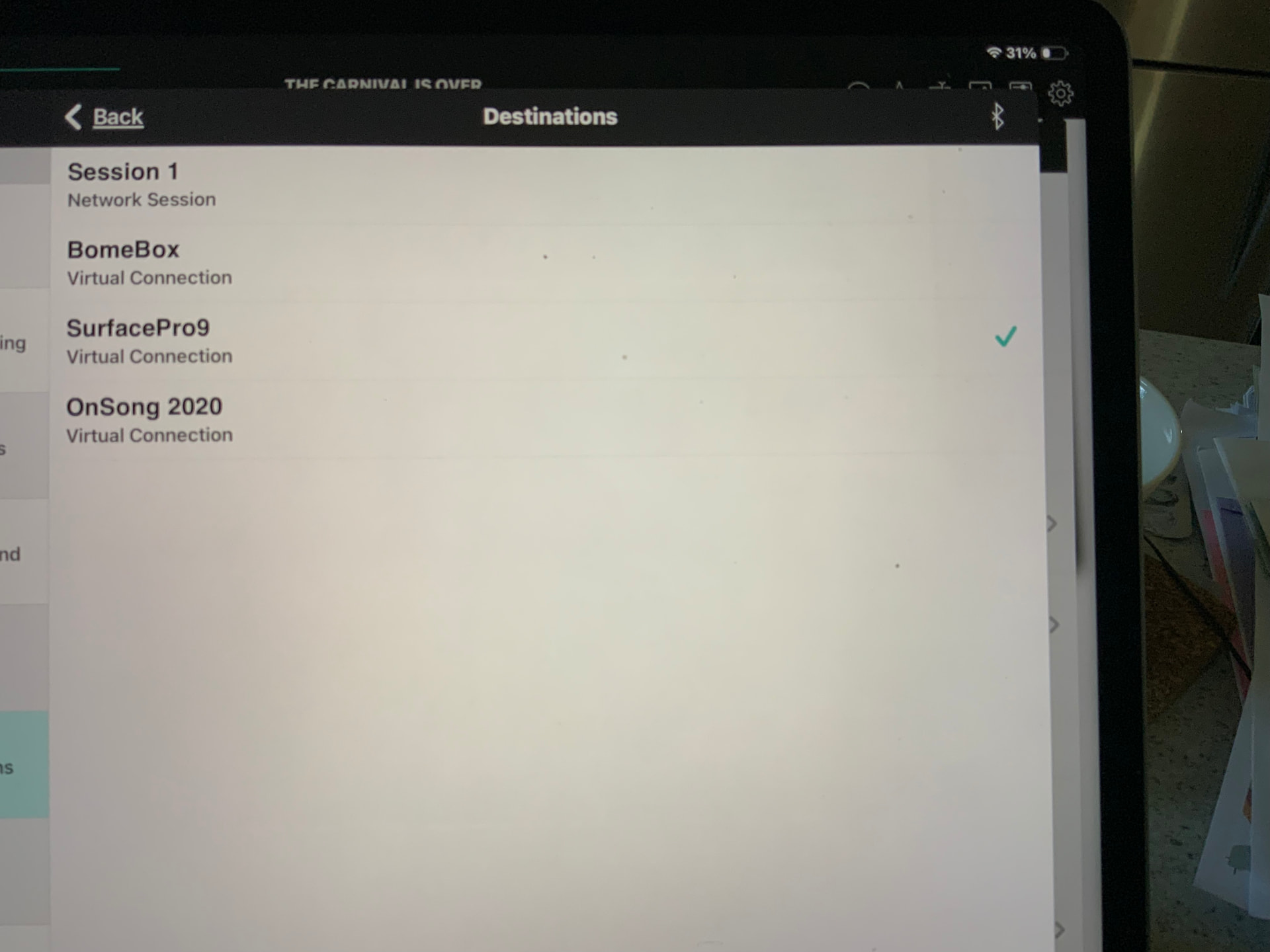
Pic 2 - iPad screen (Utilities>Settings>Midi settings>Destinations.) The Surface Pro is ticked indicating connection. For a long time I did not know about this screen showing the connection. I just assumed that the connection would happen automatically. And some times it would. But, 70% of the time it would not connect even though the Bome Network options to automate connection were ticked. The tick is the magic bit and needs to be showing as ticked with both wifi and Ethernet.`
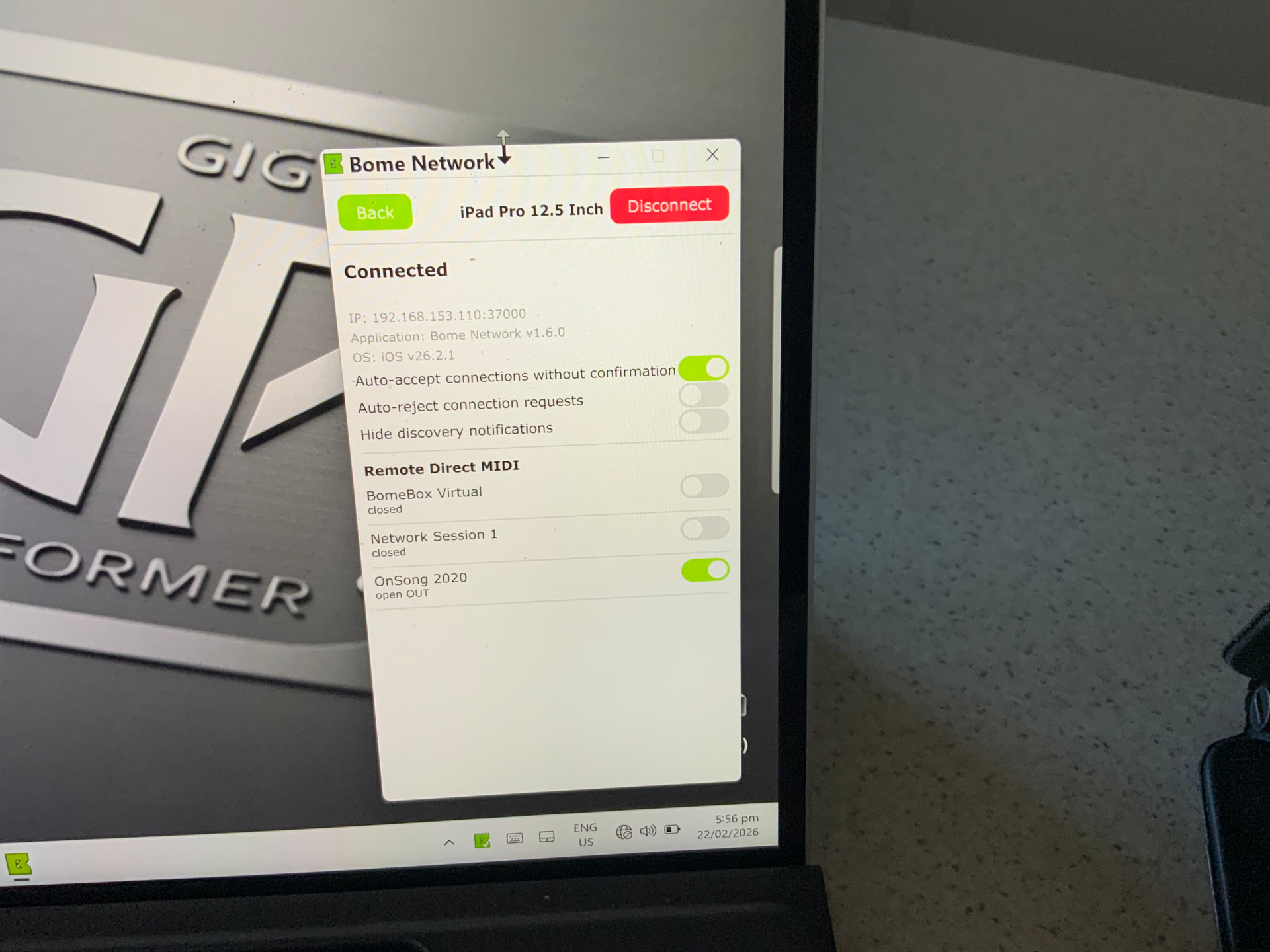
Pic 3 - Bome Network on the Surface Pro. Note the green icon in the task bar to the right - it has the white tick indicating connection. The window shown just above the task bar icon shows that OnSong is the chosen connection. As I mentioned before, you would expect the connection to be automatic. Perhaps in a future update, this auto connection may be improved/fixed. As a final note, upon boot up of both machines, the Surface will show the white connection tick, but the iPad really needs to be checked each time. Mostly, I have to remove Bome Nw and re load it in before I can see the connection tick as in Pic 2. Aonther indication perhaps that Apple really doesn’t want to have anything to do with Windows in any way, except when it has to and only then under sufference!
I hope that this is easy to follow. There are many hours of frustrating screen staring behind this very simple (when you know how) fix. Cheers:)
This issue of Windows not unloading ram is a real issue for me. There have been times when I’ve changed rack spaces and then opened the task manager to find up to three instances of previous GP rackspaces still in there. I am pretty sure that that was part of the problem at the gig last Saturday night. Trouble is, when you are playing and doing your own sound as a sololist, you just forget to check things like the task manager.
I have asked before, but is there a workaround whereby a command can be sent to the TM to clear out ram? A button on the dektop to press sounds good. I believe that this non-clearing of ram is a known bug from what Ive read. Even though I have 32gig of ram installed, the fact that Windows doesn’t release it either at all or not quickly enough, means that my machine will eventually run out and crash.
Windows doesn’t have a single native “purge” command like macOS, but you can achieve this through batch scripts or PowerShell by triggering built-in system processes or using official Microsoft utilities.
(1) Simple Batch Script (Built-in)
This script uses a legacy Windows command to trigger background maintenance tasks, which often helps release “zombie” memory from closed applications.
How to create it:
Open Notepad.
Paste the following code:
@echo off
echo Clearing memory...
%windir%\system32\rundll32.exe advapi32.dll,ProcessIdleTasks
echo Done.
pause
Use code with caution.
Save the file as ClearRAM.bat.
Right-click the file and select Run as Administrator.
–
(2) PowerShell Script (Advanced)
This approach focuses on clearing the “Standby” list (cached data that Windows keeps in RAM for speed but can sometimes prevent other apps from loading). This is most effective when paired with the official Microsoft Sysinternals RAMMap tool.
The Command:
If you have RAMMap.exe in your system folder, you can run this command in a PowerShell window to empty the standby list:
powershell
.\RAMMap.exe -EmptyStandbyList
Use code with caution.
Automated Script: You can find community-maintained scripts on GitHub that automate this process every few minutes to keep standby memory low.
(3) Alternative: Taskkill Script
If specific apps (like Chrome or background bloatware) are the problem, you can use a script to force-close them.
Example Script:
batch
taskkill /F /FI "MEMUSAGE gt 100000"
Use code with caution.
(This kills any process using more than 100MB of RAM—use with caution as it may close system apps).
Important Considerations
Modern RAM Management: Windows 10 and 11 are designed to keep RAM mostly full to speed up the system. Empty RAM is “wasted” RAM in modern OS logic.
Safe Alternatives: For a more user-friendly experience, tools like Wise Memory Optimizer provide a one-click “Optimize” button that performs these script actions safely.