I have one keyboard triggering two different VSTis. To do that I wired in, 2 diff MIDI Ins of the same MIDI KB I’m using. MIDI IN A is limited to the lower half of the KB to trigger a Bass VST. MIDI IN B is limited to the upper half of the KB to trigger a treble synth VST.
It seems as though plugin persist is triggered regardless of the allowed keyboard range. Whenever I play the lower KB, both the Bass AND the Treble VST are un-bypassed.
Did you make sure the keyboard range is set up so the “bass” midi in block is not triggered above a certain note and the “treble” midi block is set up so it is not triggered below a certain note.
Plugin Persist 2 has to be inserted between the MIDI In block and the plugin. So, in your situation you need two instances of it. Make also sure you use a different CC# for each instance. And of course follow the instructions of use.
@jeffn1 Yes I set the ranges of each MIDI IN Block. @David-san I followed the instructions as best I can. Apologies, but I am still missing something. Do I need to change the CC# in more than one place, or just where I double click on the Plugin Persist block? For some reason, each plugin bypass state is subject to the others parameter.
After prgramming everything, each plugin is in a bypassed state, I click the upper range of the KB to trigger the treble synth and it unbypasses and follows the ms release I programmed. But also the Bass VST unbypasses and follows the release ms for the treble Plugin Persist settings.
Similarly, when I press the bass note, both VSTs unbypass and the treble synth follows the different ms release of the bass VST Plugin Persist settings.
When I change the Bass Plugin Persist to CC#126, the bass continues to be unbypassed by the treble and it follows the treble release ms as well, it stops responding to it’s own release ms.
Let’s confirm. Do you have two instances of the plugin persist scriplet?
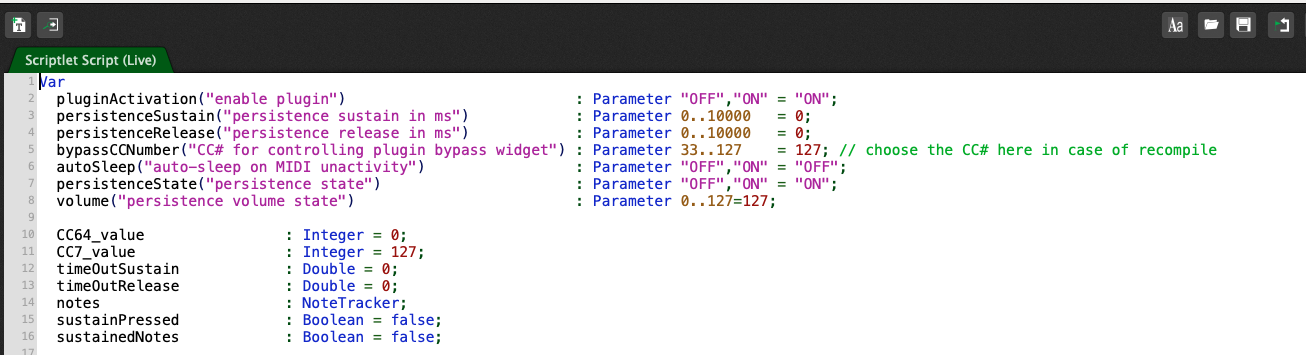
You only have to change the CC# at the top of the script where the variable is declared.
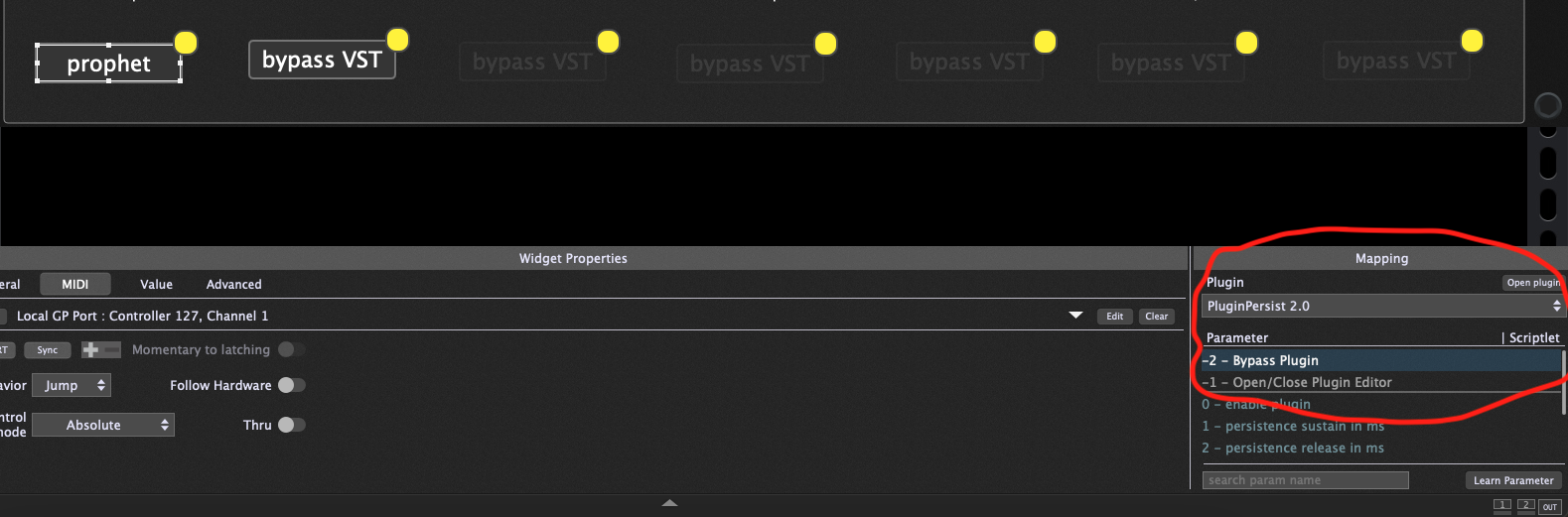
You also have to assign the midi cc to the text widget.
So you should have two widgets per plugin persist scriplet and corresponding vst.
This was initially confusing to me as well.
However it’s clear in the instructions.
Once we read it several times.
Yes I have two instances. I have to assign the selected CC to the text widget? That might be my mistake. I’m not on GP right now, but I assign the text to the Plugin Persist and then select the CC variable? I think I was assigning that to the VST plugin.
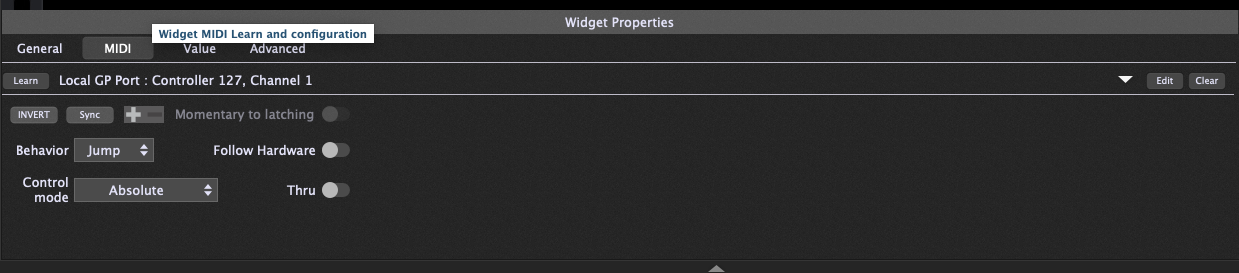
Yes you go to the midi tab of the text widget and assign it to
GP local port - cc 127 or 126 (whichever you are using in the scriplet)
I was losing my mind at this one too.
Nobody helped me either.
But please read the instructions more times - you will understand it 100%
How funny. I knew that saying a bit different.
Give them a finger and they will take the whole hand.
However here nobody is taking yards or hands. Just people trying to ask questions and understand.
After all it’s a community.
I think @David-san point was that Plugin Persist v1 and v2 are his own user scripts that he graciously provided to the community here, along with plenty of information on how to use them and lots of forum support for those scripts already. So, suggesting that a video tutorial would be helpful is just…yeah, kind of ridiculous.
Many of us have had to adapt things that others have shared for our own purposes. User-provided material is like Github-- you get what’s provided, say thank you, and figure out how to adapt it to your own needs. I’d say @David-san has provided far more support for what he shared for free than most people on Github do.
I’m sure if you want to pay him for his service, he’d consider making you a video tutorial.
Another thing to remember here is that people put in a lot of time and energy to help and share with others here in the community. We aren’t AI chat-bots—our resources are finite. Use them mindfully and only as much as needed.
I meant useful as in - I might make a video about it to avoid the same confusion for other users - that me and zfh had.
Sorry if that was misunderstood.
I assigned the text widget to Plugin Persist’s “CC# for controlling plugin bypass widget” and stopped getting sound. I’m sorry, but I’m clearly not understanding something. If anyone has the time to check out my attached gig file and explain to me what I’m doing wrong, that would be awesome. Or if it’s simple, you can even correct the gig file and upload the new one.
midi assignment - this has to be the same as what you said in the scriplet. so it’s correct for 127, but the next scriplet if it’s 126, the midi assignment for that widget should also be 126.
I would make those changes myself and reupload the file - but you are using an audio interface which i don’t have, so i don’t want to mess your file.
those instructions should allow you to easily make the modifications yourself.
I hope this helps you out.
Let me know if you have any more questions - and dont worry - you won’t take any inches or hands
Nothing wring with that, you could do it.
Thanks for the detailed explanation, it is much better than a gig file. This way @zfw will have to do things by himself and go on learning…