I really thought I had this working. Now when I program a song or a part to send a program change to Pianoteq it doesn’ t work. All the knobs send their positions so I get these weird modifications to the preset. What I would like to happen is for the preset to send its controller values to the knobs but it’s happening the other direction instead. I’m sure I’m missing because I don’t know how GP would know which plugin to send the PC to. Right now I have 2 instances of Pianoteq running, one for each keyboard. I also tried to enter a program change into the song part which does allow me to specify the MIDI channel. Each pianoteq instance is on a different channel.
I found this tip on Google:
In the main Pianoteq screen, Ctrl-click (command-click on Mac) on the preset name, that will toggle midi-learn mode for that preset. Then send the program-change midi message (or note-on, or control change) that you wish to assign to that preset. Repeat for all the presets that you want to recall via program change, and you’re done. Don’t forget to save your MIDI assignments in the options / MIDI panel in order to have them recalled on startup.
How exactly are you doing this? Screenshots would help. Have you defined a ‘Handle’ for a midi in block, and are then selecting this in the Song Part Properties > Midi section?
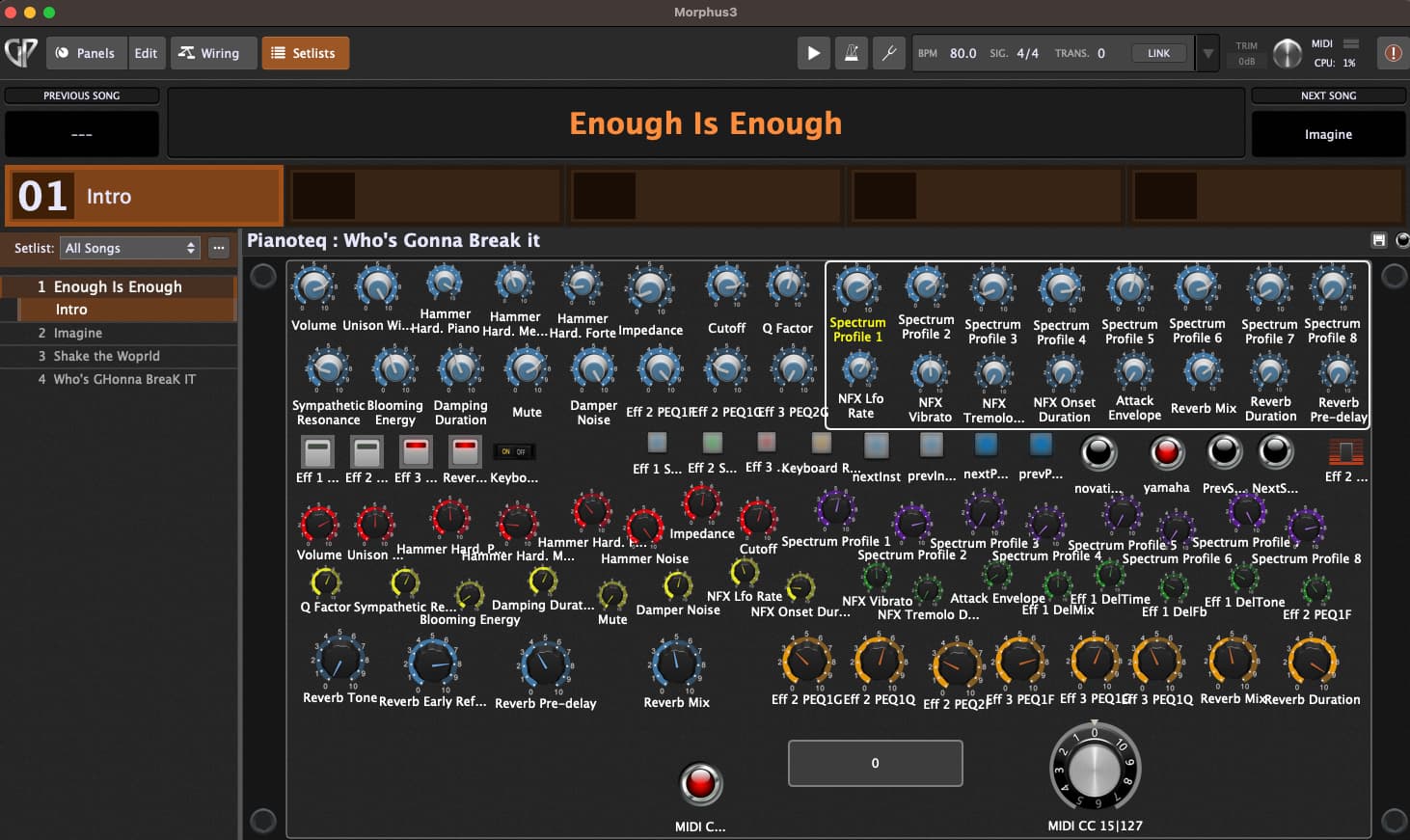
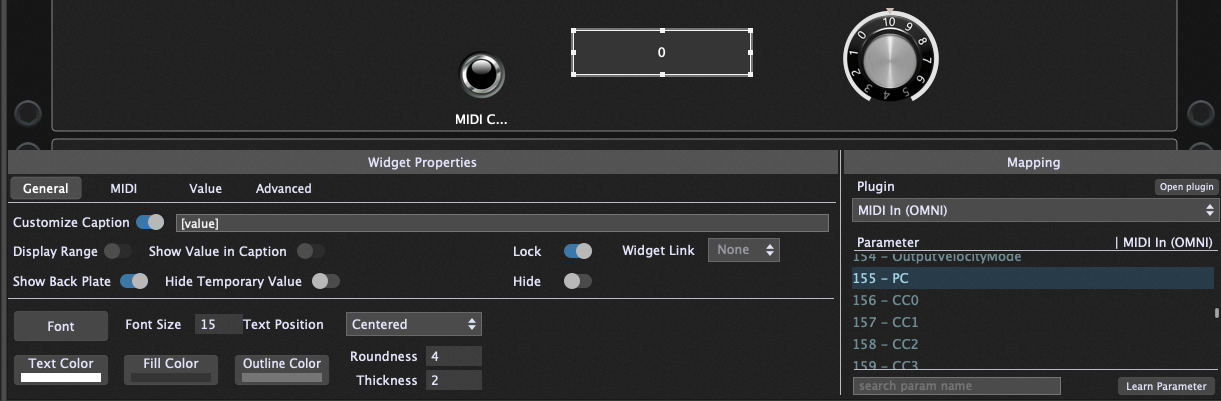
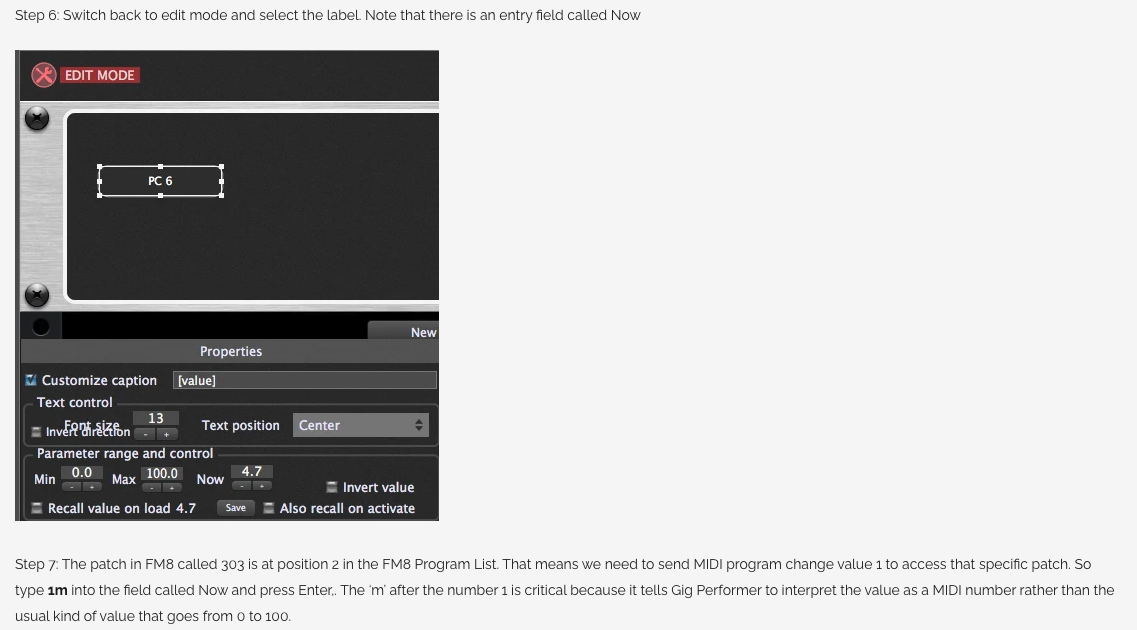
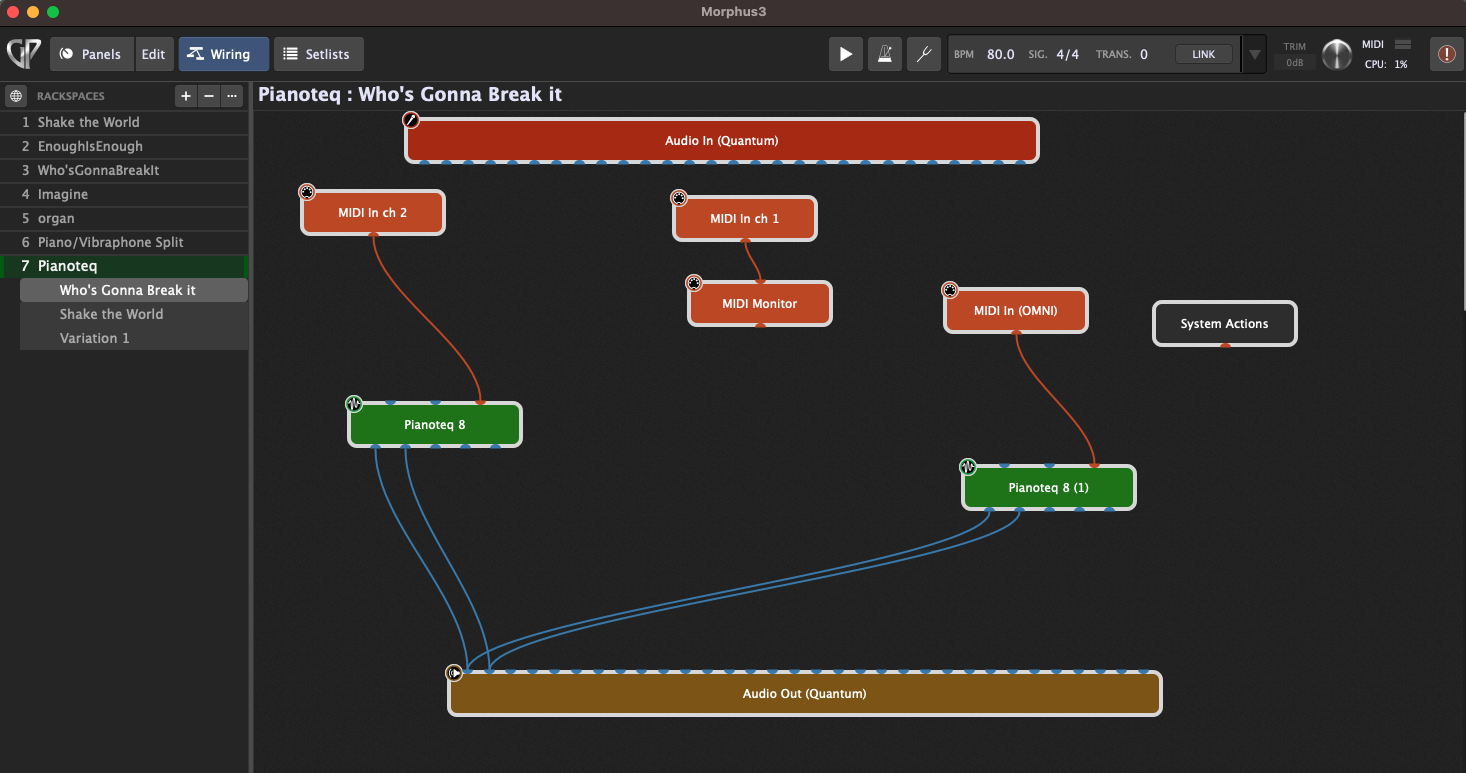
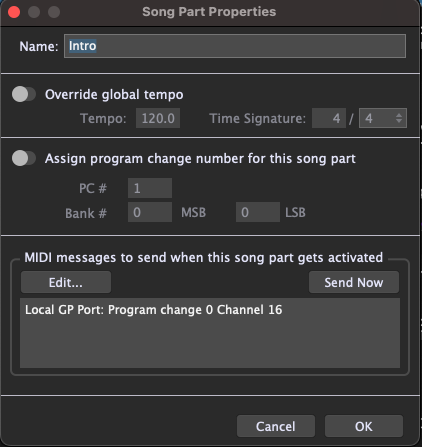
Thank you everyone for your responses. I searched the term handle in the manual and couldn’t find anything that made sense to me. I’ve spent hours trying to make sense of how to change presets with each song. The wire view screenshot shows that I’m using 2 MIDI channels to play 2 instances of pianoteq from 2 different keyboards. I tried a few different approaches. The blog shows the picture in “blogpost” which show widget properties different from mine shown in “text label”. I also tried to send a PC from Song part properties. Every time I tried this the program crashed. And now I have a song that won’t load and I can’t select it so as to delete it. Another thing I tried is to send CC messages from a knob. I can only do 3 presets per knob because of a weird thing in Pianoteq. I set up 3 variations each selecting a different preset. Sometimes the race sends the preset change and then all the knob settings which are always different which makes the presets different which is interesting but not what I want. If you look at the panel view you’ll see LOTS of parameters. You asked for screenshots so I gave you them! Thanks Rank13 in particular. And thanks npudar, the hard part is sending the PC messages from GP. Well I’m sure it’s easy once I understand it.
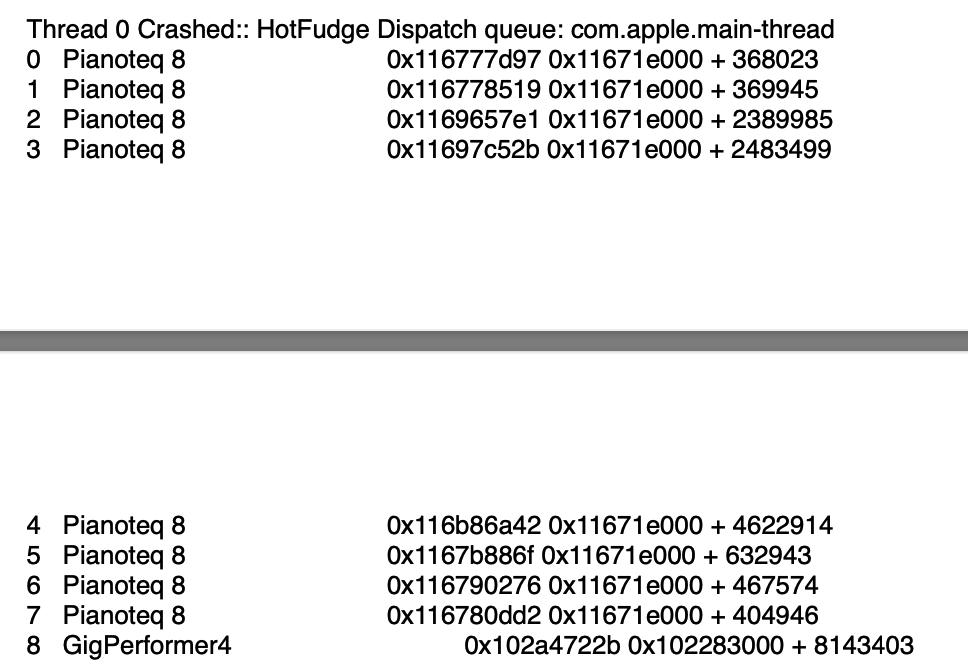
- Do you have a crash report?
- I do not understand the purpose of exposing so many Pianoteq parameters via widgets. Surely most of those are never going to change once they’re configured to your taste. Why not just change hem in the Pianoteq plugin editor directly?
Thanks dhj…I don’t know how to generate a crash report. I do these improvisational shows without charts or key signatures. Manipulating sounds in real time is part of the show. I go back to analog synths with patch cords and more knobs than this. I surprise myself as much as the audience. Half the knobs are for one instance of pianoteq and the other half for the 2nd. It could be that I’m asking too much of Gig Performer. Also, all those knobs aren’t finalized. I’m still in the experimental stage.
There’s no problem with lots of widgets — I was just surprised to see them all but now that you’ve described what you’re doing, I can see why you would have them. It’s an outlier case.
GP shouldn’t crash - I wanted to see the report to determine whether the crash was in GP or in one of the plugins.
I just found this crash report if you can make sense of it.
GP crash report.pdf (203.4 KB)
Here’s a TXT file if that’s easier. GP crash report.txt (172.9 KB)
Thank you dhj. I just contacted Pianoteq. In the meantime, I created a new gig and repeated the steps to send a PC from a song variation. Pianoteq didn’t respond so I don’t think I did it correctly, but GP didn’t crash. When it DID crash, there was a song that wouldn’t load and there was no way to delete it. The technique that was described in this blog post didn’t seem to apply to the current version of GP. I’m at a loss.
Morphus3GP.gig (1.3 MB)
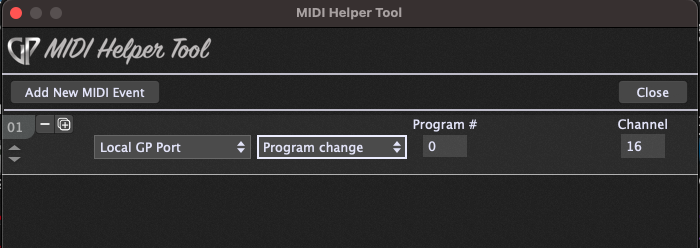
Here’s the GP file that crashes when I try to send a PC message from a song part. I took out Pianoteq completely and it still crashes. These are the steps I sent to pianoteq before I realized that it wasn’t crashing GP. When you open GP, click on Setlists. Rightclick on one of
the songs. scroll to the bottom to song part properties. click Edit.
then add new MIDI event. click ReMOTE CSL Compact… select GP port on
the bottom. then program change. close. Then OK. Then it crashes.
When you open the gig you’ll see that the 4th song cannot be selected. So something is corrupted. I know that if I can send a PC message to Pianoteq, it will work fine. I tried the procedure described in the blog post I linked to before. But it doesn’t match up with the current version. I tried inserting the filter block between the MIDI in and pianoteq to map bank select to PC. All I need is for a preset to come up. In Mainstage it remembers presets for each song automatically.
You had a MIDI Out PC message going to the Local GP Port in song 4 that was causing it to trigger a different song in the list. That’s why it couldn’t be selected.
See if this works for you now:
Morphus3GP_amended.gig (1.3 MB)
Need to see the crash report, not the gig file.
Here’s another crash report. If someone could please tell me how to send a PC message to a plugin from
a song, part, rackspace, or variation, I would be thrilled.
GP crash report 2.pdf (119.4 KB)
Thanks edm11. It works. I still need to find a way to send a PC message to a plugin from
a song, part, rackspace, or variation
Here’s one way to do it:
PC_change.gig (173.5 KB)
Look over the mappings and wiring, and that should give you an idea of how to accomplish what you’re looking to do. What you’ll notice with this method is that you’re not directly sending a PC to the plugin from the songpart. You’re mapping a widget within a rackspace to send that PC to the MIDI In block that’s connected to the plugin, and switching to that rackspace is what triggers that widget to send the message directly to that plugin.
That crash was GP running out of stackspace, caught in an infinite loop. Were you by any chance trying to send OSC messages? It looks like you might have created a feedback loop
Right-click on a MIDI In block in wiring view, and you’ll see an entry for it in the menu:
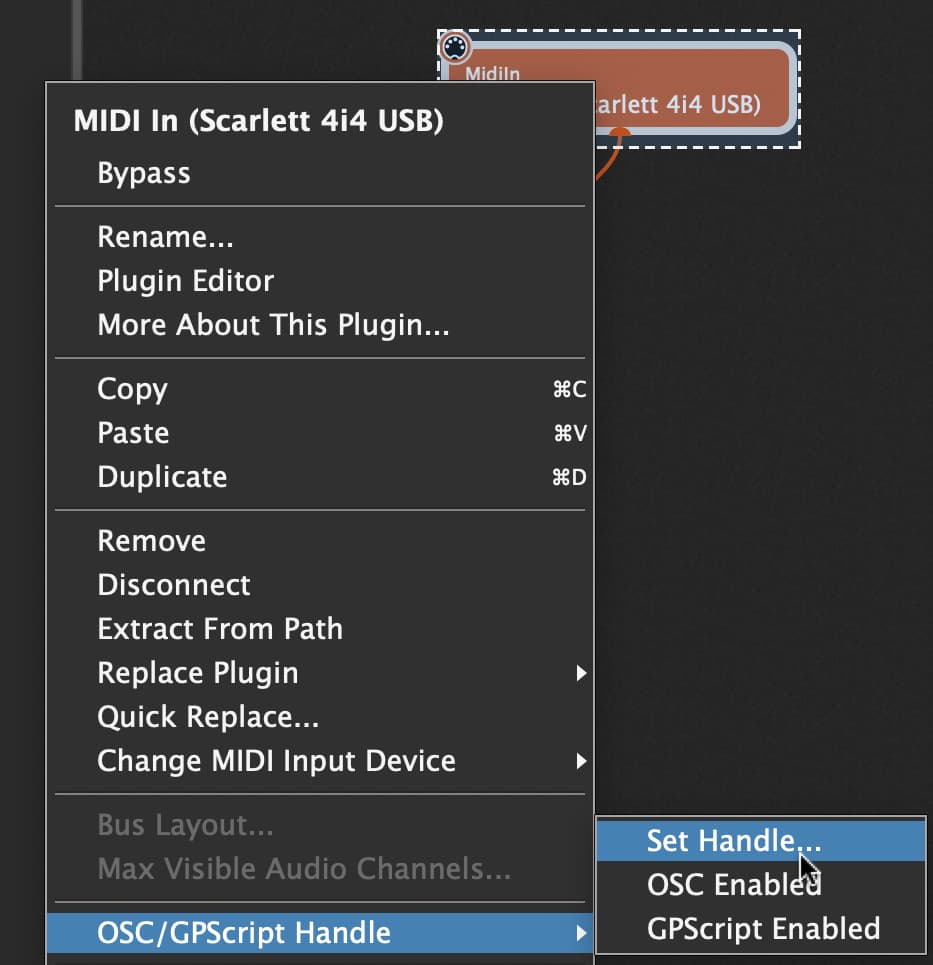
If you then give it a name/handle, you will see it turn up in the Song Part Properties > MIDI device list:

This will provide a very direct way for you to send PC messages from this MIDI In block to any connected plugin.
Sending to the Local GP Port is a very different outcome, as these PC messages are received at the GP system level, and will (by default) be used to select a rackspace or song. This could be the reason for the crashes if you are getting stuck in a loop with songs/parts sending PC messages to the Local GP Port, which in turn is selecting a different song, which is then sending another PC message to the Local GP port, which is then…etc.
Wow what an outpouring of wisdom! I actually got it to do exactly what I need. I was feeling a little shaky for a minute there. I love this transparent form of support.