I know I did the cardinal sin by updating my Mac OS, but I did it after checking most VST’s work with Sequoia 15.7.1, and with enough time before my next gig, so what I thought!!
Now when I open a gig file, most of the racks that contain Cherry Audio’s Organ3 have shifted octave. So I have experimented by shifting octaves in both midi in and in the VST, and then saving each rack space, but when I restart GP or the Mac the Organ3 has shifted octave in the opposite direction.
I have reloaded the Cherry VST, and that hasn’t worked. I don’t wish to roll back to previous OS, as I haven’t done any Time Machine saves as I am still fairly new to Mac OS features and functions.
Has anyone experienced anything similar? Or know what it might be? Or can offer a fix please? Thank you in advance.
Yes, only the pitch shifts on that single VST. All other VST’s work fine. When I play the sound where it is mapped on the keyboard it is either an octave higher or lower than it should be.
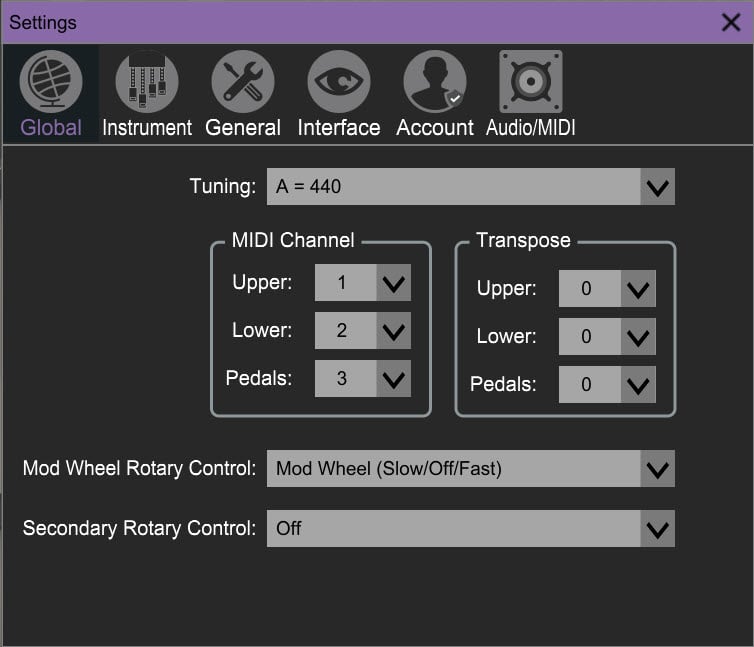
I assume that you’re talking about the Blue3 organ. In the Global tab in the Blue3 Options, is the Transpose section all zeros for Upper, Lower and Pedals?
Yes, correct. When a rack loads the organ sound drops an octave in pitch. I then go into that screen you shared and change zero to +1 in the upper organ. Followed by saving the rack. Then when I reload the rack (gig file) the +1 remains but the organ sound has jumped back up and octave in pitch, so I have to bring it back to zero again.
The same happens when I change the pitch in the midi-in block, but a couple of times now when I have adjusted the pitch via midi-in it has crashed GP, or caused stuck keys via the chord maker plugin (when used). GP for me has never crashed before, so it makes me think there is a conflict somewhere now.
I believe the default in the plugin was always set to ‘0’, as I never transposed via the plugin before this happened, but since the update there has been a couple of instances where I attempted to change the pitch in the midi-in block (due to the pitch changing without by itself), and GP crashed, closing the app. GP never crashed on me before. So I have found adjusting the pitch in the VST to the safer bet. I adjust the upper organ pitch from ‘0’ to ‘+1’, to bring the pitch back to the correct sound, the ‘+1’ doesn’t change when I reload everything later, but the pitch changes back up an octave. So I then have to adjust it back to ‘0’ again. There appears to be some conflict somewhere.
When I load my gig file it automatically ‘either’ jumps up and octave in pitch, ‘or’ jumps down and octave in pitch (based on re-starting GP or my Mac multiple times to test if my adjustments or saves have worked).
To be honest I have no idea what a crash report is, and did not think of it when it crashed. It only happened a couple of times when making the pitch adjustments in line-in, in the wiring page. So I have been avoiding it by adjusting pitch in the VST, which does not appear to cause any crashes. Maybe I should try to cause a crash and check the report. Are you able to tell me how to find this report please?