Patrick Kimbrell is a guitarist from the United States.
This video shows how Patrick uses Gig Performer 5 to practice, record, and command rackspace, plugins and effects chains on the fly using song markers in the Streaming Audio File Player, the plugin included in Gig Performer.
This is what he used to record his song Take Flight.
Listen to the song on SoundCloud → LINK
–
I wanted to show you this really cool software that I’m using called Gig Performer 5.
And I just used it to record my guitar instrumental called Take Flight.
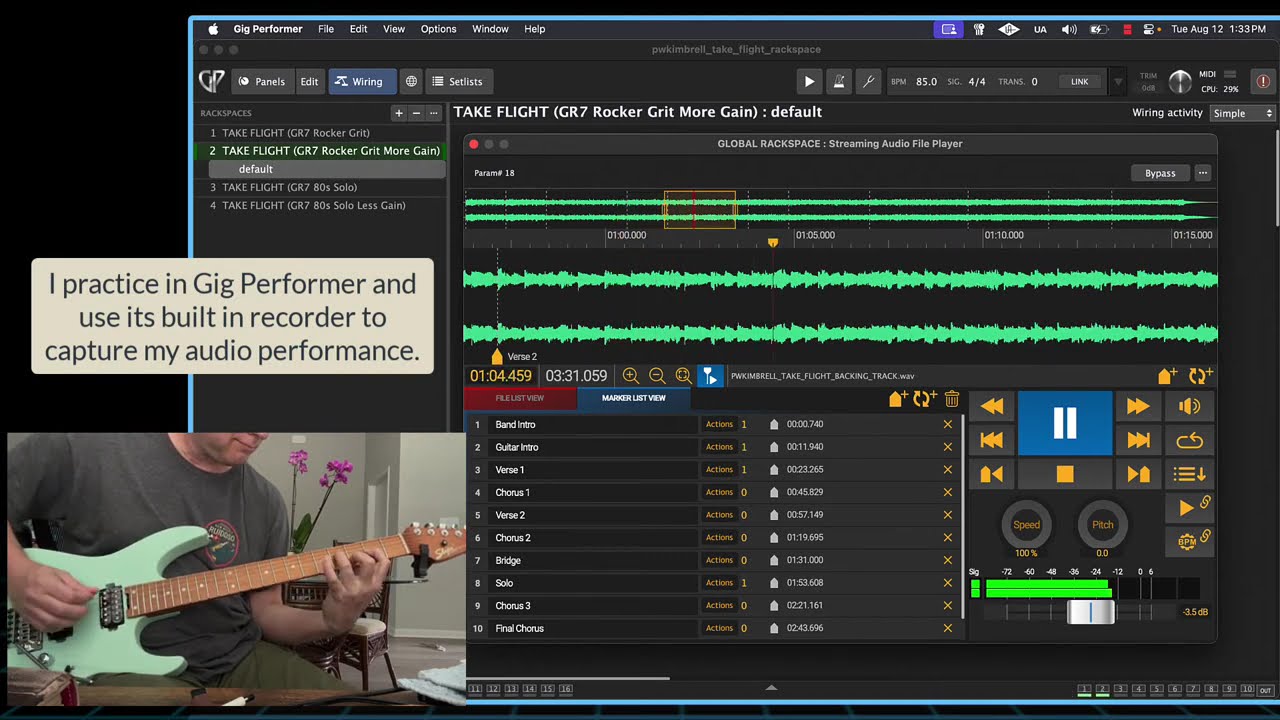
The amazing thing about Gig Performer is that I was able to create a backing track, which you see in the Streaming Audio File Player. And Gig Performer allows you to insert markers into the song.
So, for example, the intro. And for each marker you can define actions.
I can set it to where I can have different what’s called rackspaces. And what rackspaces are is the plugins and effects that I want to occur at that marker point.
For example, as the song plays through, it automatically does the switching for my guitar for the various rackspaces. So, I can go from a clean sound to a slightly more gain sound to the guitar solo, which is a completely different amp and set of effects than what’s on the other part of the song.
And it’s all done seamlessly, which means I can actually pretty much play the song live.
You can load all these different songs and rackspaces in there and practice at home with your laptop. And then you can actually go to a gig somewhere if you wanted to perform for somebody and load this up and play and just just go and it’s just amazing.
So in this video I’m going to play my song for you basically and you can watch how it goes through and changes the rackspaces and effects in real time.
Gig Performer 5 is awesome. I love this thing.
–
In the video:
- The Streaming Audio File Player plays a backing track in the Global rackspace.
- I use Guitar Rig 7 Pro and UAD plugins for my rackspace effects chains.
- The 1st marker sets to the rackspace 1 (GR7 Rocker Grit). It features low gain setting for the intro chords.
- The next marker changes to the “More Gain” rackspace. It’s got a bit more gain for sustaining the melody.
- I have additional markers for visual cues if needed such as chorus, verse, bridge, etc. Markers can be useful for song parts, chord changes, or whatever you need.
- The rackspace changes at the marker to the “80s Solo” (GR7 80s Solo). It’s a completely different amp and effects chain, making the solo pop!
- I practice in Gig Performer and use its built-in recorder to capture my audio performance.
- I export the audio from Gig Performer to my Luna DAW. Alternatively, the audio can be routed directly into a DAW using GP Relayer.
I love practicing and performing with the actual tones used for my audio releases sounding just like the album.
–
More information:
