I have decades of work on my Korg Triton, and now that I wanna use it for GP, is there a way i can transfer all my sounds to the Triton VST? Instead of me recreating everything all over again..
1 Like
No, it’s not possible at the moment. I thin I read something about a tool for the programs, but not for Combis.
But the main question should be: Is this the best idea? Why not use the possibility of other VSTs?
That’s a conversation you would need to have on the Korg forums
Yes, there is a way. Unfortunately, my explanations tend to be on the lengthy side, so please bear with me. I use both a Korg Triton Rack (still in use in my setup with GP) and the Korg Triton/Triton Extreme VSTs in GP. Since the physical Triton Rack uses zero PC resources it still remains a crucial cornerstone in my setup vs the rather significant load the Triton/Extreme VSTs have. I also have a number of programs that use samples I have created, but there is still no support for sample uploads.
To answer your question:
Yes, it is possible to transfer programs and combinations from a physical Korg Triton to the Korg Triton VST, but doing so requires conversion tools and has some limitations to be aware of.
Method and Tools
-
The physical Korg Triton allows you to save your programs and combinations as .PCG files.
-
There is a dedicated, community-developed tool called “Korg Triton PCG to VST json patch converter” which converts these PCG files into the .patch (json) format used by the Triton and Triton Extreme VST plugins.
-
This tool can convert both Programs and Combis. It supports exporting up to 4 user banks at a time (matching the VST’s user bank capacity), and handles most of the Triton’s features, including combinations, user arpeggiators, drum kits, and many IFX/MFX specific parameters.
Limitations
-
If your original Triton patches use custom samples loaded into RAM (Bank 1), the VST will not be able to import those samples, as the VST version does not support user sample import.
-
There may be some manual management required when working with bank assignments: the VST only supports 4 user banks, and sometimes moving patches between banks may require some file management.
-
While the converter aims to replicate all effect settings, not all Triton effects are 1:1 compatible or may be 100% complete in certain versions of the tool.
Practical Steps
-
Save your Programs and Combis as a .PCG file from your original Korg Triton.
-
Use the PCG-to-VST converter to export these patches into the VST’s preset folder.
-
Copy the resulting .patch files into the Korg Triton VST preset directory on your computer.
-
The VST should then recognize and allow use of your transferred sounds.
This process is widely used by both original Triton and Triton Extreme owners wishing to preserve or migrate their legacy patches into the software environment.
The link to the GITHUB tool is HERE. The landing page is the documentation page which has a very decent description of the tool, how to use it, and its limitations. Also note that the VST presets folder on your PC may not be the same path(s) as provided in the documentation example and require some investigation. Good luck!
Hope this helps.
3 Likes
Thanks very much. i will try this. also there is midi ox program that i heard…
Can you please give me a link how to do this step by step please…
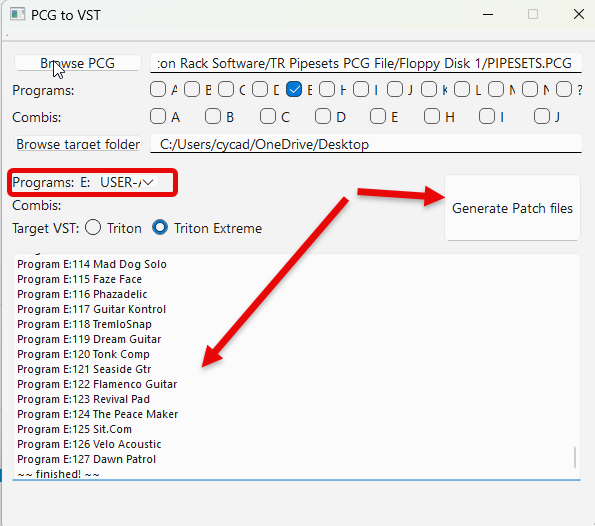
Due to the numerous permutations and differences between computer platforms, programs and organization, that’s not really possible. The Github site does give a reasonably good description of how to use the tool, so you should be able to figure it out if you have mucked about with aftermarket stuff like this. Basically, you download the tool - figure out whether you want the GUI version or command line version, probably the GUI for your case, whether you need the PC, MAC or Linux version, then just run the tool (it will say it’s unsigned, but you will want to run it anyway). Then you just decide what PCG file you want to convert (keeping in mind the limitations - e.g. no user sample files etc). The tool is smart enough to determine if it’s a program PCG or combi PCG, then you decide what user bank of the target VST you want to export it to. After you generate the json file, you then copy it into the presets folder. I am including the link to the tool download page and three screenshots (I have a PC, Windows 11, as examples of what you would see for what I have selected. That’s the most I can do for you though. If that isn’t enough, find a computer savvy friend and ask him to sit down with you and give you a hand.
Download page is HERE.
The below screenshot is the GUI interface. In this instance, I chose a combi PCG, selected the program bank (I should have chosen a combi bank for this example, sorry about that) from my Triton that I want to export, and the VST User Bank I want to export it to. I exported the files to my Desktop (“Browse Target Folder), and will then copy them into my VST presets folder. See the next screenshot.
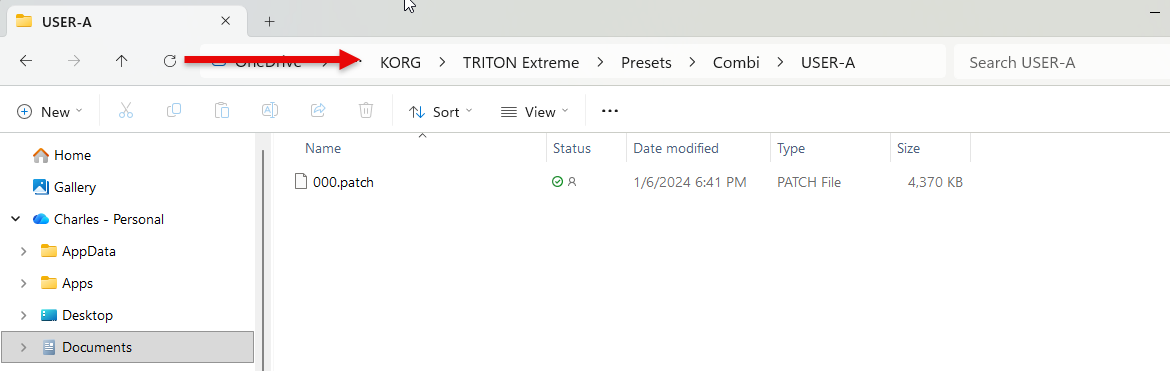
Your VST path will be different, but as an example, will look something like this. Pick or make the folder for the User Bank you want to use in the VST and copy the exported patches there.
Keep in mind it is an aftermarket enthusiast tool, which by it’s very nature almost always means there will be trails and errors to get it to work - if it works. For my particular use case, I just hooked up my Triton Rack through my midi router to GP and play any of my patches I want to use. There is usually more than one way to do things. Hope this helps.
1 Like