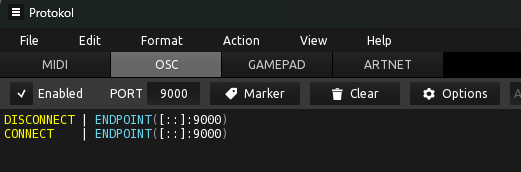
I use 2 instances, linked via OSC. Everything works fine.
Instance 1: Sending port: 9000. Rec port 15000
Instance 2: Sending port: 15000 Rec: 9000
When I open a 3rd instance, it breaks the communication between the first two.
3rd instance Sending: 9001 Receiving 15010
Even when I close the 3rd instance it doesn’t restore the OSC communication. I have to restart both, then its OK again. Why is the 3rd instance messing things up when the ports are totally unique?
Do you have an OSC monitor that can show you what’s actually happening?
Without knowing more I’ll take a guess that maybe something is causing a feedback loop, and something is shutting down the OSC ports to break the loop?
I was waiting until I can check (not home right now) but yes, there is a script that was sending something on a specific port. However, that port was the listening port of the main instance, (not the port the 3rd instance was using), so if there was a loop, it should have happened without opening the 3rd instance?
I need to confirm this but it could be that it’s not osc in general that broke but only the script that was using that specific Port. I’ll be able to confirm that in an hour or so.
So I can confirm, it is not a general OSC communication failure, only the OSC that is sent via the script that stops working. I should have checked earlier but I didn’t think about it at the time. The rest of the widgets that are setup to control between instances via the midi advanced “direct addresable OSC” still work fine.
However, it is not broken immediately. It works until I add the script to a new rackspace or recompile an existing one, that’s when it stops working. When I exit the 3rd instance, the OSC script starts working again.
I can also confirm that it has nothing to do with the script that sets a specific IP port , because I commented out that script and the behavior is the same. As a matter of fact, I think NOT specifying the port might be the cause??? This is what breaks:
OSC_SendString (sending instance)
On OSCMessageReceived (rec instance)
With two instances, (and without specifying a port) the OSC Sending could only go to one place. But now that a 3rd instance open, there is another possible “destination”. Could this be it? Except if not specifying a port in the script, isn’t it automatically supposed to send itt on the sending port specified in the main OSC setup page? In which case it SHOULD only be going to THAT instance and opening another instance shouldn’t have any affect on the behavior…
I have Protokol it says it’s connected but its not showing any action. I have widgets connected between instances, its working, sending on port 9000 but its not showing any activity on port 9000.