Onsong to GP Setlist Integration

I discovered a game changer when it comes to navigating your setlist using OnSong.

No need to use msb/lsb or limit yourself to program changes.

I found an option in OnSong that sends the name of the song in a Midi SysEX message when changing songs. You can capture this SysEx message using a scriptlet and have GP switch to that song.

The key is that you want the song titles to match exactly, including casing.
2 Likes

Since there were no ascii scripting functions, I had to write scripting that converts Hex to Ascii.

var ascii : string array = [" β€œ,”!β€œ,β€β€œβ€œ,”#β€œ,”$β€œ,”%β€œ,”&β€œ,”'β€œ,”(β€œ,”)β€œ,”*β€œ,”+β€œ,”,β€œ,”-β€œ,”.β€œ,”/β€œ,β€œ0”,β€œ1”,β€œ2”,β€œ3”,β€œ4”,β€œ5”,β€œ6”,β€œ7”,β€œ8”,β€œ9”,”:β€œ,”;β€œ,”<β€œ,”=β€œ,”>β€œ,”?β€œ,”@β€œ,β€œA”,β€œB”,β€œC”,β€œD”,β€œE”,β€œF”,β€œG”,β€œH”,β€œI”,β€œJ”,β€œK”,β€œL”,β€œM”,β€œN”,β€œO”,β€œP”,β€œQ”,β€œR”,β€œS”,β€œT”,β€œU”,β€œV”,β€œW”,β€œX”,β€œY”,β€œZ”,”[β€œ,”\β€œ,”]β€œ,”^β€œ,”_β€œ,”`”,β€œa”,β€œb”,β€œc”,β€œd”,β€œe”,β€œf”,β€œg”,β€œh”,β€œi”,β€œj”,β€œk”,β€œl”,β€œm”,β€œn”,β€œo”,β€œp”,β€œq”,β€œr”,β€œs”,β€œt”,β€œu”,β€œv”,β€œw”,β€œx”,β€œy”,β€œz”]

function GetAscii(a : int array) returns string
var s : string
var i : int
var c : int

//Print ("Ascii")

for i = 0; i < Size(a); i = i + 1 do
    if a[i] > 31 && a[i] < 123 then
        c = a[i] - 32
        s = s + ascii[c]        
    end 
end

result = s

end

2 Likes

include β€œASCII”
//Called when a MIDI System Exclusive (sysex) message is received

On SysexEvent(s : SysexMessage)

var len : int
var val : integer array
var i : integer
var sngint : integer array
var sng : string
var index : int
var switch : Boolean
var slmode : Boolean

slmode = InSetlistmode()

If slmode == True Then

	//Print("OnSysex")
	len = SM_Length(s)
	//Print(len)
	for i = 0; i < len; i = i + 1 do
         val <-- SM_GetValue(s,i)
	end

	If val[0] == 240 && val[1] == 0 && val[2] == 2 && val[3] == 36 && val[4] == 13 && val[5] == 83 Then
         Print("IsHeader")
         for i = 6; i < len - 1; i = i + 1 do
       	sngint <-- val[i]
         end
    End
 
    //Print(Size(sngint))
    sng = GetAscii(sngint)

    index = GetSongIndex(sng)

    switch = SwitchToSongByIndex(index,0)
    Print(sng)
    Print(index)

End 

End

Wrapped the SysEx script in an If statement to prevent script from crashing when GP is not in SetListMode.

1 Like

OnSongToGP.zip (1.2 KB)

Here’s the two gpscript files.

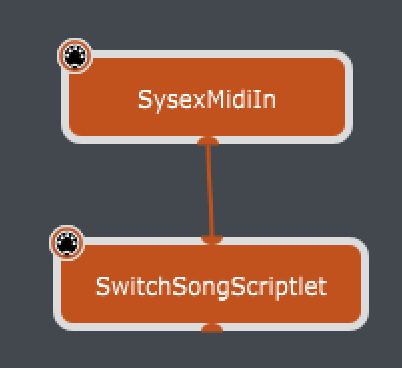
Save to the scripts directory, then create a Scriptlet widget and load the OnSongToGP.gpscript file into the scriptlet. Route your Midi In from your source with SysEx enabled.

2 Likes

Is that option here? OnSong | Manual | Broadcast MIDI Settings

Don’t see how that would be useful in GP unless it doesn’t actually send the program change

That is correct.

1 Like

@dhj Using the files I posted, GP will read the Song Name from the SysEx message and no matter what position it is in your setlist will switch to that song. The name just has to match exactly and GP has to be in Setlist mode with that song in the current Setlist.

1 Like

Great stuff!

@npudar Did you get it to work?

We’ll feature this in the newsletter! :slight_smile:
That is why I was curious where was that option in OnSong.