Has someone been able to program a patch change on a Nord stage 3 that will change to a specific Rackspace in GP, please?
I’m not familiar with the specific keyboard but presumably it can send out program changes. So you just have to configure your rackspace (actually a specific variation of some rackspace) to respond to the particular program change and that will work
Hi,I am quite new to GP and I apologies for my ignorance. But how do you create that specific variation please?
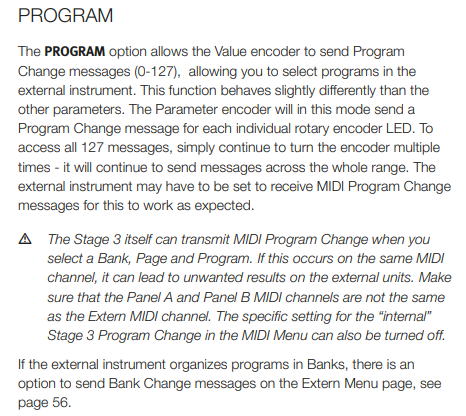
Page 44 of the Nord Stage 3 Manual
1 Like
Every rackspace has at least one Variation. So, whenever you are using a rackspace, you are using a variation.
1 Like
Might be a silly question from me,but where do I find the Program Change in GP,please?
I know where it is in NS3
Just to back up a bit, the easiest way to change rackspaces is to go to the next rackspace/song part or the next song/song part. This is very simple (see Global Midi Options). It works great if you follow setlists.
This is what I do.
There are a bunch of posts about various “song finder” options that allow you to more quickly jump to a song if you are not following a setlist.
Maybe search the forum for song finder and see if that helps. (And if you follow a setlist, it’s even easier. Just use “midi learn” in the Global Midi for a button on your controller to move back and forth to songs/song parts).
I hope this helps a bit.
I watched a lot of Gig Performer YouTube videos to get a better understanding of everything.
Jeff
1 Like
If you are in rackspace view, by default PC’s will switch rackspaces in the order they are presented.
If you are in setlist view, PC’s will switch songs in the order they are presented.
In both cases, you can override this behavior by editing the variation properties or song part properties.
In the Options, Global MIDI menu, you can specify which devices(ports) are recognized for program change messages. By default they are ignored.
Steve
1 Like
May I encourage you to take a little time to review the online user guide and leverage search engines. All the information you’re looking for is documented there, including how to deal with program changes in Gig Performer.
While people here are very happy to help with non-trivial how-to issues, it’s a little unfair to ask users to help you with items that are easy to answer by yourself. For example, if you type gig performer program change into Google, the very first answer immediately refers you to an article on how to deal with program changes in Gig Performer (see image below)
The developers have put a lot of time into creating documentation and lots of articles covering numerous aspects of Gig Performer and it’s really easy to find the right article with simple searches.

2 Likes
You need to use Extern Mode for each Program you create on the Nord
I created a conversion Excel to lookup the PRG, MSB, LSB for all Songs.
You can paste your songs into it or just use it to find the right MSB/LSB/PRG.