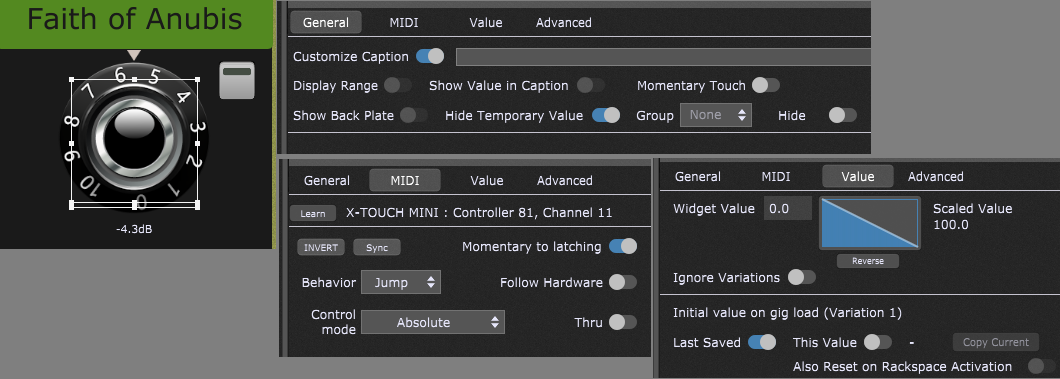
Ok, while trying to lighten the project, I noticed that, somehow the issue is bound to the global rackspace script (Step player that @schamass created in this topic)
If I remove this script, the behaviour return to normal.
I paste here my whole global rackspace script if it can help.
Var
  lblStatus, btnSkip, btnPlayAndStep, btnResetToOne : Widget

  btnPlayingAP1, btnPlayingAP2, btnPlayingAP3, btnPlayingAP4, btnPlayingAP5, btnPlayingAP6,  btnPlayingAP7, btnPlayingAP8 : widget
  lblReady1, lblReady2, lblReady3, lblReady4, lblReady5, lblReady6, lblReady7, lblReady8 : widget
  lblFile1, lblFile2, lblFile3, lblFile4, lblFile5, lblFile6, lblFile7, lblFile8 : widget
  ledLoaded1, ledLoaded2, ledLoaded3, ledLoaded4, ledLoaded5, ledLoaded6, ledLoaded7, ledLoaded8 : widget
  PlayPos1, PlayPos2, PlayPos3, PlayPos4, PlayPos5, PlayPos6, PlayPos7, PlayPos8 : widget

  ButtonsPlayingArray : widget array = [btnPlayingAP1, btnPlayingAP2, btnPlayingAP3, btnPlayingAP4, btnPlayingAP5, btnPlayingAP6, btnPlayingAP7, btnPlayingAP8]
  LabelsReadyArray : widget array = [lblReady1, lblReady2, lblReady3, lblReady4, lblReady5, lblReady6, lblReady7, lblReady8]
  filesArray : widget array = [lblFile1, lblFile2, lblFile3, lblFile4, lblFile5, lblFile6, lblFile7, lblFile8]
  LoadMarkersArray : widget Array = [ledLoaded1, ledLoaded2, ledLoaded3, ledLoaded4, ledLoaded5, ledLoaded6, ledLoaded7, ledLoaded8]
  PlayPositionsArray : widget array = [PlayPos1, PlayPos2, PlayPos3, PlayPos4, PlayPos5, PlayPos6, PlayPos7, PlayPos8]

  activetrack : integer = 0 //counting starts at 0
  colRed, colYellow, colGreen, colGrey : integer

  //user function to zero playpositions
  function ResetPlayPosition(track : integer) //if track = -1 then Reset all tracks, else reset specific track
  var index : integer
  if track == -1 then
    for index = 0; index < Size(PlayPositionsArray); index = index +1 Do
      SetWidgetValue (PlayPositionsArray[index], 0)
    end
  else
    SetWidgetValue (PlayPositionsArray[track], 0)
  end
 End

//user function to stop playheads
function StopPlayhead(track : integer) //if track = -1 then stop all tracks, else stop specific track
var index : integer
  if track == -1 then
    for index = 0; index < Size(ButtonsPlayingArray); index = index +1 Do
      SetWidgetValue (ButtonsPlayingArray[index], 0)
    end
  else
    SetWidgetValue (ButtonsPlayingArray[track], 0)
  end
End

//user function to set & color the active lane/track
function SetActiveLane (lane :integer)
var index : integer
  for index = 0; index < Size(LabelsReadyArray); index = index +1 Do
    if lane <> index then
      SetWidgetFillColor(LabelsReadyArray [index], colGrey)
    else
      SetWidgetFillColor(LabelsReadyArray [index], colYellow)
    end
  end
  SetWidgetLabel (lblStatus, “Ready to play Track#” + (lane+1))
End

Initialization
  colRed = RGBToColor(0.8, 0.0, 0.0, 1.0)
  colYellow = RGBToColor(0.8, 0.8, 0.0, 1.0)
  colGreen = RGBToColor(0.0, 0.6, 0.0, 1.0)
  colGrey = -12829636 //default “grey” value, read from a label widget with “GetWidgetFillColor(lblFile1)”

  SetActiveLane (0) //counting starts at 0
  SetWidgetLabel (lblStatus, "Click the large boxes in the middle to open the player and load a file!")

End

        // -----------Previous name : "btnStepOn"

On WidgetValueChanged (bval : double) from btnPlayAndStep
var actualtrack : integer =0
  if bval > 0.6 Then
    if GetWidgetLabel(LoadMarkersArray[0]) == “0.00” then
    SetActiveLane(0)
    SetWidgetLabel (lblStatus, “Track #1 must not be empty! Please load a file in Player1 / Lane 1! Then save and reload your gig.”)
    else
      //Set the regarding play-button to ON
      SetWidgetValue (PlayPositionsArray[activetrack], 0) //reset play position before play
      SetWidgetValue(ButtonsPlayingArray[activetrack],1.0)
      actualtrack = activetrack // store actual track# for status message

        //check if we reached the end of the available track numbers
        //if not switch one further
        if activetrack == Size (LoadMarkersArray)-1 then
            activetrack = 0
        else
            activetrack = activetrack +1
        end

        //check if actual lane is loaded with a file, if not find the next loaded lane
        if GetWidgetLabel(LoadMarkersArray[activetrack]) == "0.00" then
            While activetrack < Size (LoadMarkersArray)-1 and GetWidgetLabel(LoadMarkersArray[activetrack]) == "0.00" Do
              activetrack = activetrack +1
            end
        end

        if activetrack == 7 then activetrack =0 end

        SetActiveLane(activetrack)
        SetWidgetLabel (lblStatus, "Playing Track #" + (actualtrack+1) + " / Ready to play Track#" + (activetrack+1))
    end
  end
End

        //New Skip button, maybe there are some unescessary code lines

On WidgetValueChanged (bval : double) from btnSkip
var actualtrack : integer =0
  if bval > 0.6 Then
  if GetWidgetLabel(LoadMarkersArray[0]) == “0.00” then
    SetActiveLane(0)
    SetWidgetLabel (lblStatus, “Track #1 must not be empty! Please load a file in Player1 / Lane 1!Then change the rackspace and come back.”)
  else
    //Set the regarding play-button to ON
    SetWidgetValue (PlayPositionsArray[activetrack], 0) //reset play position before play
    actualtrack = activetrack // store actual track# for status message

        //check if we reached the end of the available track numbers
        //if not switch one further
        if activetrack == Size (LoadMarkersArray)-1 then
            activetrack = 0
        else
            activetrack = activetrack +1
        end

        //check if actual lane is loaded with a file, if not find the next loaded lane
        if GetWidgetLabel(LoadMarkersArray[activetrack]) == "0.00" then
            While activetrack < Size (LoadMarkersArray)-1 and GetWidgetLabel(LoadMarkersArray[activetrack]) == "0.00" Do
              activetrack = activetrack +1
            end
        end

        if activetrack == 7 then activetrack =0 end

        SetActiveLane(activetrack)
        SetWidgetLabel (lblStatus, "Track #" + (actualtrack+1) + " Skipped ! / Ready to play Track#" + (activetrack+1))
    end
  end
End

//pressing the Reset To One button
On WidgetValueChanged (bval : double) from btnResetToOne
  if bval >0.6 Then
    StopPlayhead(-1)//-1 means “all tracks”
    ResetPlayPosition(-1)//-1 means “all tracks”
    activetrack = 0
    SetActiveLane (0)
  end
End

//set label colors according to a track’s play button’s state
On WidgetValueChanged(w : Widget, index: integer, bval : double) from btnPlayingAP1, btnPlayingAP2, btnPlayingAP3, btnPlayingAP4, btnPlayingAP5, btnPlayingAP6, btnPlayingAP7, btnPlayingAP8
  if bval > 0.6 Then
    SetWidgetFillColor(LabelsReadyArray [index], colGreen)
    SetWidgetFillColor(filesArray [index], colGreen)
  else
    ResetPlayPosition(index)
    SetWidgetFillColor(LabelsReadyArray [index], colGrey)
    SetWidgetFillColor(filesArray [index], colGrey)
    if activetrack == 0 Then
      SetWidgetFillColor(LabelsReadyArray [0], colYellow)
    end
    SetWidgetLabel (lblStatus, “Ready to play Track#” + (activetrack+1))
  end
End