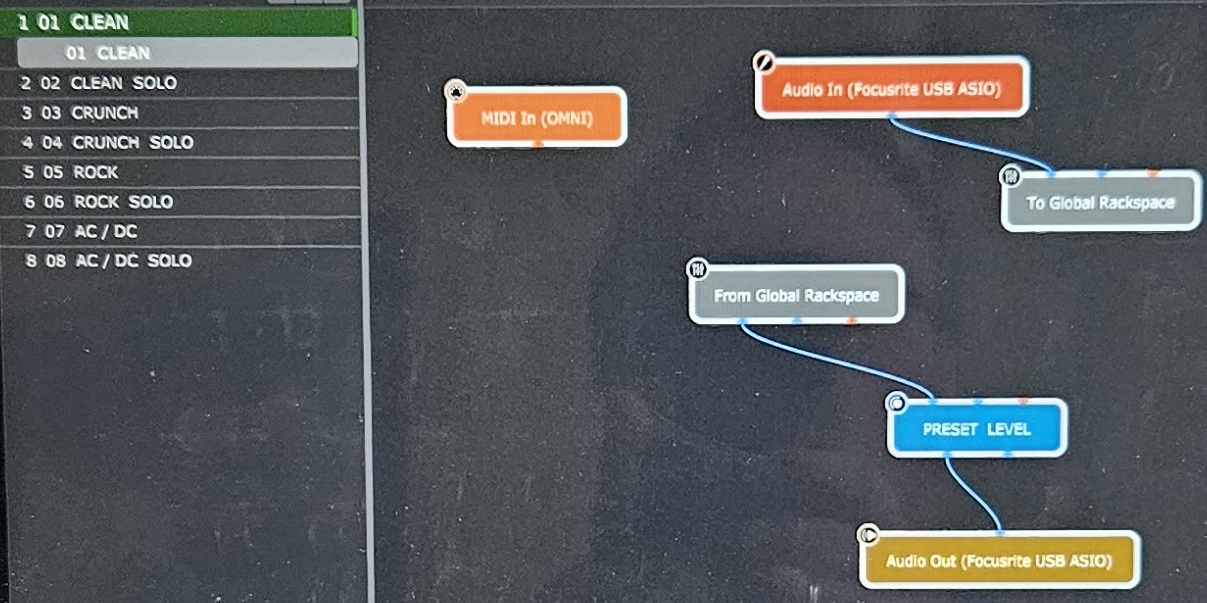
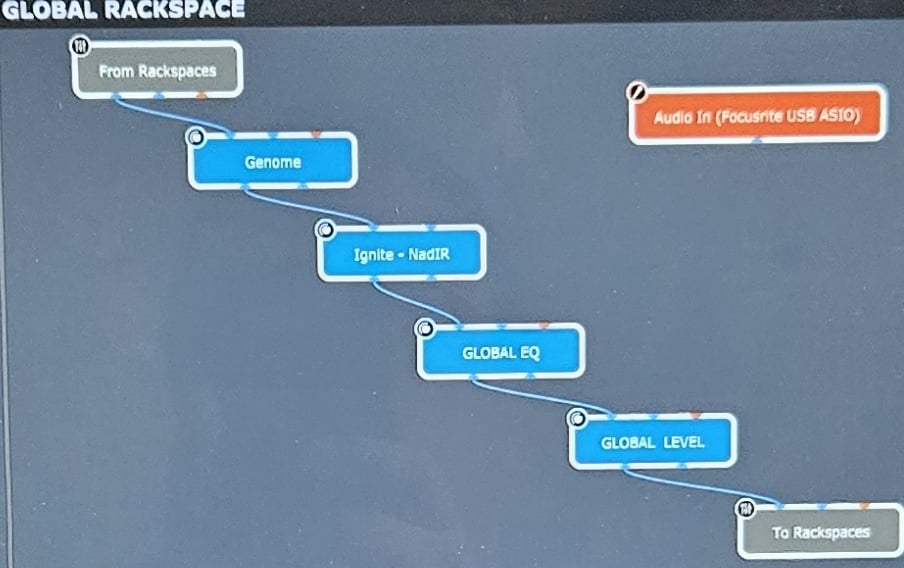
Attached are 2 images of my Wiring Rack and my Global Rack.
Am using it this way as am using Two Notes Genome for my NAM Captures and Pre and Post EFX.
I initially had 1 x Genome instance in each Rack - CPU usage was the same but when I manually switched from rack to Rack, it caused the GP5 CPU meter to spike from a steady %43 to > %90 for 2 seconds before settingling back - this CPU spiking is a known issue when moving between multiple instances of any NAM player.
So …. I have a Morningstar MC8 Pro on the way - should have it in the next day or so.
This spiking is caused by the previous an current rackspaces running in parallel for a short while to make the handover seamless.
You can send pc messages to a plugin using a MIDI-in block, but some might by ‘eaten away’ by GP for it’s own use. There are options to control this.
Keep in mind that switching presets in a plugin might cause stuttering or might be seamless, depending on the plugin and how well it’s written.
For switching on and off effects, I would use a switch widget and assign the right plugin parameter to that widget. Then you can attach a MIDI cc/note/whatever to the widget.
I thought the rack Changes could be done by straight forward Mid PC (?) … and as the Blocks in Genome are all Midi CC assignable, they could be turned on/off with basic Midi CC (?)
It is possible to skip the widgets and in some setups necessary, but that type of design more or less fights against the way GP is supposed to work. Some have learned that the hard way.
If you use widgets then they act as ‘memory’ for settings you tweak of the plugin(s). Also you can then use rig-manager what makes changing to another footswitch or controller easier.
Yes. That is: switching between rackspaces/variations or songs/songparts. The pc numbers are the numbers in front of the rackspace/variation/song/songpart. But that’s not going to do you any good for global rackspace: there’s only one, and there are no variations.
You’ll have to switch on ‘Pass unused PC messages’ if you want to send them to plugins
My FSW actually arrives later this morning my time
Re: Using Widgets …. do I have these 3 scenarios correct
1) I can “create” and “assign” a Widget to each Block that I want to turn on and off and then assign a Midi PC or CC to that Widget to turn that Block on / off ?
For info …. the Genome Plugin has both Presets -and- 10 x Internal “blocks” with in it - I use the Amp “Block” to load NAM Captures and 6 or 7 of the other individual EFX “Blocks” within Genome for EFX
2) I can “create” and “assign” a Widget to each Preset in Genome that I want to switch between and then assign a Midi PC or CC to that Widget to switch between those Genome presets ?
3) I can “create” and “assign” a Widget to each Genome internal EFX “Block” that I want to turn on and off and then assign a Midi PC or CC to that Widget to turn those Genome internal EFX “Blocks” on and off ?