Mute/solo groups with auto switching

Hi folks,

Here’s the question - I think it’s probably been discussed but here’s the need…

I want to have multiple sounds switched in mute groups/solo switching. So if I flip a switch widget to ‘on’ state, the others will mute.

Example - 4 sounds. 4 stereo channels, 8 channel mixer. Could be done by muting, soloing, turning off the sound or control send - a myriad of ways to turn them on and off manually. but to get it so you turn on one and the others automatically turn off is what I am after - kind of an ‘if then’ programming statement.

I tried widget grouping, but found I cannot have a widget in multiple groups.

scratching my head - looking for someone who has probably figured this out :slight_smile:

Thanks!

In your example with a mixer, do you just want one stereo channel active at a time?
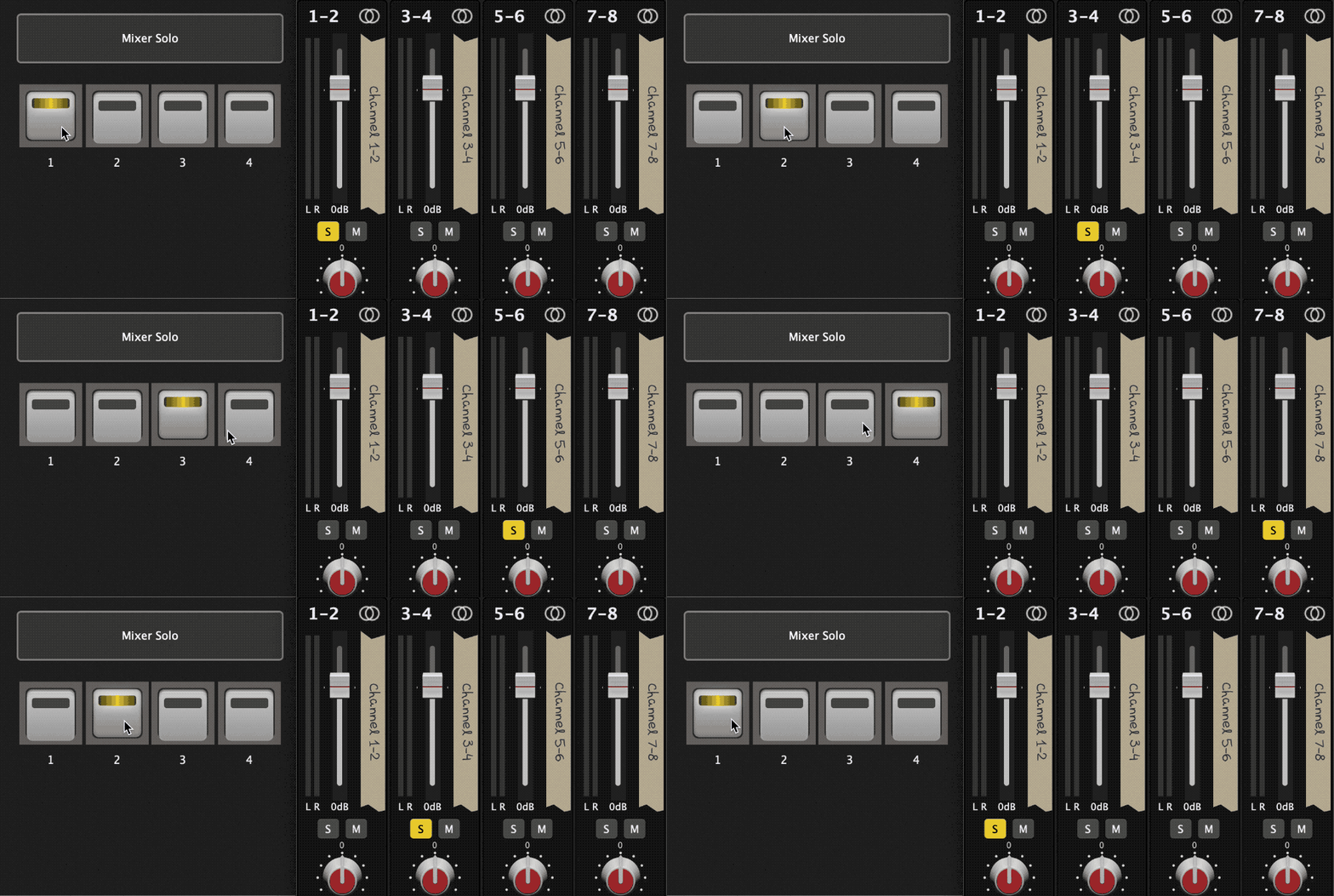
If so, you would use the ‘radio button’ option to set 4 widgets to the same radio group (widgets mapped to the solo parameter of each channel).

Thanks - so that is the idea to turn them on - kind of the same as widget groups - but how do you simultaneously turn the others off with a single button push?

For example - state 1 - ch1 on, ch’s 2,3,4 off; state 2 - ch1 off, ch2 on, ch’s 3,4 off…and so on.

Why would you need a widget in multiple groups? If you have 4 stereo sounds, and you only want to hear the ONE currently selected sound, use a 16 channel mixer, set up all widgets in 1 group, have each sounds output pair wired to a mixer input pair, and assign 1 widget to each mixer input pair’s solo parameter.

If you are wanting to layer sounds, set up another mixer for each layered sound and wire the sounds for that layer into that mixer. Then wire each of these layered mixer’s output into the main master mixer inputs and set up the widgets like above solo the input from a selected layered mixer.

Am I missing something?

That’s what the radio button group (widget properties) will achieve.
Have a look at this example rackspace.

Mixer Solo With Radio Buttons.rackspace (86.4 KB)

gp-mixer-solo-with-radio-buttons

3 Likes

That’s it!

I will have to revisit this and see what I did wrong. Thanks!

1 Like

Hi,

The idea is automated soloing as you would find on an analog mixer. Rank13 has it figured out. Not sure what I did wrong but will figure that out. Thx!

The button group is a separate setting and not the same as the widget group setting. They’re on the same screen, though

Edit: button group should be radio group (thanks @rank13)

You mean radio group?

Yep. Didn’t have my computer to check it. Thanks

1 Like

The limitation of the radio button group becomes an issue when you want to have a secondary action happen. For example let’s say you also want to bypass a plug-in when you mute it or the opposite of that, unbypass when you solo it. I was hoping that with this major upgrade, this limitation would be addressed, but at least you can do this with scripting. I have this script and a lot of my rack spaces and I can send it later but I’m out right now.

Right, I noticed that - same for widget groups - if you want a widget to exist in two groups - and also for radio buttons, things like indicator lights (That would indicate a state - on/off) cannot be part of a radio button group.

That said it’s a cool feature with a future path.

I would like to try this script.
Do you have the script to solo with bypass
Cheers

I’m away for a few days, will post it later! :slight_smile:

1 Like

An idea: Radio Buttons to do More than 1 Thing - #3 by David-san

I think a big problem with using radio buttons together with additional grouping, will be the handling of bidirectional communication - be it a (yet) not existing link group, a connection via scripting, or sending CCs via GP Local Port!
So, as long as everything is going only a one way, so that the radio button plays the “boss role” and all the others follow its state, everything is pretty straight forward.
Things will get difficult though, if one would expect that te radio button also would not only “act” but also “re-act” to any changes of one of its slaves.
I.e. a radio button causes a mixer channel to be switched to solo, at the same time another “linked” button (hower it may be done) will bypass the according plugin, and another, also linked button will bypass an effects plugin somewhere in the chain…
So what would happen if the mixer channels gets unsoloed manually? Or what if the effects plugin is used by another plugin and has to be unbypassed?
How should the radio button react to those changes?
In my opinion, the user has to be aware of this signal flow being a “one way street”, and also from the development side these eventualities have to be taken in account if it comes to realizing that option, which might make that not to be an easy task!

1 Like

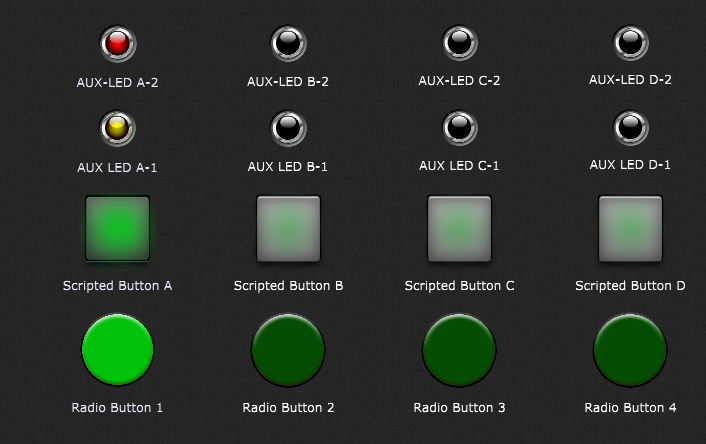
I just made a small example file of how things could be done via scripting:

There is a radio button group (4 buttons in a “Radio Group 1”), and every time the state of one of those buttons changes, the script will update the state of the pad widget above (Scripted Button) accordingly.
The AUX-LEDs above the pads are in the same widget link group (A,B,C,D) as the pad widget below, so they also will change their state according to the group they are in (one might change the number of involved widgets per link group at will).
That way you can control 4 parameters at once with only one “real” radiobutton… the rest of the bunch (per column) is just linked to the “Scripted Buttons”.

BUT:
As i said before, this solution works only one way around:
The script doesn’t care of whatever you do to the other LEDs or pads!
You can group-wise (linked!) turn them on or off in any possibe way, which might turn up unwanted situations, but as soon as you trigger one of the radio buttons, all the widget states will be set again accordingly. But maybe this is also good enough for most people.
One could also “block” widgets from being used via GUI (mouse).

This is the script (should be easily adaptable for diffrent numbers of radio buttons):

var
btnRadio1, btnRadio2, btnRadio3, btnRadio4 : widget
btnScriptA, btnScriptB, btnScriptC, btnScriptD : widget

radioButtons : widget array = [btnRadio1, btnRadio2, btnRadio3, btnRadio4]
scriptedButtons : widget array = [btnScriptA, btnScriptB, btnScriptC, btnScriptD]

function setButtons()
var
index : integer
    for index = 0; index < Size(radioButtons); index = index + 1 Do
       SetWidgetValue(scriptedButtons[index],GetWidgetValue(radioButtons[index])) 
    end
End

Initialization
    setButtons()
End

// Called when any of several widgets changed
// The widget and index parameters are optional
On WidgetValueChanged(w : Widget, index: integer, newValue : double) from btnRadio1, btnRadio2, btnRadio3, btnRadio4
    setButtons()
End

radiobuttons with aux-group script.gig (210.2 KB)

Maybe that helps…

1 Like

Correct! The radio button needs to be the “boss” or master, never the slave.

1 Like

Very cool! Thanks!

1 Like

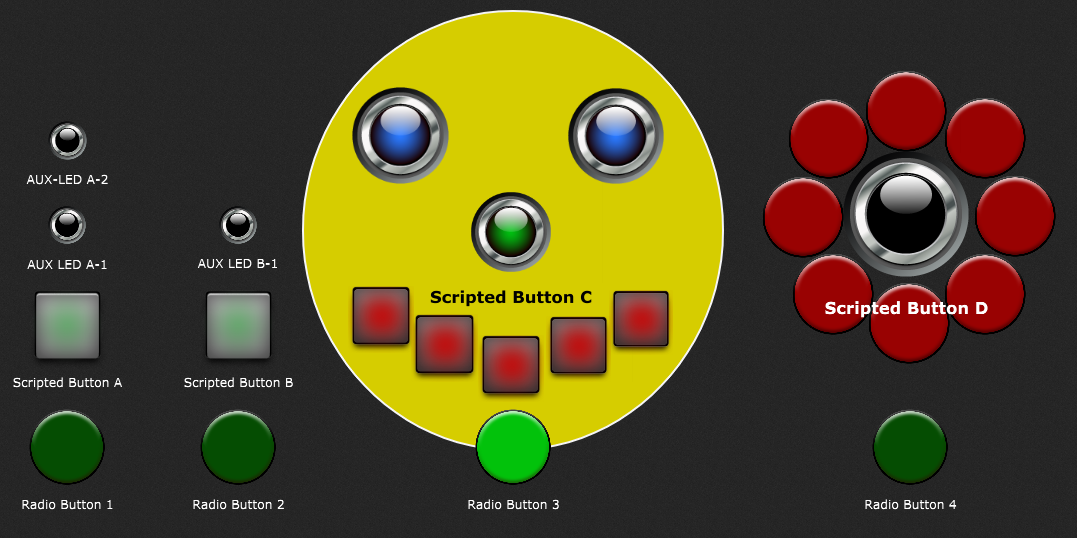
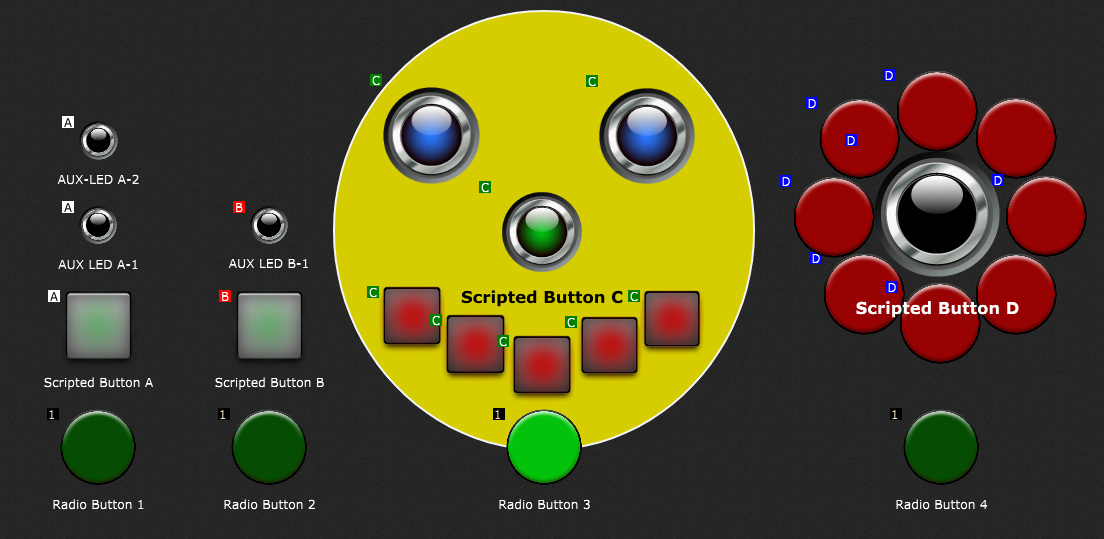
Just to point out that the number of the widgets in addition to the one “Scripted Button” really doesn’t matter, i made some changes to the rackspace panel to make it look a bit friendlier… :upside_down_face: :partying_face: :smiley:

Here you can see that all the “AUX” widgets which belong to a radio button and its corresponding “Scripted Button” heve been placed into the same widget link group:

Make a face smile and a flower bloom…
radiobuttons with happy aux-group script.gig (345.0 KB)

4 Likes