MSuperLooper Control Scheme

Hi All,

I’ve successfully tested MSuperLooper with the wild rig I’m building, and now it is time to create a comprehensive set of MIDI commands paired to Melda “controllers” with which to drive the automation of the looper instances I’ll be using.

MSL has 16 stereo channels to work with, each with four tracks/loops to record and play back. This comes with a suite of 20 or so commands per channel which might be used to discretely control each channel’s functions.

Now I suppose most sane people don’t worry about creating a foot pedal mapping with ALL these commands available…. they just create a MSL preset for each song with the tools that song will require. I, however am not that kind of sane. Since my “foot controller” is in fact Ableton Live, I don’t need to worry about running out of buttons or switching banks. I just need to create a midi clip with each command and drop them into the arrangement view.

Trouble is, as simple as that would seem, each command requires its own “controller” to be set up within MSL, and these controllers are organized into presets with only 128 slots. Ergo, I cannot access the complete suite of discrete channel control functions without futzing around with preset loading.

I had really hoped to be able to simply dedicate a virtual midi port to the control of my looper and divide things across its sixteen midi channels. So simple: midi channel 1 controls looper channel one… just drop the universal “record” command onto an Ableton midi track set to “Looper Control: MIDI channel 1” and presto! But alas, there are not enough slots to create 16 separate “controls” for each function within MSL itself.

Has anyone who has wrestled with this come up with a solution that works well for this?

BTW, I am currently bypassing the rack panel for this stuff… it seems unnecessary to ALSO create a widget for each of these functions, when I can simply connect the virtual midi port to the MSL plug-in’s MIDI input. Open to discussion.

*edit- In my “BTW” comment I had forgotten that, like MSL ‘controllers,’ widgets have a direct connection to the plugins parameters. I.e. I would not need to use BOTH controllers AND widgets. Still, widgets for the control of all this would be very space-consuming and, in the end, unnecessary. GLScript is probably the way to go… or perhaps building an extension. *
If no one here has a solution, you could ask Chandra Guitars, the guy that makes so many of Meldas YT ‘how to’ vids, including several on MSL. A lot of their presets were built on his work as I understand it. Every question I’ve ever asked him he’s answered, and I think he does some consulting work too. Just thought I’d mention him as a possible resource.

2 Likes

Is the best way to contact him through YouTube comments? Or can you share his contact info?

Correction - Chandler Guitar, as in Chandler Oliver. I’ve always contacted him through the comments of his how to vids, but he does have a Weebly webpage and a contact form. I think I’d just ask him for his contact info and why for in a comment on the MSL Midi Controller video first and see what happens. Maybe this vid would be of interest too - he has a lot of them. Just watching him mess around and get some beautiful sounds out in a short video, in real time, makes my head spin. Hope what he does makes more sense to you than it does me, but maybe one of these days.

And/or

.

2 Likes

GP Script is an option. Received midi messages could directly control MSL parameters.

It would require a bit of work to set up your mapping of midi channel/CC to parameter number.

1 Like

Ah, that makes sense. The use of parameters directly sidesteps the whole MSL ‘controller’ thing, and GPScript can reinterpret MIDI messages to parameters however I see fit.

The perfect opportunity to dive in to GPScript.

1 Like

You can extract all the parameter numbers and names using this script. You can then paste it into a spreadsheet app.

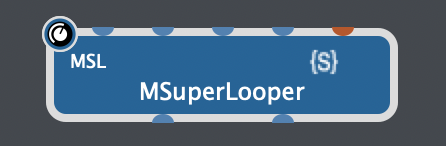
You just need to add a GP Script handle to MSuperLooper (e.g. “MSL”)
image

Var
   MSL : PluginBlock

Initialization
   Var 
    params : Integer = GetParameterCount(MSL)
    i : Integer    
   For i = 0; i < params; i = i+1 Do
    Print("" + i + ","+GetParameterName(MSL,i))
   End
End

I can see that not all Track parameters are grouped together (I assume that new parameters were added over time). If they were all together in a group, it would have made it much easier to extend the script to cover all 16 tracks.

3 Likes

Try this for the track parameters. My aim here was to make it as efficient as possible to control all 16 tracks. “MSL_CONTROL” is the handle I gave the virtual midi input port.

Var
   MSL : PluginBlock
   MSL_CONTROL : MidiInBlock

// Track parameters are controlled via CC numbers 27 to 38, with each MIDI channel controlling a different MSL track (1-16).
//  27  Reset Track
//  28	Play Track
//  29	Reverse Track
//  30	Select Track
//  31	Select and record Track
//  32	Loop Number
//  33	Gain
//  34	Pan
//  35	Feedback when overdub
//  36	Feedback
//  37	Feedback FX
//  38 	Volume

On ControlChangeEvent(m : ControlChangeMessage) Matching [27..38] from MSL_CONTROL
    Var 
        Channel : Integer = GetChannel(m) - 1
        CC : Integer = GetCCNumber(m)
        CCtoParam : Integer 
        
    Select
        CC < 35 Do  // Main group of track parameters (starts from parameter 27). Each track is spaced out every 8 parameters.
            CCtoParam = CC + (Channel * 8)
        CC < 38 Do  // Track feedback parameters (starts from parameter 200). Each track is spaced out every 3 parameters.
            CCtoParam = 200 + CC - 35 + (Channel * 3)
        True Do  // Track volume parameters (starts from parameter 254).
            CCtoParam = 254 + Channel
    End
    // Set the parameter directly in MSL
    SetParameter(MSL, CCtoParam, MidiToParam(GetCCValue(m)))
End
2 Likes

Did you mean GPScript or is there another language out there will a similar name?

Finger Flub!

Yes, GPScript.

This makes all kind of sense to me, @rank13! Thank you.

That said, it is not working for me yet. Admittedly, there are too many gaps in my knowledge at this point about GPScript and MSuperLooper to know whether this is user error. In any case the code is pretty clear… I should be able to simplify/troubleshoot as needed… but at the moment I’m getting no response. A few newb questions:

  1. I assume, since the parameters are being set directly from the script via the Plugin handle (MSL), that there need be no midi ‘cable’ connection between the MSL_CONTROL block and the MSuperLooper block. Is that correct? (If I DO connect it, a MIDI Monitor in line suggests that the original CC values are not consumed by the script… they still appear at the input, which may be fine depending on your answer.)

  2. Does the variable MSL_CONTROL refer to the MIDI input block name, the Virtual MIDI port itself, or the handle of the MIDI input block? I assume these are both handles due to the same object type being used in the variable initialization?

  3. Does GPScript have a convention for using strings with spaces? Bome Network Pro creates virtual MIDI port names automatically, and there are spaces within the names (if that ends up mattering due to your reply to #2)

Most likely, this is something silly on my end, and your code works fine. I do promise to read up on GPScript soon, and stop pestering you for answers to easily solved problems!

Correct.

The GP Script handle name (set via right click of the midi input block in wiring view ). Also, tick the ‘Use in GP script’, or similar option when seeing the handle name.

This won’t affect anything. The handle name is what is used/referenced.

1 Like

I came up with this modified script which includes the rest of the channel-specific parameters.
It has been only lightly tested (None of the commands address the wrong channel… it seems they are all routed to the proper channel by the script. Whether the commands themselves are the CORRECT commands has not been tested.)

This script does not pass any of the global (non-channelized) commands yet. There are so many commands here that I think I’ll use a separate virtual midi channel for the global commands. That way future plugin control updates will never outnumber the available CCs. To that effect, I’ve renamed the corresponding variable with a ‘CHANNEL’ designator.

I’ve also affixed a number on both the object variable names… I will have need of multiple of these to control multiple instances of MSL… since MSL does not allow for simultaneous recording of multiple tracks. (O Mobius, why hast thou abandoned me?)

Var
     MSL1 : PluginBlock
     MSL1_CHANNEL_CONTROL : MidiInBlock
  
// Track parameters are controlled via CC numbers 27 to 38, with each MIDI channel controlling a different MSL track (1-16).
//  102      Reset Track
//  103	Play Track
//  104	Reverse Track
//  105	Select Track
//  106	Select and record Track
//  107	Loop Number
//  108	Gain
//  109	Pan
//  110	Feedback when overdub
//  111	Feedback
//  112	Feedback FX
//  113      Volume
//  114      Dry Fx Even if Not Selected
//  115      Input
//  116      Output
//  117      Default Bars
  
On ControlChangeEvent(m : ControlChangeMessage) Matching [102..117] from MSL1_CHANNEL_CONTROL
    Var 
        Channel : Integer = GetChannel(m) - 1
        CC : Integer = GetCCNumber(m)
        CCtoParam : Integer 
  
    Select
        CC <= 109 Do  // Main group of track parameters (starts from parameter 27). Each track is spaced out every 8 parameters.
            CCtoParam = 27 + CC - 102 + (Channel * 8)
        CC <= 112 Do  // Track feedback parameters (starts from parameter 200). Each track is spaced out every 3 parameters.
            CCtoParam = 200 + CC - 110 + (Channel * 3)
        CC <= 113 Do // Track volume parameters (starts from parameter 254).
            CCtoParam = 254 + Channel
        CC <= 116 Do // I/O and Dry FX parameters (starts from parameter 270).  Each track is spaced out every 3 parameters
            CCtoParam = 270 + CC - 114 + (Channel * 3)
        CC <= 117 Do // Track Default Bars parameters (starts from parameter 319)
            CCtoParam = 319 + Channel
    End
  
    // Set the parameter directly in MSL
    SetParameter(MSL1, CCtoParam, MidiToParam(GetCCValue(m)))
End

I figure I’ll throw my 2 cents in, since we have similarities in what we’re trying to do.
I also am using multiple instances of MSL(in lieu of Mobius 2) along with GP and Reaper.
The difference for me is, I use the multiple instances of MSL in Reaper instead of GP. My sound routes from GP , splits off to Reaper for the looping, and then back again to GP to mix in with live playing,
Why?
Because inside Reaper I can control all of the parameters of MSL within the built in controls and envelopes there. No need for scripting or external commands to be sent for looping. The only commands I need to send to GP are song changes and tempo, which I do via OSC.

I started doing as you are trying to do it, and then realized I was making life a lot harder on myself with all of the commands needing to be sent via script or otherwise for 4 different instances of MSL. Perhaps you should rethink the routing and try it in reverse.

Like I said, my 2 cents. Hope it helps.

2 Likes

Thank you!

Yes, I did try it as you’ve suggested, and the Ableton-equipped Mac can even host Mobius, since it is on Mojave.

The issue there is the latency of the audio interface and the relative weakness of my Show Control Mac. I’m using Dante Virtual Soundcard on my “show control” machine, which handles not only any potential audio inputs, but up to 14 tracks of multichannel output. This machine is my timing master, so I’ve buffered it up since it is an old machine and it knows about all the audio ahead of time… but not so if I use the inputs: then I suffer from noticeable delays. Plus DVS includes a mandatory 4ms latency on top of any buffering I use.

So I believe I would need both a better Mac and a second $2000 audio interface to do as you suggest, unfortunately.

1 Like