There is a nice step-by-step guide to setup MobileSheets and Gig Performer, but :
1 - it’s for PC, not Mac (and there are differences)
2 - it’s for MS to drive GP, while it’s the opposite I need (to be complete, it’s my keyboard driving GP, which then should drive MS)
Is anybody out there driving MS from GP on a Mac ? Screenshots would probably be the best way to help, as I’m really lost with MIDI lingo.
Thanks DHJ. I’m using MS on an external monitor connected via USB, so all is done on the Mac. For the record, the external monitor is an iPad, but it’s used as external monitor (named Sidecar by Apple).
Nevertheless, can you send me screenshots of your setup ?
parameters of the “prev” and “next” GP widgets in the global rackspace (assuming that’s how you do it, at least that’s how I was recommended to do it)
Unfortunately not - my live performance since is packed away - completely different from my development machine (where I don’t use an iPad)
That said, assuming you have two way MIDI communication working between your iPad and your Mac, the setup for both MS and GP are trivial.
Presumably you know how to specify a program change (and optionally a bank) for a song in Mobile sheets so that when you select a song, the PC (and optional bank) will be sent to GP. Then in GP, you would specify the same PC and bank for the initial song part of a song (if you don’t need banks then you can default to bank 0,etc, this is documented in our manual)
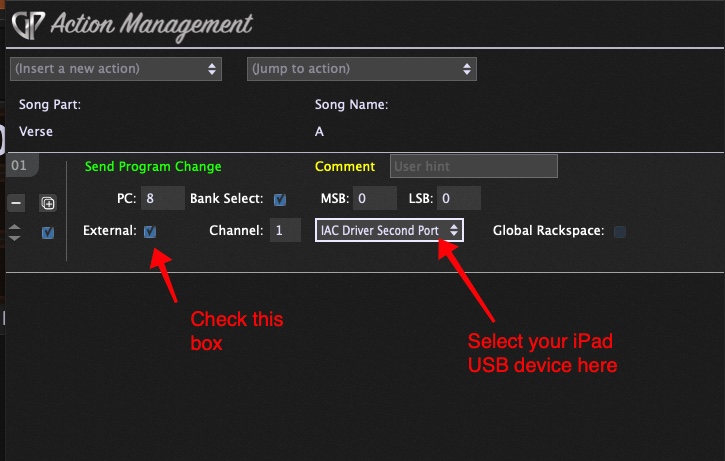
For selecting the sheet music for a song in MS from Gig Performer, I use song part actions.
Here’s an example