On my novation Impulse 61 unfortunately the (<<) and (>>) buttons send Sysex midi instead of CC…
I have been unable to learn these buttons so that (<<) triggers previous song and (>>) triggers next song.
I know Javasccript and have looked through the GPScript manual and System functions list… But it still isn’t clear to me how to actually make this script
But so far I am stuck with my 4 building blocks:
In the global midi monitor
pressing (<<) comes through as Impulse f0 7f 7f 06 05 f7
pressing (>>) comes through as Impulse f0 7f 7f 06 04 f7
And
PrevSong()
NextSong()
are functions
I have looked at other threads but that hasn’t made sense of it to me.
Would really help on stage, as grabbing a mouse and peering at the computer to change each song doesn’t make for such a cool performance!
MIDI Learn a widget is only possible for Standard MIDI messages and not for SysEx Messages.
This is because SysEx Messages are defined this way: only the start byte and the end byte are fix and the content between could be any combination of bytes.
Did you try to use the Pads on the novation ?
Another option could be to use a software like Bome Translator to convert SysEx Messages to standard MIDI Messages.
In the short term, you can create a gigscript or a global rackspace script that responds to incoming sysex messages so that you can detect the ones you care about and then “Inject” a CC message (say) back into Gig Performer via the GP Local Port which can then be picked up (learned) by those Next/Prev songs
var FCB1010         : MidiInDevice
    v_next_song     : ControlChangeMessage
    v_previous_song : ControlChangeMessage

initialization
 v_next_song     = MakeControlChangeMessage(44, 127) //Just example number
 v_previous_song = MakeControlChangeMessage(45, 127) //just example number
end

//Called when a MIDI System Exclusive (sysex) message is received at some MidiIn block
On SysexEvent(s : SysexMessage) from FCB1010

 if s == # f0 7f 7f 06 05 f7 then
  InjectMidiEventViaRigManager(FCB1010, v_previous_song)
 elsif s == # f0 7f 7f 06 04 f7 then
  InjectMidiEventViaRigManager(FCB1010, v_next_song)
 end

End
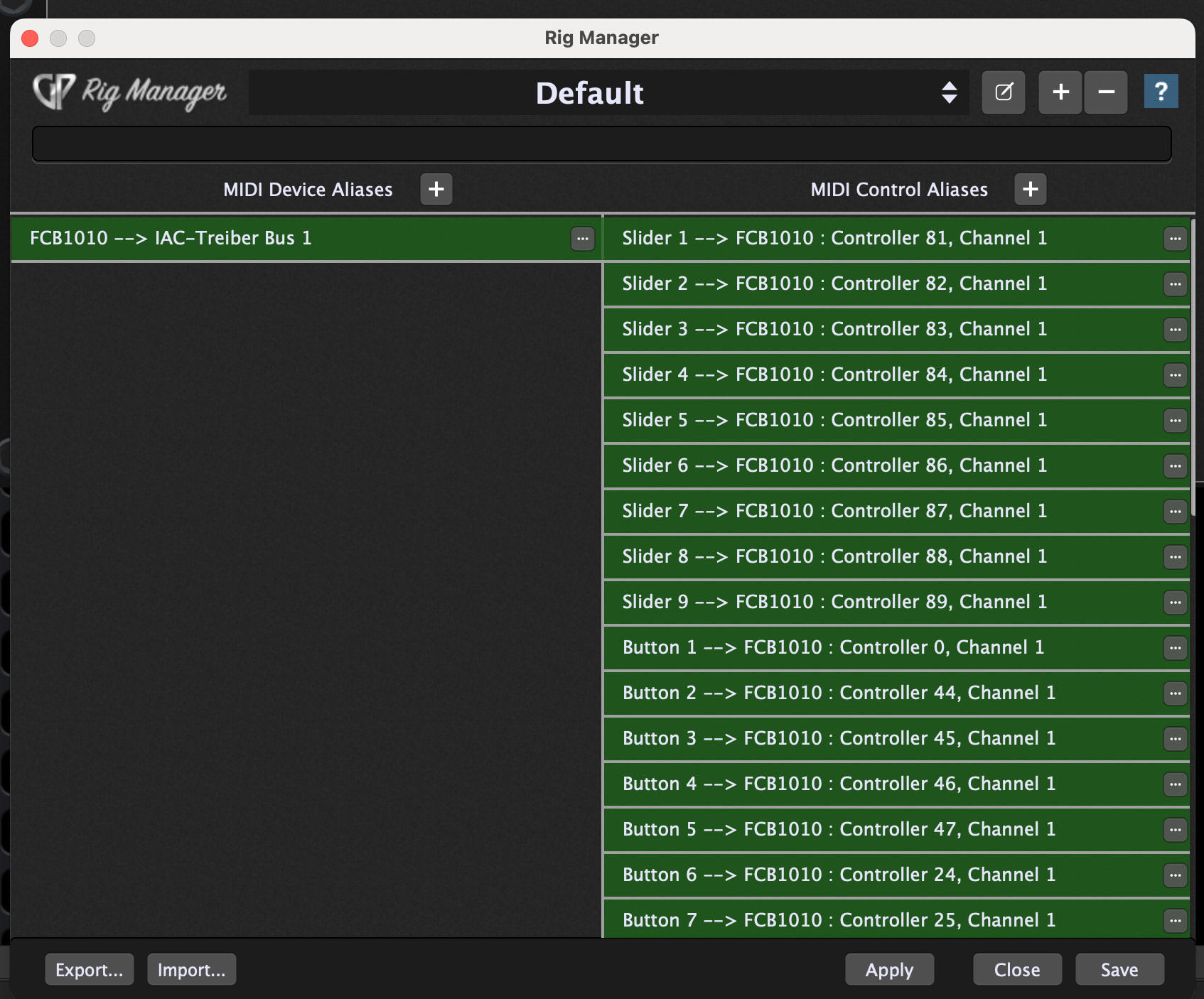
In Rig Manager I defined the MIDI Device Alias that is referenced in the above script
Now you should be able to use your buttons and in Gig Performer they arrive as the defined CC messages and this messages you can learn in the Global MIDI Assignments.
Fantastic, that works perfectly thank you!
I couldn’t have figured this out alone.
I just changed the channel to channel 3 to make sure no other notes during playing or anything could accidentally change the song, and in the global midi menu enabled a settings that like: ‘only allow channel 3 for program changes’.