I am playing midi files through Midi File Player to Abbey Road Vintage drummer in Kontakt 7. Is there a way to have them play back to back seamlessly without stopping?
How is your routing and what is the issue?
I have a play widget which starts the midi file. I also have a dial widget that allows me to select other midi files. The issue is that whenever I switch to a different midi file, the first midi file stops and I have to hit play again to start the next midi file. I’d like to be able to cue up the next midi file and have it play as soon as the first on ends.
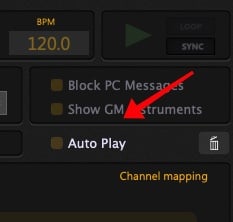
If your MIDI files are in the right order, you can use AutoPlay to start the next one when the previous one ends.
Otherwise, the only way to do this right now would be to use GP Script, specify a different song in each variation and respond to the EndOfTrackSignal parameter of the MIDI File player and switch to the desired variation.
We’ll probably improve on this for a future release (though no guarantees as we don’t like to promise anything)
Thank you for this response. I do not see Auto Play option on my screen. How do I get that to appear? Also, I’d like to be able to loop the first midi file until I tell it to move to the next one, so auto play may not be the solution for me. Is there a script available that I could try?
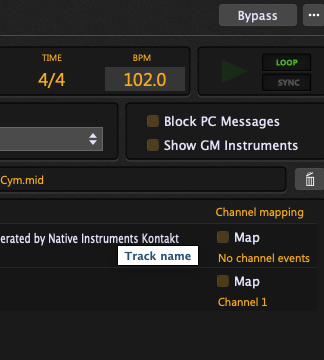
What version of GP are you running?
I am running GP 5.0.9.
That AutoPlay option was added to version 5.1.1 and we are now at version 5.1.4
You might want to update (don’t do that unless you have a week or two of free time just in case there is an unexpected problem that you need to address - such as an anti-virus tool deciding to block it)
Hope you are being a little sarcastic about the update..? Will it run on Catalina?
this is not sarcastic, it is a good idea to test a new update (and not only Gig Performer) weeks before using it in a live situation.
I always do that and before installing an update I do a backup.
“Der Teufel ist ein Eichhörnchen”
And this are the requirements
What are Gig Performer Pro’s System Requirements?
Gig Performer® Pro system Requirements:
-
macOS 10.9 or later (Intel only)
-
macOS 10.14 to 13.x (Universal version, works on both Intel and Apple Silicon chips)
1 Like
I do not understand what was sarcastic about what I wrote. You are running an older version of GP 5. The auto play feature was implemented in 5.1. one and our current version of GP is at 5.1.4. Your license entitles you to use the latest version. However, we always tell customers that they should never update anything within a week or two of a show just in case they run into a problem that might require some time to fix.
So that’s some sage advice, I can appreciate that.
So I guess when I’m trying to build is basically a midi player that plays a virtual drum kit plug-in. I like the idea of using midi because you can easily change tempos without degrading the sound quality. seems like this should be very doable in GP and perhaps someone has already made one?
You can route different elements (snare, kick, etc.) to different plugins: [blog] How to improve the sound quality of instruments in your MIDI files