Hello, I’m a new user working on a Wind Controller rig coming over from MainStage, Bidule and TouchOSC.
I would like to use GP’s Variations to control external hardware - a Meris Hedra harmonizer. The Hedra responds to CC and PC messages.
My goal is to adjust the various Hedra settings using a mouse within GP or from a NanoKontrol and to also adjust the Hedra’s knobs and have GP widgets mirror the adjustments.
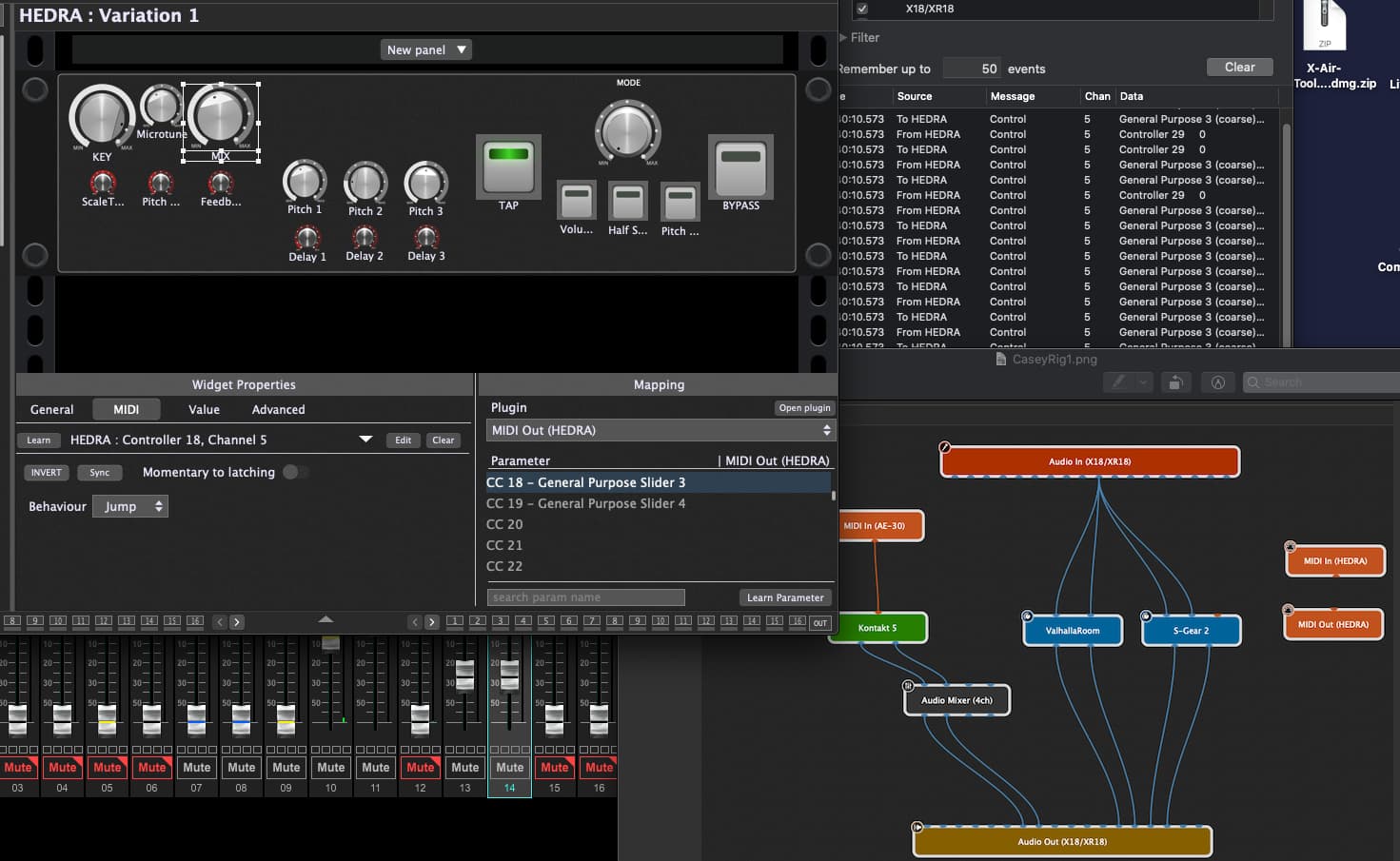
Sync or mapping gets button controls to work but for most experiments whenever a Knob control is moved MIDI feedback loop occurs.
Please point me in the right direction.
The Hedra has two 5 pin MIDI DIN ports, one a regular IN, the other is configured in software for OUT or THRU. Have tried both settings and expect OUT to be the one for this job.
Hedra connects to Roland UM-One USB MIDI interface through a Meris MIDI to TRS interface.
MacOS10.15.7, MacBook Pro 15" Mid 2012 16gb Ram, 500Gb ssd
Gig Performer 4 from GP site
AE-30 windcontroller, Korg NanoKontrol, Behringer XR18 audio interface/mixer, Vantec 10 Port USB 3.0 hub
I don’t know what your setup is supposed to do with the Hedra, but from your widget properties window, I see that your widget is learned to the CC18 from the Hedra (MIDI IN equivalent) while you control the CC18 of the MIDI OUT block of the Hedra. So regarding the CC18, in a way, you bridged the MIDI IN to the MIDI OUT of the Hedra. It seems that for any reason, the Hedra sends out the CC18 it received (MIDI TRHU configuration?). You can check it by removing the MIDI association of the Widget and open the GP Global MIDI monitor. Move the CC18 widget and if you see some CC18 messages replicated on the Global MIDI monitor, this will confirm what I suspect.
If you don’t need to receive the CC18 form the Hedra, simply clear the MIDI learn association. If you need to receive the CC18, then perhaps it could be enough to only MIDI learn the CC18 with your widget and to activate the SYNC option without mapping the CC18 in turn to the Hedra MIDI OUT block. Many possibilities…
For my understanding:
You midi mapped a widget to show the value of your midi controller, right?
Now you want your midi controller be moved when you move the widget?
If so, just enable the sync button on the midi learned widget.
If not already Setup is made in rig manager, you can select the physical midi device the sync should. Work on.
not many folks are having this issue. So I’m checking further to ensure the hardware THRU / OUT setting works. Seems if the hardware is on THRU the behavior I’m seeing would happen.
Hi. Turns out GP could do everything I wanted with my Meris Hedra harmonizer pedal. Also thanks to the GP’s great OSC support I could also do everything I wanted with an Xair mixer.
Especially Where he talks about using just a minimal audio interface…
I decided to abandon my original hardware control plan in favor of doing the harmonizing and mixing in the box. Resulting in a much more manageable physical and virtual rig