MIDI devices disabled from windows

I’m havine some troubles in last hours with my windows/gp setup.

All MIDI devices are no more visible: i can see devices in device manager bue startene GP and looking for a MIDI input oelr output i don’t see anything.

Also the audiofuse is seen by GP as audio output device but no more as a midi in/output interface.

Everytjing was working perfetto until last week.

Simeone has/is experiencing similar issies? Dove u have any suggestion?

Thx so much

Something changed last week!

Do you have some other application running that’s grabbing and locking those ports?

Connected by USB?

I might try turning off the computer, disconnect and reconnect all USB cables and restart computer.

Maybe usb hub went bad? (Is it powered?)

USB cables?

(I’ve also had computer USB ports go bad).

That’s a more detailed description (Yesterday I was on stage)

All the Class Compliant MIDI devices are not visible from any application (GP, Camelot or MidiOX)

  • Dexibell Vivo S7
  • Cuvave Chocholate (usb connected)
  • Arturia AudioFuse 16Rig (Midi ports)

The only device is KORG NAUTILUS that uses Korg Midi Drivers and not Windows standard compliant one.

The Arturia AudioFuse is visible inside the application only as ASIO Audio Card but it’s MIDI part (In/Out) is not visible.

Korg is connected via powered USB Hub (like vivo and cuvave) while Arturia is connected directly to PC USB port

Action that I performed:

  • Disconnect → Reboot → Reconnect
  • Using Korg Uninstall Driver to uninstall devices → Reboot → Reconnect
  • Unplug Devices, uninstall USB devices (USBDeview) → Reboot → Reconnect

Nothing has changed. The only MIDI device avaiable is Always Korg Nautilus.

Windows Update maybe?
Maybe try to revert to an earlier Restore Point?

Definitely something OS related.

I’d try installing all latest drivers (chipset, etc.)

1 Like

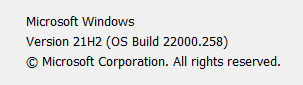
The problem seembs connected to 25H2 windows 11 release and it’s MIDI 2.0 feature that conflicts with class compliant midi 1 devices (Korg uses it’s drivers so it’s “safe”)

Now it’m trying a driver ricreation… (thank’s to chatgpt suggestion)

I ‘ll update this thread asap

Did you just updated to an official Windows release or did you install a beta/pre-release version?

If you installed a release version, interesting to understand why it is not reproducing for other users.

I can’t reproduce because if it ain’t broke…

image

Yes, mine is also 25H2 and I performed with it live with nmo problems.

@andreabardi
Why do you think it is related to 25H2, or maybe I’m missing something?

The problem seems to be resolved (I’m reserving further testing). Below is a brief summary from memory.

Problem:
Windows version 25H2 (the one with the new MIDI 2.0 management) suddenly stopped recognizing Class Compliant devices (MIDI 1.0).

Reason:
The 25H2 update installs the entire dormant MIDI 2.0 system. Microsoft activates the new subsystem gradually: in other words, it is present but not active, and it activates when you least expect it. When it did activate, a conflict arose between the old devices (which use “legacy” drivers) and the new layer that communicates MIDI 1 devices with applications. This explains why the devices were correctly installed but were not “seen” by the programs.

Solution:
Here, it’s basically a “WHO KNOWS!” :slightly_smiling_face: After several unsuccessful attempts, I downloaded the latest runtime (in RC) from Microsoft’s site ( About Windows MIDI Services - Windows MIDI Services
), which provides a small program called Windows MIDI and Musician Settings.

At this point, I:

Disconnected all instruments and the audio interface.

Removed all unconnected USB devices using USBDeview.

Created a script with ChatGPT that identifies all ghost MIDI devices via PowerShell and removes them:

Shows all detected MIDI devices

$allMidi = Get-WmiObject Win32_PnPEntity | Where-Object { $_.Name -match “MIDI” }
if ($allMidi.Count -eq 0) {
Write-Output “No MIDI devices detected.”
} else {
Write-Output “Detected MIDI devices:”
$allMidi | Select-Object Name, Status, DeviceID

Confirm removal

$confirm = Read-Host “Do you want to remove all these ghost devices? (Y/N)”
if ($confirm -eq “Y”) {
foreach ($device in $allMidi) {
Write-Output “Removing: $($device.Name)”
pnputil /remove-device “$($device.DeviceID)” | Out-Null
}
Write-Output “Removal completed. Please restart your PC.”
} else {
Write-Output “No devices removed.”
}
}

Launched the new Windows MIDI app. A message appeared asking to run a command (midirep.exe or similar) as administrator. This script repaired the drivers associated with some default MIDI devices (midi and midi1).

Restarted the Windows MIDI app. This time it launched successfully.

Reinstalled AudioFuse16Rig drivers.

Restarted the MIDI 2.0 service (from the Windows MIDI app, last tab at the bottom with the Panic icon :wink:).

At this point, the Arturia MIDI appeared inside the app. I launched Camelot/GP and… boom. Peripheral visible again.

I then proceeded to reconnect ALL devices one by one, verifying each time that the instrument was recognized. Everything seems to be working properly and (apparently) the issue with the KORG device stacking (MIDI position greater than 10) is resolved.

Notes:

Camelot Pro / GP both see all peripherals now, but older applications (like MIDIOX) do not, as they cannot communicate with the new layer.

Interesting note: the native Windows MIDI app now provides a MIDI monitor (finally!).
2 Likes

I think it unexpectedly did not connect to my midi controllers after the update.

In my case, it worked after restarting the computer and futzing around with other stuff (unplugging and replugging usb connections.)

The weird thing is it still seems to have changed the order that devices are recognized when I start up. It used to be that the USB connection closest to the plug was device 1 in Rig Manager and the next USB slot was device 2. That seems to have swapped. Weird. (I never changed anything in Rig Manager).

Maybe I’m wrong about But it seemed to have happened after that same update.