I’ve been using Gig Performer as a live mixer for my daughter’s acoustic club and cafe performances recently. It’s been 100% reliable, and I love that I’ve been able to customize the UI. I record the raw inputs at every show without worries.
Rather than build a traditional mixer UI, I went with a more purposeful design…

The first thing you might notice is the VU meters for various stages. I’ve also got monitor widgets to detect peaks. The first VU meter is after a CL2A compressor for vocals. The second is after the 1176 vocal compressor. I only expose the knobs related to gain and threshold, as the ratio and attack/release are predetermined. the third VU meter is after the 1176 compressor on the guitar. Each VU meter has a switch so I can make them visible/hidden. The main reason is that I layer them so the meters hide the faff, rather than the other way around.
The EQ is probably the most interesting. Rather than frequency, gain, and Q, I have some predetermined gain knobs with constrained ranges. For instance, both guitar and vocal have a low shelf that can be cut but not boosted. It’s simple. If I get p-pops on vocals or boomy hits on guitar, I turn it down. Vocals have some boost regions for Up-Front, Definition, and Air. Guitar can get a cut for mud and boosts for presence and air. The frequency ranges are complementary and based on experience with the artist.
For reverb, I have Tai Chi on both guitar and vocals. I’ve predetermined the sound and the space. I just have the wet control and a ducking threshold for each. I love ducking reverbs, and the beauty of this plugin is that it doesn’t duck the initial reflection and room tone, but it does duck the tails. The result is that the attacks on the guitar and consonants of the vocals are clear as a bell, with a consistent sound. As the voice or guitar trails off, the reverb fills the space. The controls enable a full sound without mush. I can switch off the vocal reverb when the artist speaks.
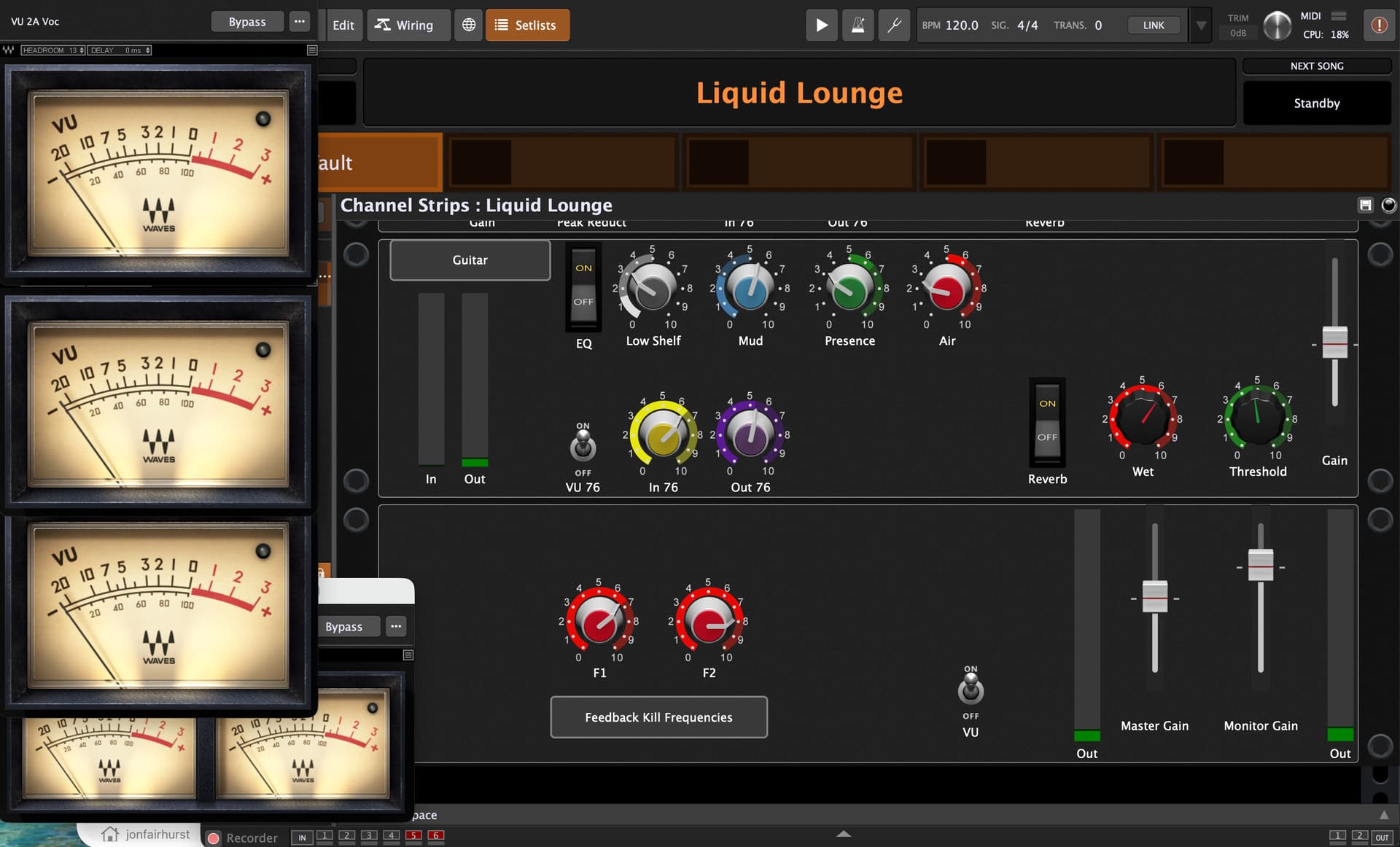
On the bottom, I’ve got controls for the master and monitor gains, and both VU and peak meters. On the monitor path, I’ve got an EQ with some sharp cuts that I can use to kill a low and a high frequency if we get feedback. I just sweep them to find offending frequencies. We put the FOH speaker out front enough that I don’t need any funny business on the signal path for feedback. Both monitor and main have the same overall mix and effects, and that’s been adequate. Reverb on the vocal monitor really helps a vocalist hear the monitor over the direct sound.
For recording, I just record the Shure SM58 and the pickup from the guitar. I should get an additional ambient mic for applause. I shoot video of the performances, and, I’ve just been using camera sound for that so far.
I should get another Behringer X-Touch and use it for live. I own one, but I have it kind of permanently mounted to my own setup. The computer UI has been okay. With well-adjusted compression, each show is nearly hands-off after a few songs. That said, having hardware controls for such specific knobs like “mud” and “wet” would be handy, given good labeling.
We did the recent two-hour show on battery only. We have a couple of Mackie Thump Go battery-powered speakers, and these lasted the whole gig. My 13-inch M1 MacBook Pro and RME Babyface Pro FS lasted as well, though I started turning down the screen brightess for the daytime, outdoor gig to manage the computer battery draw. My Canon R8, shooting 4K video made it for 90 minutes and could have used a power bank.
This was our fourth show using this setup. I can store a different variation for each venue - outdoors is very different than an undamped bar! After each show, I just drop the dry recordings into a Logic project with various plugins for the audio to match with the video.
The bottom line is that this setup meets all my requirements. The highly focused controls makes my mixing decisions really easy. I don’t overthink it. No glitches at all. The recordings have been perfect. Sure, a full board would be more flexible, but that flexibility can take longer to set up and gives the opportunity to mess up. Like, “did I accidentally hit a mute or solo button?”, or, “what happened to my send?”
Oh, I should mention that RME’s Totalmix has been great too. I have a preset for her shows (which is quite different than my personal setup.) I just recall her setting and the input gains are just right. It’s the packing/unpacking, and setup that take time. There’s just a moment for a simple sound check. (Do we hear guitar and voice on FOH and monitors?) If so, the first song just starts and I fine tune from there.
I should mention that I got the initial EQ frequencies from the cheatsheet offered by Hardcore Music Studio. I then tweaked them a bit for the artist and instrument. See the bottom of the page here: https://www.hardcoremusicstudio.com/
Without Gig Performer, I wouldn’t have ever considered mixing with this approach. With Gig Performer, it’s easy to make a setup like this. No scripting necessary. Making a generic mixer with Gig Performer is a much heavier lift. (I’ve done it.) And have you looked at the prices of mixing systems that host plugins?!!
Sure, if you mix as a hired gun, you need the flexibility of a true, general purpose mixing system. But if you mix a small number of artists, this kind of focused UI works beautifully.
Once again, Gig Performer offers top, professional results, economically. It’s fully customizable for your needs. It’s rock solid for live use. And all I need are a laptop, audio interface, and USB cable to mix a 2-hour gig without needing to run AC power. My experience with this use case couldn’t be better. It’s been perfect.
