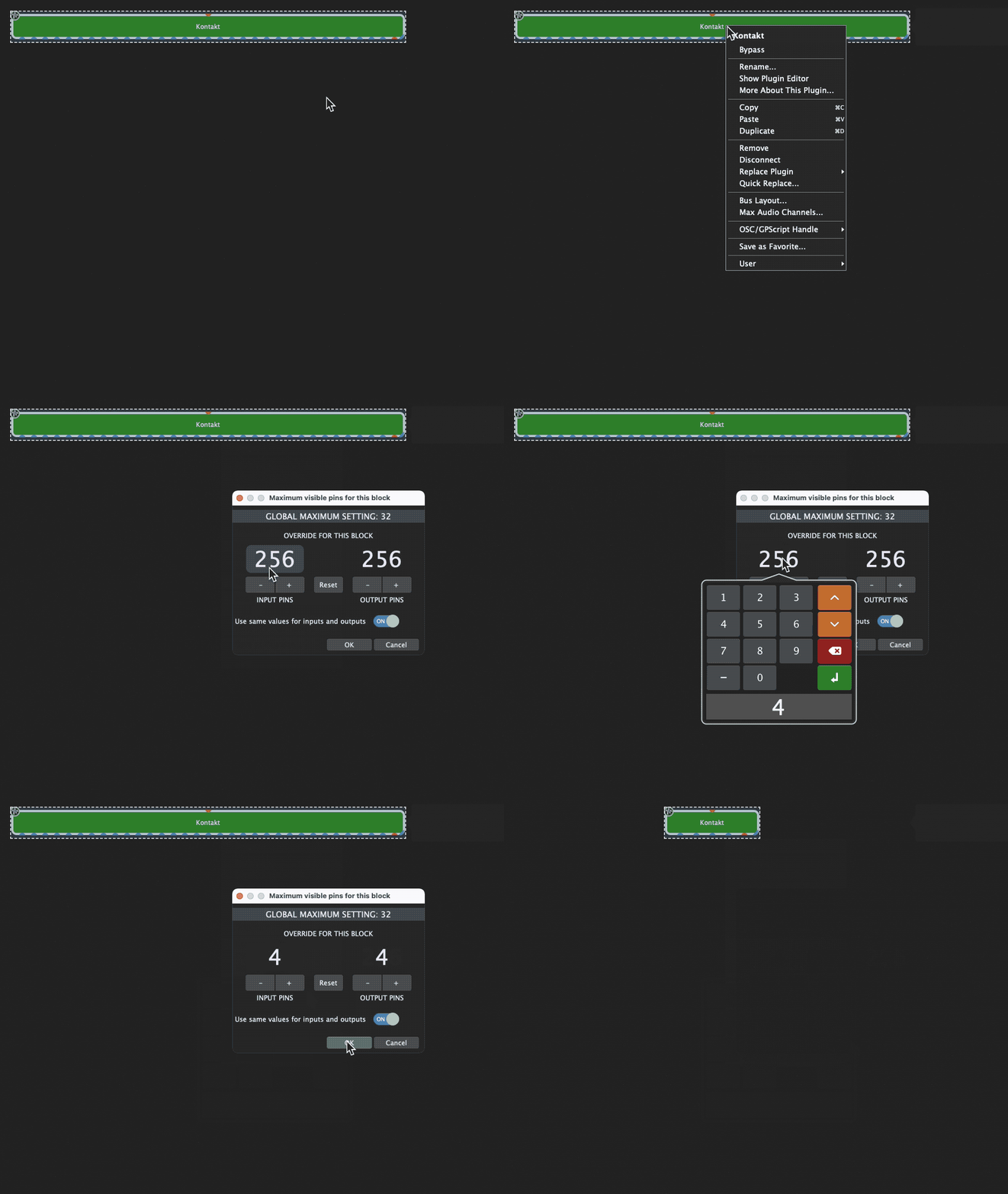
When I try to “type in” a lower number of outputs to make Kontakt smaller in the rack space (it is crazy big) I will not respond to the lower number. It does not seem to “take”.
However, it did reduce outputs/size when I used the +/-. (Which is unwieldy).
Could you please provide exact steps (including which Kontakt plugin you used, version number, vst or vst3 or AU, etc) so we can reproduce. Also, which version of Gig Performer and on which platform?
Hello, it is the latest version of Gig Performer purchased through Plugin Alliance on March 29, 2022. It is the latest version of Kontakt 6, also recently purchased 4/2/22, using the Factory Library. I use it on a laptop with Windows 10.
Okay, Kontakt is a VST3. And I just tried to change the value by moving the mouse up and down and it worked. So, the only thing that didn’t seem to work was when I actually input the number in. So, al in all, this is not a big deal. But, just letting you know.
I clicked on the box where the numbers change and was able to input a number into one side. But it did not change the number on the other side (even though its was set to apply to both). So I was able to type in a number, but then it just reverted to the numbets previously set.
Try double clicking on the number in the box (not the colored box with all dugits, I did not seem to get that option). It sort of let me type in a number.