As @edm11 observed, you can control multiple parameters at once but we do it by using multiple linked widgets. Each one can have not only a min/max but in fact you can define arbitrary curves to control how each widget in the linked group actually moves. That’s much more powerful than a simple min/max concept.
That’s great, I did a search in the user manual, but didn’t know to search for “linked” widgets.
I’m driving now, but on a quick perusal, it still looks like I have to clutter my rackspace with more additional widgets for each parameter.
Obviously love the custom curves, that’s huge, still would be great to be able to link multiple parameters and and their own min/Max and curve to a single widget though.
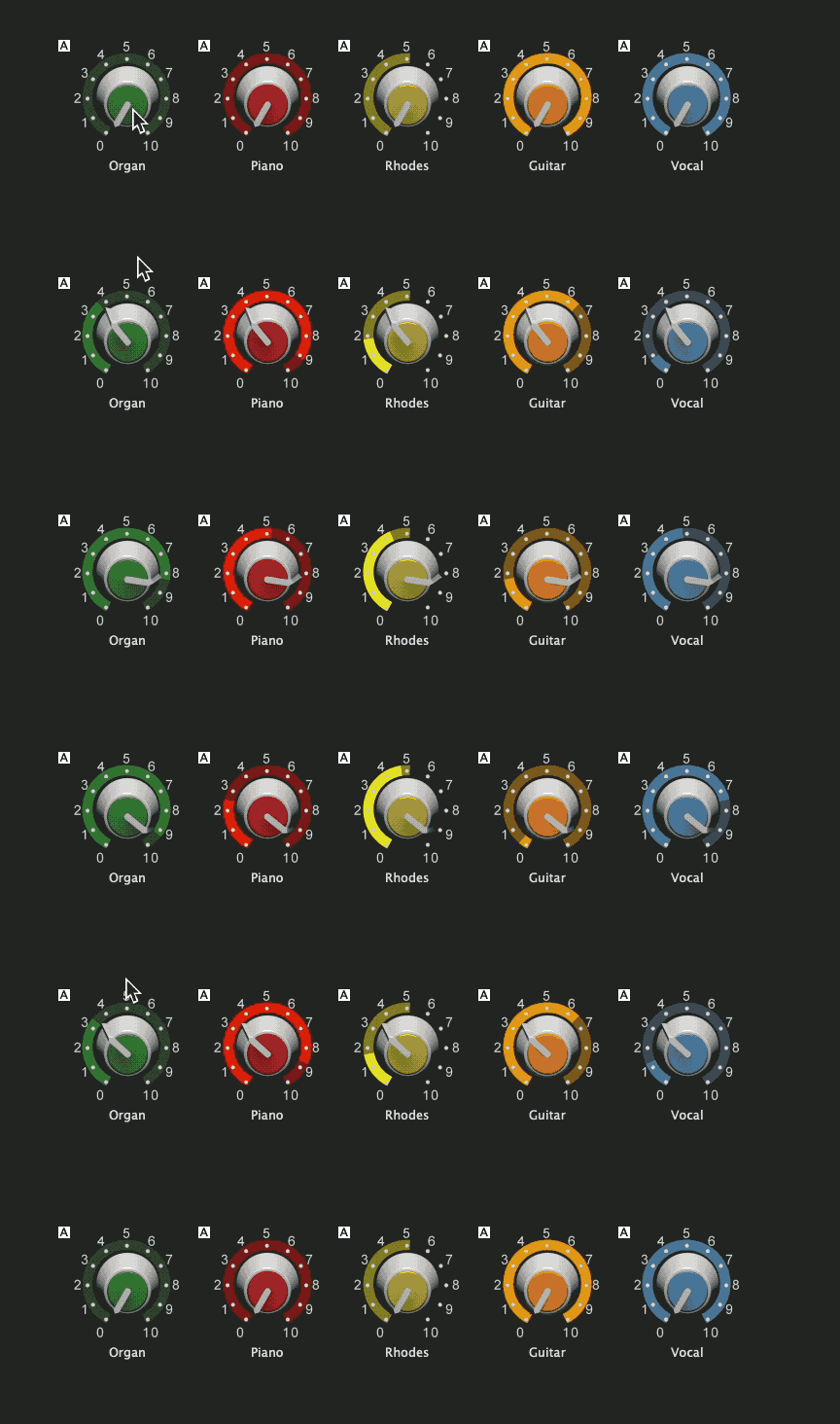
The thing is, our widget model has significant benefits over that single widget/multiple parameter approach. Take a look at this collection of (just) five widgets linked together.
The outer ring shows the actual scaled value for each widget and you can easily have a title telling you what each widget is doing.
If you use a single knob with multiple parameters (as some plugins and hosts do), then you have a knob with a large number of rings around it that very soon gets out of control. It’s also not feasible to easily indicate what each one is doing. In a DAW/recording world, that may work but we believe that in a live performance situation, the ability to see immediately what’s going on with each widget is more important and has to be easy to view/understand.
So for example, you can easily see that the vocal volume is off when the organ volume is half-way up.
That is a cool image. Although I use widget grouping one of of my songs (to increase fullness perceived volume of an organ during parts of Walking on Sunshine), the faders are go up at the same rate. And I never really dug into it deeper.
Just be looking at this graphic, I feel I can understand how this works.
Cross-fading is a really simple thing to do as well using just two linked widgets with the scaling curve of one of them inverted. As you increase the value of one widget, the other will decrease. Map them to different volume faders (say) and you have instant cross-fades.