Thanks, yes - I can do this conversion automatically. It won’t need to be in all cases where there is a negative number - only where the combination of the root note and negative value result in a displayed key being at an index less than 0. If this is the case, I will shift the display one octave.
I’ve published a new release of the extension.
In addition to the autoscroll feature, it includes a critical fix for a potential crash if you use MIDI or OSC to change songs. If you use this extension, please update asap!
8 Likes
Hello, autoscroll is a great thing. At the moment you can only start scrolling globally. But I would also like to be able to stop autoscroll via MIDI. How does that work? I am grateful for this extension.
1 Like
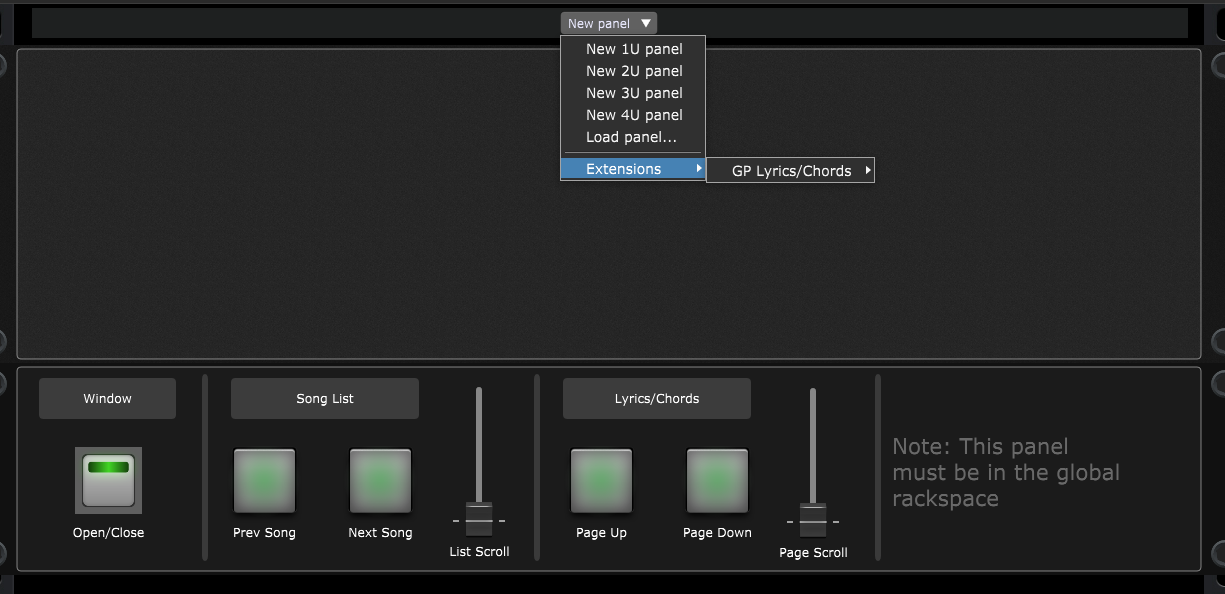
There is a template panel that you can add to the global rackspace. In this last update I included a widget for auto scroll start/pause and reset. These can be controlled via MIDI like any other widget.
If you had already added the panel previously, it’s best to remove it before adding the new version. You access it via panel “Edit” mode and the “Panels” menu at the top of the window.
Cool, it works. I’m also glad that the crashes are now fixed. Thank you very much
2 Likes
This is a fantastic update to an already indespensable extention for GP. @rank13 congratulations and thanks for the hard work on this contribution!
3 Likes
@rank13 how can I set up a button to launch the lyrics/chords extension window?
You can open/close the window via a widget. There’s one included in the template Panel, which you can add via Edit mode.
If you want to add a button widget to your own global panel, just give it a handle/name of GPLC_OPEN in the widget Advanced tab.
2 Likes
GPLC_OPEN works perfectly
1 Like
Thank you for this extension!
4 Likes
I did not find the template panel. I would like to start the scrolling when I change to a new song. I have the window opening with GPScript but the scrolling doesn’t start. How is that accomplished?

@rank13, nice Work, helps a lot and absolute awesome. One question: did someone got it running on start up with window opened in fullscreen mode?
1 Like
If you add the template panel to the global rackspace (as shown in the earlier post), you can set the widget properties for the Open/Close widget to always open the window when GP opens the gig file. You do this via the ‘Value’ tab and the ‘Initial value on Gig load’.
However, there’s not a current way to put it into fullscreen automatically.
This is great but Im having trouble controlling play/pause by gpscript. The open widget operates as expected but the play/pause button flashes on and off rapidly when this script is run-
On Song(oldSongIndex : integer, newSongIndex : integer)
// Called when you switch to another song
SetWidgetValue(GPLC_OPEN,127);
SetWidgetValue(GPLC_AUTOSCROLL_PLAY,127);
End
I wonder why? I put a print statement in to confirm it runs just once per song change.
I determined the widget activation needs to be changed after the song change. I learned some more gpscript and was able to make a delay after changing songs before activating the autoscroll button.
2 Likes
Did it by Global Scripting, works fine. Thank you for this Extension, IT IS a gamechanger for my Setup.
2 Likes
I’m on the road and will be trying this extension later, but my curiosity is impatient and was wondering if this extension can change the button (song parts selector) colors similar to the song/rackspace selector extension?
I should be able to re-use the code from the selector extension, so will look into adding it.
1 Like
Excellent, thanks!