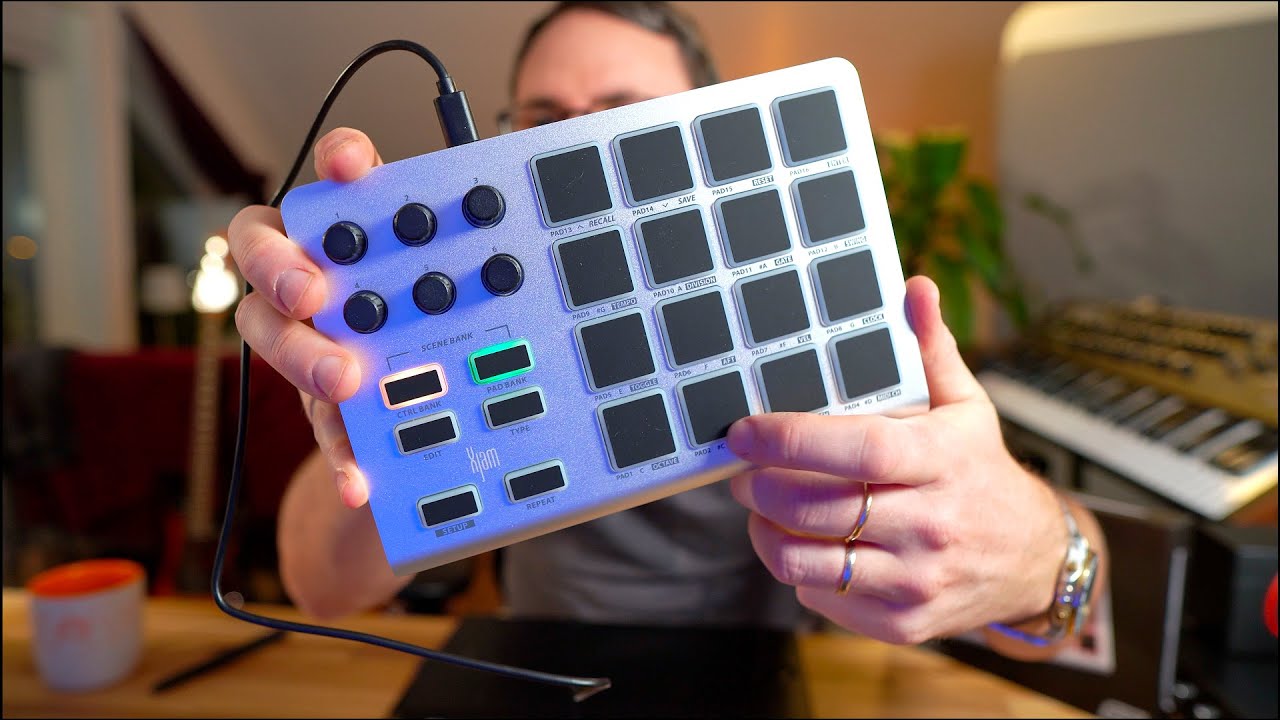
The ESI Xjam looks like a standard drum pad controller (it’s pretty good at that), but you can also program the pads to send PCs and CCs using the Windows/Mac editor. It’s really solid, with enough weight and rubber feet that it won’t slide around on whatever surface you put it on. I paid 96 € at Thomann for mine. Bitwig Studio and Studio One Pro automatically configured themselves to use it, so I didn’t need to add it as a controller. For Gig Performer, I think it might make a good poor man’s Stream Deck.
Thanks but that’s huge for just a few buttons. I’m really only looking for a button to reset the audio if i get note hangs (very rare, but still), and maybe a couple of others. The Korg Nano i already have can do it but i don’t like its from factor or the fact it uses the old micro USB.
It also needs to be about the size of a paperback book so it sits on the MODX neatly.
I guess i could use one of my M-Vave Chocolate plus pedals and have that sitting on the floor out of the way. Not ideal but it could work as a panic button.
Actually your last comment was helpful. I have a Stream deck mini (6 buttons) that i never use. I’ve never really thought about using it with GP. I might look in to that. Thanks
If you can spare a few keys at the bass or treble end of the MODx maybe you can repurpose those for button duties? Maybe even key combo’s like the lowest and highest key together?
Ohh, now thats a good idea if it’s possible. Highest and lowest together would be perfect. I can sacrifice one or the other, but as I want it to reset the audio I think id need a safe guard against triggering it by mistake.
Thinking about it I don’t see why I dont just use the MacBook’s keyboard for this, but id still like one or two more buttons if possible.
yeah i tend to like to keep things in front of me which is why I thought of ways to do it all on the MODX. Another option could be if you have an unused footswitch assignable button, for it to send out a momentary cc when pressed. You could then use it like a shift button, where all the keys on your MODX can trigger a different action or keystroke. This should be easy to set up in something like bome midi translator or using gig performer’s scripting itself.
I do have a spare foot switch i could use, but i like the ides of the keys doing it if i can get that working.
It’s a shame the MODX is so basic as far as this sort of thing goes. I got my first MODX during the first lockdown (when i switched from bass to keys), but it’s only now that i need to use the midi side properly.
I think the MODX is perfectly capable! Perhaps not built in, but with some scripting, I’m sure you have everything you need in there, especially if you just need buttons to trigger things.
Sorry, I meant to say either an unused footswitch input, or an unused assignable button on the MODX as a shift button that you hold down to enable the keys on the keyboard to trigger a specific action or keystroke. That way, there’s no real way you’d play the key combo that will accidentally trigger the action.
Yeah, it’s a great keyboard. If i could only have one keyboard for life this would be it (for various reasons, but mainly sound).
It’s just a shame the sliders etc arent much use (ok, without help) in a controller situation. It seems all 4 sliders put out the same CC number, as do the buttons underneath. Loud of duplicated CC numbers. Ive got the 4 down the left hand side all working as i want them, Next/previous rackspace or song part, and create snapshot and apply snapshot to variation, but im missing a couple that i was used to having. At this stage im mainly after a quick way to do the 3 presses to reset audio.
Just a side note. When i was using my MODX and Fantom 06 together, i would connect them using a Midi cable, and have the setlist mode on the Fantom change the relevant Live Set patch on the MODX. This worked really well until i found a bug, that is still there today in the MODX+ as well. If the Live Set slot contained a SSS performance, and im using channel 16 to control the switching, the patches on the MODX would not change remotely anymore. I would have to manually select a non SSS Performance to get it going again. I reported this to Yamaha via the support forum, and it was confirmed it was repeatable, but nothing was ever done about it. This was before the + range came out.
At the moment im using Assign 1, Assign 2, and the 2 Motion Seq buttons. Im not sure what you mean by using the Scene buttons. I can see each of the buttons sends CC92 but with a different value. Can these be used to do different things?
Im only using one Performance, with just one part, as the MODX is just a controller. Im not really up on sending changes from it, but dont really need to. I use a BT foot pedal to advance Song parts live, and manually use a Scene button (any of the 4 seem to do the same thing) to advance the song. I feel safer having the buttons. On the keyboard as sometimes I’ll advance too many song parts, so need to go back. I find it better with a button.
Im also planning on using the MODX as an interface, so having GP (MacBook Pro) sending its audio in to the MODX over the USB cable and out through its main jacks. Any thoughts on this?
I have just programmed the Super Knob position buttons (and I guess the knob itself) to trigger Panic. That was the most important missing one for me. Just need to make sure I dont touch anything in that area when playing.
Oh wow!!!, I never realised that button was even there. Ive had a MODX since 2020, and my 7+ since it came out, and there are still a few buttons ive never pressed. This sounds like it will be the perfect solution.
Just wanted to report back that life is good now thanks to your suggestion/post.
A couple of things caught me out, but i figured it out. Turing on Remote each time was one, but the other was programming the Knobs. when i turned each of the knobs the CC number changed, i couldn’t figure out what use this was. Then i realised i need to set a CC number first using Edit, and then it all worked Flawlessly.