Looking for MIDI Processing and Routing Plugins, or GP Solutions

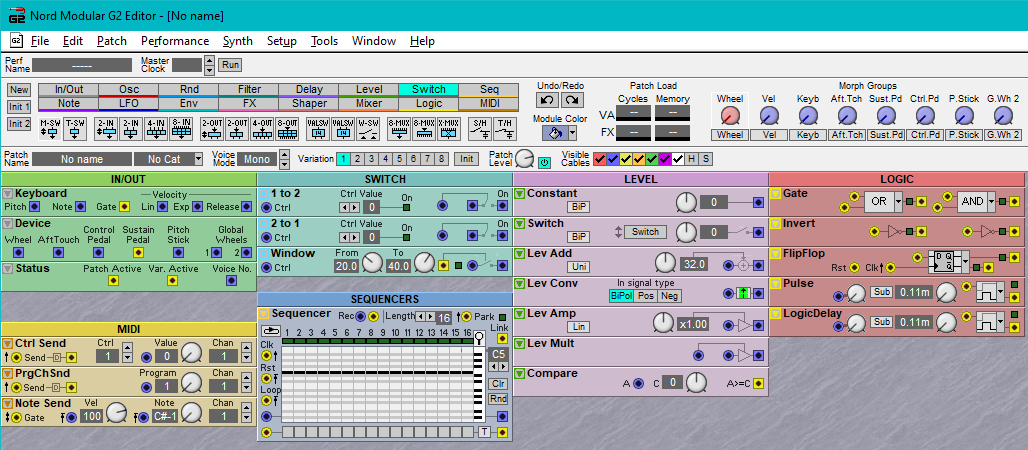
I’m currently stuck using GigPerformer mostly for our drummer’s Battery 4 kits, which we love, and some Kontakt samples that make up for the lack of audio samples/waveforms in my one stage keyboard, the Nord Modular G2X synth. If I’m ever going to replace the Nord with GigPerformer and a simple MIDI keyboard, I’ll need to find some good MIDI processing and routing plugins, to replicate the incredible Nord Modular toolkit (see the screenshot, showing the MIDI and routing modules I use the most).

When I play with my band, I’m covering vocals, left-hand bass, and right-hand synth. My hands rarely leave the keyboard, so I depend on my two pedals (sustain, control), and occasionally a button or knob, to instantly make patch and setup changes from one song part to another. So, the issue is not the synth patches themselves. Between Pigments, SynthMaster Two, Kontakt, and all the Arturia plugins, I’ve got more than enough synth power to get the sounds I need. It’s a big job to translate 50-60 Nord patches to plugin patches, but I’ve already done a few and it’s doable.

I realize that the Nord Modular is a self-contained world and necessitates its own way of doing things, and doing things the GP way with various plugins will be different. The Set List feature will take care of many of the setup changes I currently do with logic modules and switches, and Ripchord looks like it’ll do a great job handling note transformations. But I’ll still need the ability to process incoming MIDI notes and controllers (sustain, control pedal, etc.), and decide what to do in response to those messages, in different contexts. I can give lots of examples of different ways I use the Nord’s modules to do this.

I’ve looked at Soundigy’s MIDI Toolkit, it’s incredibly comprehensive but seems to be geared toward manipulating external hardware. Loomer Architect is another “Modular MIDI” toolkit that looks good. But both of these kits seem to be so self-contained that I’m not seeing how their outputs could manage routing within GP. They’re both plugin hosts in themselves, and I don’t think it’d be a good idea to put my plugins inside one of these hosts, with only the toolkit plugin in GP. Basically I need some decision processing in GP.

If anyone knows of other toolkit/processor plugins, or alternative solutions, I’m open to suggestions. This is just the beginning of my journey…
Maybe that is “mit Kanonen auf Spatzen geschossen”,
do you know Max/MSP?

I know about Max/MSP, though I’ve never used it. It’s a fairly self-contained environment, isn’t it, like NI Reaktor? Also like the MIDI toolkits I mentioned?

It can process incoming messages, manipulate and send out.
On Mac the Max/MSP provides virtual MIDI Channels, so Gig performer sees that as a MIDI device,
SO you can route the MIDI messages from your controller to Max/MSP, manipulate them and send out and Gig performer gets the manipulated messages.

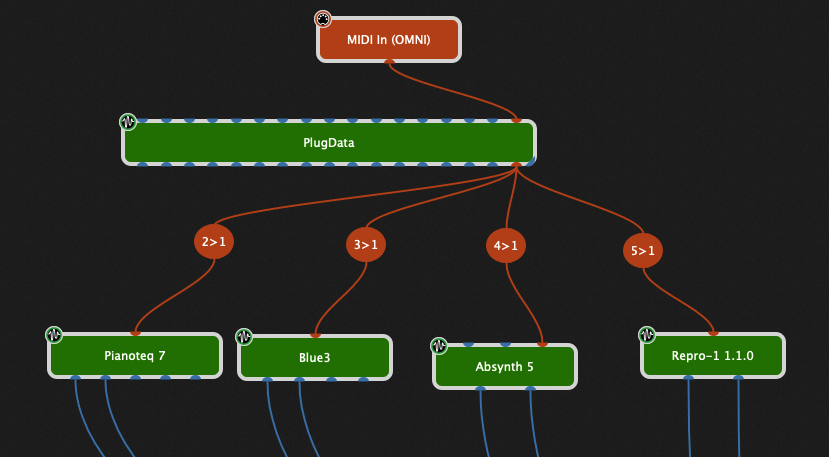
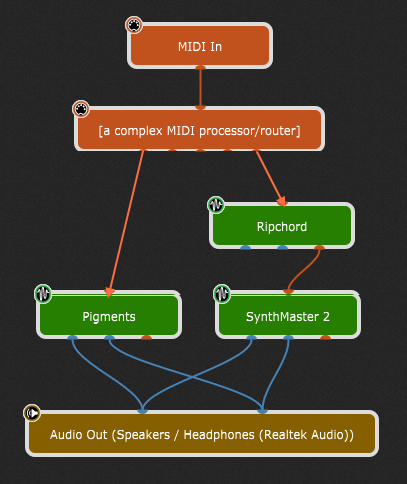
That sounds like exactly what I’m looking for. But in what form would GP get the manipulated messages? Ideally I’d want the processing plugin to have multiple potential MIDI outputs, each connected to a different signal path in GP. For a given MIDI input, the plugin would figure out which output to send manipulated MIDI to, in GP – something like this:

image

In Max you can define multiple midi outputs and this outputs are recognized by Gig Performer.
But I can only speak for Mac.
If that is working on windows the same way I cannot say.

I’m using a MacBook, so this sounds perfect. Thanks!

Please provide a few examples of what you actually need to do that requires such a complex extra toolkit

1 Like

While Max is awesome, there is also the free PD version which has been converted to work as a VST plugin

1 Like

Sure, here are a couple of module groups I’ve created, that extend the usefulness of note presses and of the two pedals.

1) Windowed Control Pedal. Given a CtrlPed input value, it outputs a Gate signal only when the pedal is within the given window of values. This way I can have the control pedal do two, three or more different things, depending on the pedal position, and can use its changing values as well, if desired. In this example, an audio signal patched into the last module will be passed through to its output only when the pedal value is in the upper third of its range.
image

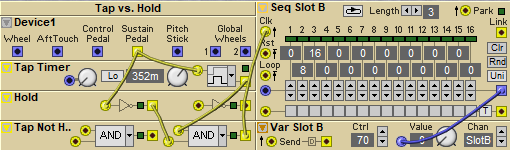
2) Tap vs. Hold. Enables the sustain pedal to do two different things, depending on whether it is tapped quickly, or held down. In this case, a Tap will trigger the sequencer to advance to its next stage, changing the variation of the patch in Slot B (this’d be equivalent to a GP song part with different parameter values), whereas a Held sus pedal will sustain the keys currently being played (b/c I have Sustain enabled for that Slot). I could alternatively set up a “Hold, Not Tap” signal path that would do something other than Sustain. I’ve also created a “Double Tap” combination, which gives the sustain pedal a third possibility.
image

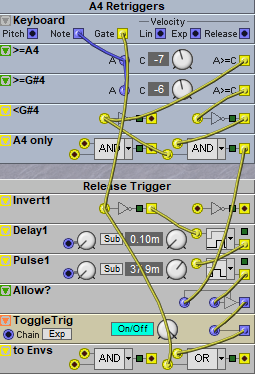
3) Release Trigger. Retriggers a note when you release it; in this case it only works on the A4 key. Normally for double triggers I just use a Delay (audio or MIDI), but for this particular song it’s important that I stay in time with the drummer b/c the tempo varies…
image

So these kinds of things are trivial to do with Max and with PD.

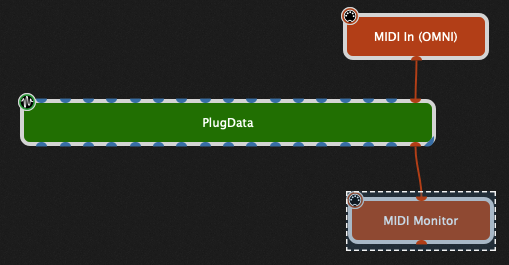
So for example, suppose I only want to allow MIDI notes to pass through if the note numbers are between 45 and 60

screenshot_6927

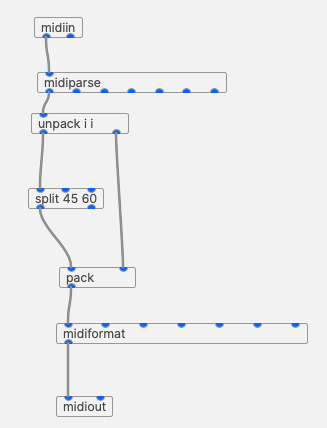
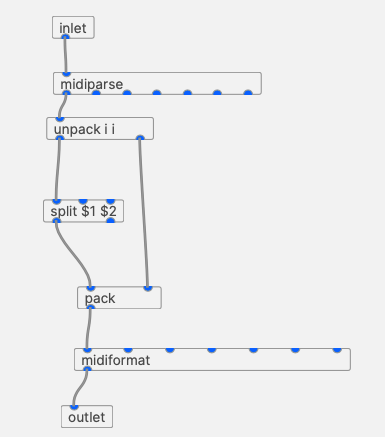
Inside the PlugData block, I have a little patcher which, going from top to bottom

  1. accepts incoming MIDI,
  2. parses out the note messages,
  3. unpacks the note and the velocity
  4. checks to see if a note is between 45 and 60
  5. If it is, then pass it through where it is packed up again with the original velocity
  6. Converted back to a MIDI note message
  7. Send back out

screenshot_6928

Where life gets interesting is that you can save that stuff as an “abstraction” and reuse it with different parameters.

For example I replaced the MidiIn and MidiOut objects with an Inlet and an Outlet and parameterized the ‘split’ object

screenshot_6931
and saved it to something called NoteGate

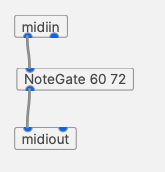
That then allows me to create the following patcher. Notice that I specified two arguments to it. This particular patcher will now only allow notes between 60 and 72 to pass through

screenshot_6932

1 Like

This looks excellent! So I’m guessing that the number of MIDI outputs is variable and that you can control which output you want to pass a given message to?

Huh? Like all plugins, there is only one MIDI input and one MIDI output port

Ah, so that’s something I’d need. The point of the MIDI processor wouldn’t be just to transform the incoming messages, it’d also be to route them to selectable outputs so that the host (GP) can send them to different plugin chains.

Is the only-one-MIDI-output a limitation of VST plugins in general, or of GP?

I suppose I could get this done by having mutually exclusive MIDI processors at the top of each plugin chain.

It looks nice and clean, so that’s really in favor of this solution, but how does this compare to using a scriptlet?

There’s nothing to stop you from using different MIDI channels and then use GP Midi Constrainer plugins for routing. E.g.

1 Like

I don’t know how to answer that — they are very different programming paradigms. GP Script is a more traditional text based language. Max was originally created about 35 years ago and is an example of an iconic (visual) based, kinda dataflow paradigm.

It’s very powerful - I’ve used Max for about 30 years myself and in fact the reason Gig Performer has supported OSC from the beginning is so that Max and GP could work together.

2 Likes

Why didn’t I think of that?! It totally makes sense, considering that MIDI channels are how MIDI does routing! In fact I’ve already done channel-based routing, in one of the few songs that I’ve ported over from G2X patches (to 3 different Pigments plugins). The only difference is that I’m still using the G2X to decide which MIDI channel to send a note on. So your solution will take the G2X out of the loop.

Thanks so much @dhj for all your help!