Hey GP-mates!
Looking for your advice and recommendations. If you know of a specific models matching that would be great!
I’m looking for a brand-new Windows laptop that will be strong enough for C++ development using Visual Studio, and also will serve as my backup laptop for playing live gigs with my 80s-tribute band.
Some specifications needed:
At least 1T SSD.
32 or 64 GB RAM.
Monitor:
Touch sensitive.
Size about 13".
2 in 1 is a plus (foldable to a tablet mode).
Graphic card is less important I’ll mostly connect using Remote Desktop.
CPU
I’m not so updated, what should I look for?
For Visual Studio - need fast math calculations + the more cores the better.
You will pay a premium for a laptop. Why not buy a mini-itx and save $1k? That’s what I did and bought an $80 touch screen to hook up to it with a wireless mouse and keyboard. $850 investment— laptop equivalent -$2k.
This also depends on how many plugins you need to use. At this moment I’m using an I7-10750H for playing, but I don’t have many plugins and I’m using multiple instances of GP. If you’re an Intel guy, I would think I7 anyway. In small devices I9 is not useful: too much heat. It will throttle within the minute.
I used to use this laptop also for development, but some time ago I bought a NUC (I7-1360P) and although it’s power consumption is far less than the laptop it’s a lot faster. Now I do development mainly on this NUC. For live usage it is not convenient: I would need a separate screen, keyboard and mouse.
Not necessarily… I play live regularly using a NUC style PC and a touchscreen that only requires one USB-C cable to connect it. Personally, I find it very convenient.
I would go for gen 12 or 13. 14 didn’t add that much (but it doesn’t hurt). The more p-cores the better, especially when you plan on running multiple GP instances. e-cores do matter, but mostly because it gives the os the opportunity to schedule non-realtime threads on these (although it’s not certain Windows will, but at least you made it possible).
Check the heat production of the cpu and how the laptop handles that (there are lots of reviews about this on the internet. Hopefully also for the one you think to buy), because you can have a very nice processor, but if it is throttled because of high temperatures and a bad design of the laptop, then it no use.
Buy a laptop with a cpu with the highest speed you can afford. Keep in mind that the turbo frequency of a cpu can only be deployed if the cooling is sufficient. If I have to choose between a 3.5/5.0 GHz cpu and a 3.2/5.2 GHz, I personally would go for the first one: more guarantees.
(Last advice: train your fingers to keep them crossed )
Personally I’m happy with the I7-1360P (even while it emphasizes efficiency).
Worked pretty fine and 16GB was also ok. It has Win11 but “home” so no remote desktop but für a few bucks I think you can upgrade it.
To be sure that both computers (laptop and desktop) contain the same plugins and versions I have written a simple excel macro which compares it. This enables me to configure gig performer on my desktop and use it save on the laptop
I found many laptops with the newer processor Intel Core Ultra 155H or 165H.
Anyone is familiar with those?
Is there a way to find out if they a fine for runtime audio performance?
I’ve checked this and indeed it looks powerful.
To be honest, I’m not familiar with this brand so it is intimidating a little. Are you experienced with it?
Also, how can I tell the capabilities of its processor AMD Ryzen™ 7 8840U in regards to audio processing performance?
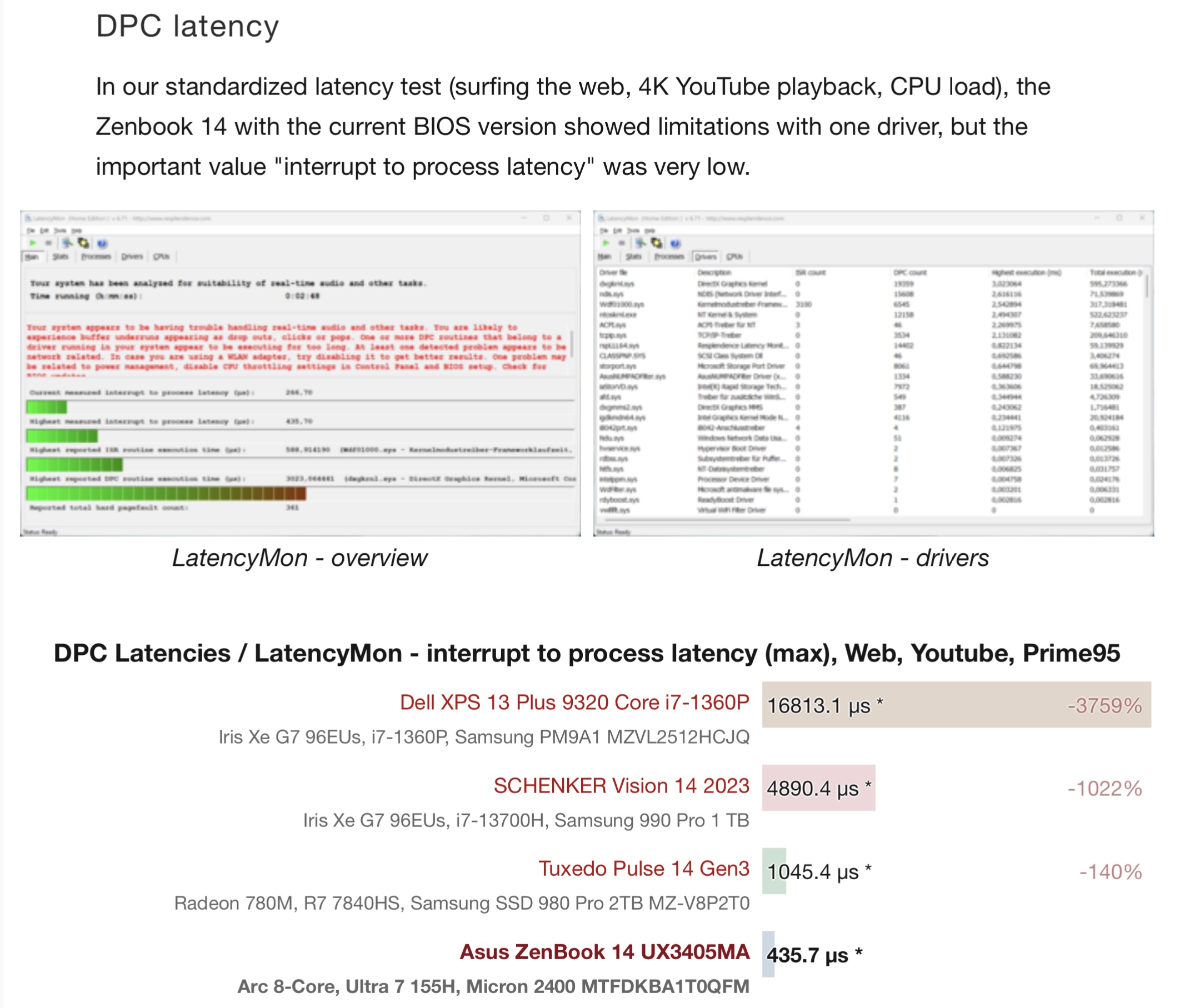
As frank mentioned below, latency is a very important thing and unfortunately is not that easy to find windows systems with low latency. Im not using windows any more but i was tempted to buy the v3 devices. There are some good reviews in YouTube and notebook check and the device has good things. I would buy it I have had the need but not anymore.
By the way, i am not fan of the new intel architectures, i would prefer a full 8 core cpu than a big.little architecture with only few performance cores
Latency has most of the time more to do with the environment the cpu works in than the cpu itself (chipset, bios, gpu, a.k.a. the laptop). I would not buy any this entire model/range.
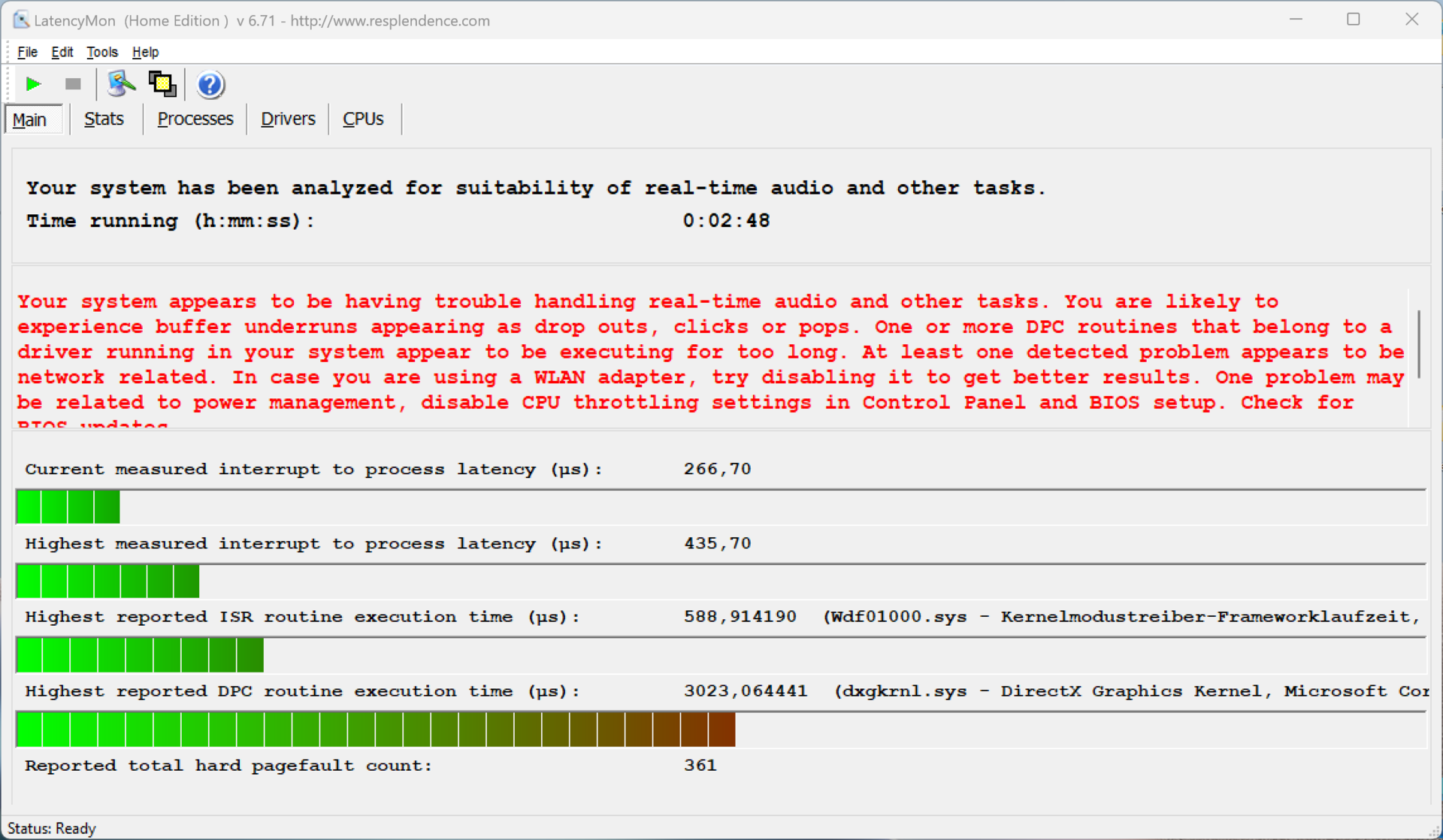
My current Asus laptop (Windows 11) from two years ago also reported a similar warning in LatencyMon but after I disabled CPU Throttling then the warning has gone and now the value of ‘interrupt to process latency’ is between 60 us to 232 us.
In the attached test above we can also see that the throttling has been enabled during the test.
Might be the best advice here (●’◡’●)
Is there any specific model you would recommend me to check?


 )
)