Hello,
I recently bought the iCON P1-M controller and have a question about how to integrate it into GP.
As I understand it, you can integrate up to 3 DAWs and my plan is to use one of the “DAW slots” for GP.
With the help of the additional program iMap you can see how the default mapping for the buttons and faders is set. What really surprised me here is the fact that pitch bend information is sent for the faders, for example, and no CC messages and note on messages are sent for knobs. Is this the standard MCU protocol?
Do I therefore have to map one of the DAW slots completely to CC messages or is there another way? I have tried this and strange phenomena happen, e.g. a knob cannot be set and jumps back and forth between two values sporadically.
I think some of you use the controller and maybe you can help a beginner.
Thanks a lot
Before offering up advice, I’d like to know more about your specific use case and what you specifically intend to use the sliders and knobs for.
X
The P1-M protocol is the “industry standard” Mackie MCU protocol. That dictates what faders and knobs send, and how they respond.
The knob protocol in MCU protocol is that knob direction is encoded as bit 7 of the data byte, and bits 1-6 are sort of the velocity the knob was turned at. I think GP is set up to recognize a couple different types of knob encoding (with a setting in the MIDI tab of the knob widgets) but I’m not sure off hand if one of them will work with MCU protocol.
I’ve been writing a GP extension for the P1M that is fully functional (I think) but incomplete in two significant ways. 1) it currently only operates on one DAW. I’d like to extend it so it’s capable of using all three DAW slots at once through GP. 2) the Function Layer buttons in the current Icon implementation are kind of “crippled” in the sense that you can’t light more than about 16 of the softbuttons. I won’t go into the details, but effectively the extension only makes use of the “Blue” page of softbuttons.
If you feel adventurous I could point you to the GitHub repository, although right now it’s only compiling for Windows. (It’s probably something trivial in the libraries causing it not to compile for Mac, but I haven’t really looked into it yet because I don’t Mac.)
hello,
I would like to use the iCON P1-M as a controller for life performances.
It is important to me that the motorized faders move into position when changing the rackspace / variation and I would like the buttons on the controller to give visual feedback when the button is activated.
I have now set the third DAW for GP in iMap (channel 3 all faders and buttons set to CC, in GP faders and buttons set to sync).
This also works to some extent - when I move a fader in GP, the motorized fader is activated - but there are still problems here.
The faders go up but not down (e.g. if a fader is set to 0 in the next GPvariation). Is this phenomenon known from other motorized faders?
Christian
Hello,
thanks for your reply.
Unfortunately I am on Mac and probably lack the knowledge to compile a script. Nevertheless, I would be interested in your Gitlab repository because you always like to learn.
I would be interested to know whether you also went down the route of configuring the faders and buttons with CC messages and whether you noticed similar limitations to mine.
Christian
Hello,
I’ll try to describe my problem.
I use the iCON device to change various parameters in GP (faders, for example, to change the volume of the various instruments in a rack space).
When I move the fader on the iCON, the assigned fader in the rack space moves. When I move the fader in GP with the mouse, the motor fader on the iCON moves, BUT:
when I change the rack space, the fader position on the iCON device is not updated.
I would like the faders to remain synchronized even when changing the rack space.
I hope I have described the problem well enough.
Christian
How look your widget properties?
This should be easy enough to troubleshoot…
When you change rackspaces you say the fader doesn’t move. If you adjust the widget with the mouse, does the fader move? If the fader doesn’t move, can you check the global midi monitor and see if the correct CC messages are being sent?
If it’s working in one rackspace it should work in another unless you are setting something with the widgets differently in the second rackspace.
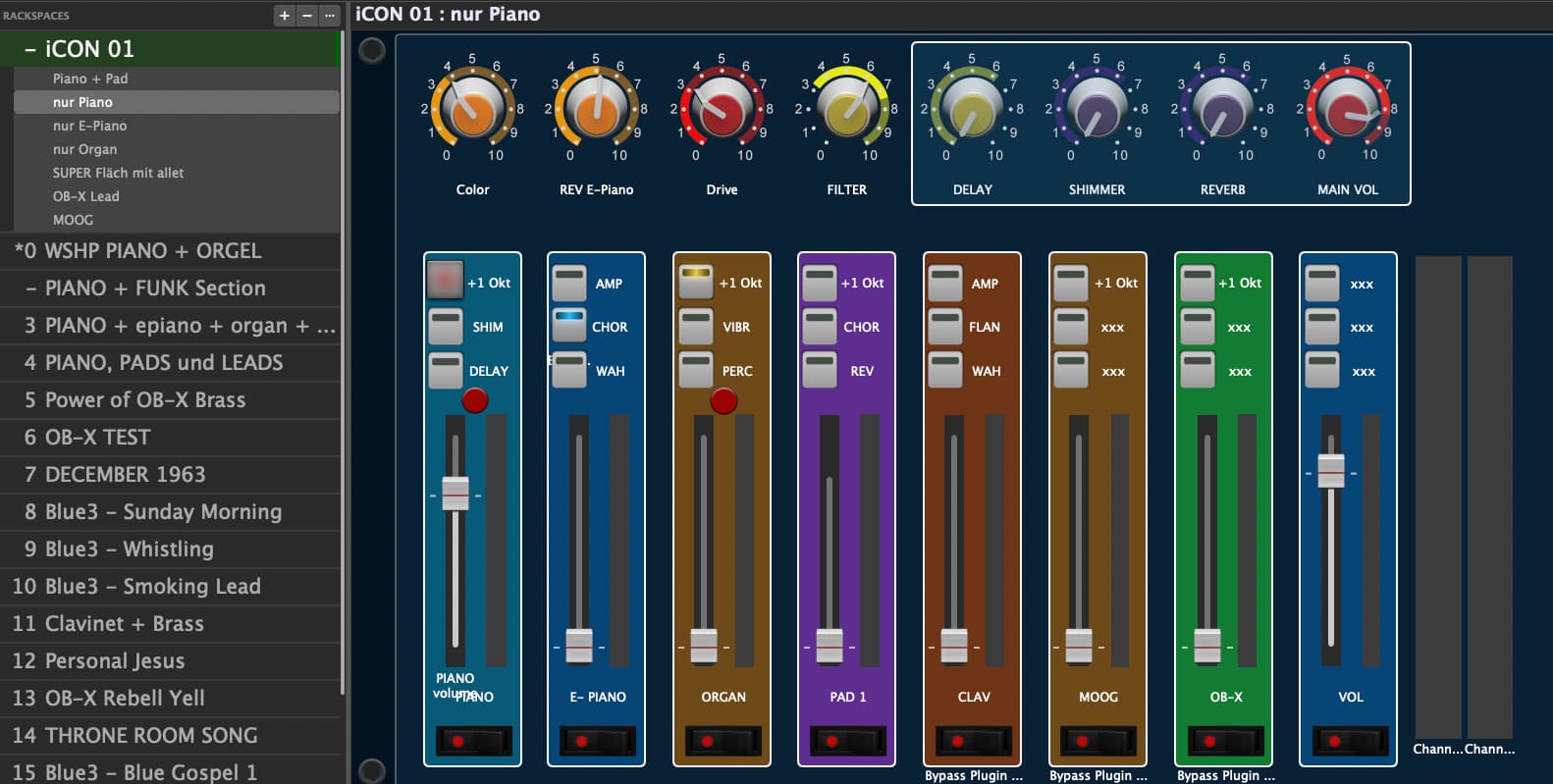
If I’m moving the fader in GP the iCON fader moves too.
If I switch the rackspace / variation some iCON fader move but they never show the exact konfiguration like the GP Settings.
If I switch from “nur Piano” to “nur E-Piano” the Piano fader mostly doesn’t move but the E-Piano Fader goes up
the MIDI settings for the fader are set to “sync”
behavior = “jump”
follow hardware is off
Try to uncheck Widget property
Ignore Variations
Please excuse my silly question.
What do you mean by widget properties? Does that refer to a property of the fader, or is it a global setting?
A fader in GP is a widget.
Please try to uncheck the property “Ignore Variations”
By the way, are your faders all in local rackspaces or do you use the global rackspace?
Please see the GP user manual about widgets
the Faders are in local rackspaces and the property “Ignore Variations” are all unchecked
With no offence I can tell you that the more widgets there are the more errors can potentially be introduced.
A couple of things might influence the parameter feedback:
- Linked widgets
- Two widgets accidentally assigned to the same MIDI CC or Rig Manager alias
- Linked widgets where one of them has specific values assigned for different variations
I would suggest you start testing with with a new rackspace and a couple of variations for only one fader (maybe the problematic ones) and extend it to more sliders and knobs later.
Can you export 2 rackspaces facing the issue and upload them?
I’m happy to do that—the problem arises when switching between the different versions of a rack space.
That’s why I’m uploading the iCON01 rack space. A few buttons on the right haven’t been assigned yet, but that shouldn’t be a problem.
Christian
CH iCON 01.rackspace (2.2 MB)