Input Bus Method to Record GP Relayer Audio in Cubase
Tested in Cubase 13, 20240416
With this method, we will define a new input bus in Cubase to use specifically for recording audio from a GP Relayer. Using one or more input buses for this purpose allows one to avoid the need for intermediate audio tracks (3-track method) and have a simple, clean 1-to-1 correspondence of audio source locations in GP and audio recording tracks in Cubase.
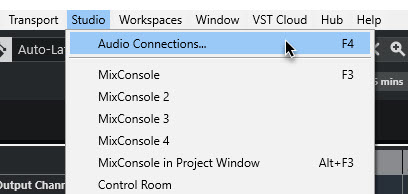
The bus is defined under Studio → Audio Connections.
Use the ‘Add Bus’ button to create the new bus.

You can name it whatever you like, but I suggest that putting the GP Relayer Relay # in the name will help to prevent any confusion later, and allow for easy association of where in GP the audio is actually coming from.
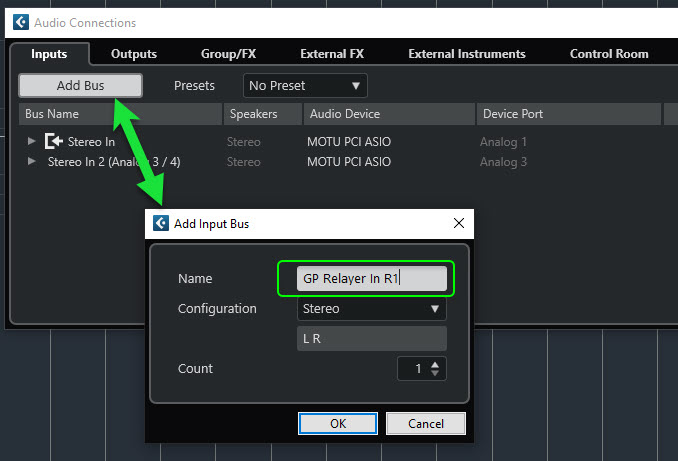
Here is the resulting bus. The system may have assigned hardware Device Ports to it. If so, probably you want to click on them and set them to ‘Not Connected’, as the intention of this bus is only to bring in audio from aGP Relayer insert.

Once the bus is created you can go to the Mixer View (via F3) and add a GP Relayer plugin as an insert on the bus.

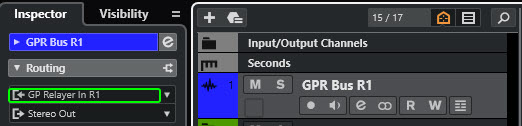
Your input bus is available as an input choice when you create a new audio track.

Here is a picture of a new audio track which uses the GP Relayer bus as its input source.
Further info on Cubase input buses can be found here.
–
Credits: @progster