There are no stupid questions but there are stupid answers… look at mine.
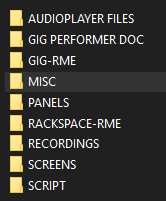
On a more serious note, when I installed GP, I started by creating a GP folder with subfolders for the different types of files I wanted to load or save.
When I need to use an audio file in the player, I first copy that file into the folder “audioplayer files” (look at the screenshot), I open it in GP from that folder and then save my gig or rackspace file in the corresponding folder.
This allows me to move folders between different locations without having to reload the audio files.
i tried this with no joy… however… now that i think about it, i may have different drive letters being used… i may try this again, and make sure i am using say D:/audiofiles/ on both, and not one being like drive c or e
It is not important to get the same path or same folder name in different partitions or disks or computers: when I move my GP folder, it can be placed anywhere.
But the most important thing is that the audio files that you use in GP come from the folder that you define.
If you create a folder with the same name and copy the audio file in this folder, it will not work, unless you save your gig after loading this fle in GP. You must use the original folder where the audio files come from. And then you can copy this original folder anywhere.
I hope I am clear enough, English is not my first language.
I just did a test, and it worked finally. I used the same folder location in both computers C:/GP Audio and it worked. In other words, I didn’t get an error, and didn’t have to ‘fix’ it. (before i used a folder in the same folder as the gig file, however the computers had different drive letters)
I did read on the forum here, that the folder location is not ‘relative’ and I get it now. I will test more, but i think its just a hardcoded location that needs to be the same on both computers.
I avoid the problem altogether by storing on Drive D which is a very fast micro SD card. I tested loading speed by temporarily copying the files to Drive C and ran a stop watch. There was a fraction of a second between the loading times of both drives. I’ve been doing this for well over a year now with no apparent problems. And I have an identical SD card as a backup.
so when you are working on one computer, you use that sd card, and when you move to your laptop, you physically move it there. (and i assume its D drive on both computers?)
As said before, drive letter or other have nothing to do with this: just copy where you want the folder containing the files used in GP, that is all
you can even move the .gig file to another hard disk and move the folder containing the audio file to a flash drive: when you will open the gig file, you will find the audio file loaded at the right place in the audio file player even though its folder is on a flash drive or anywhere else.