How to start a vst drum machine using a widget

Hello everyone,

I’m trying Gig Performer before purchasing it.
I haven’t found a way to play a VST like Drum Machine (e.g. Arturia Spark) using a widget.

I intend to start a groove or pattern inside the plugin itself as you do by clicking on the play or start button.

I tried everything, but I couldn’t.
Can anyone give me help?

Thank you.

If that plugin exposes the Start parameter, than simply map it to a widget.
Link: How to connect a widget to a plugin parameter?

Of course it’s the first thing I tried, but no VST like Drum Machine exposes the start or play function in its properties.

For MDrummer, from script I send a MIDI note and I start the playhead, otherwise MDrummer doesn’t sync the bpm.

1 Like

Normally a function of this type requires the use of Midi Machine Control protocol or Midi Transport Control protocol.
Of course I first tried to look in the plugin parameters, but in no plugin of the Drum Machine type is the Start or Play parameter exposed.

sorry, I accidentally clicked on solved and now I don’t know how to fix it

I could wrong, but at this time the topic doesn’t reflect it yet. (And it will probably not stop someone to make a post to this topic, if deemed useful).

Thanks, I hope so, because I haven’t found a way to undo the check made by mistake.

Thanks, I tried a little with a script, but I didn’t succeed.

For Arturia Spark 2 this works:

  1. Add a scriptlet (available under MIDI Processing and Monitoring) to the wiring view
  2. Past this in it (it’s a very rudimentary script, but it should get you going):
var
   start_stop : Discrete Parameter "stop", "start" = "stop" // Discrete named parameters

// Called when a parameter value has changed
On ParameterValueChanged matching start_stop
var m : MidiMessage

    
    if start_stop == "start"
    then
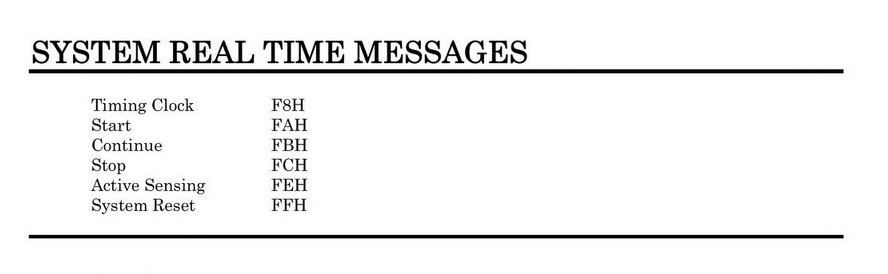
        m = MakeMidiMessage1(0xfa)
        SendNow(m)
    else 
        m = MakeMidiMessage1(0xfc)
        SendNow(m)
    end   
End
  1. Click the compile button!
  2. Go to the edit view
  3. Add a widget
  4. Assign the start_stop parameter from the ‘Scriptlet’ plugin to it. You can rename the scriptlet plugin in the wiring view
  5. Go to panel mode
  6. Press the button…

Spark 2 test.gig (19.5 KB)

Basically it boils down to this: Spark 2 responds the the normal start/stop MIDI messages: MIDI 1.0 Detailed Specification – MIDI.org (page 30 or so)

5 Likes

Great. It works perfectly. Thank you very much. I had done a little test, but my script was wrong. Now it works like a charm with yours.

4 Likes