Here is how to create a full memory dump (instead of the “mini dump”).
For example, if a plugin misbehaves and causes undesirable effects (Gig Performer freezes or crashes), follow these steps:
[1] Run Task Manager,
[2] Right-click on the Gig Performer process:
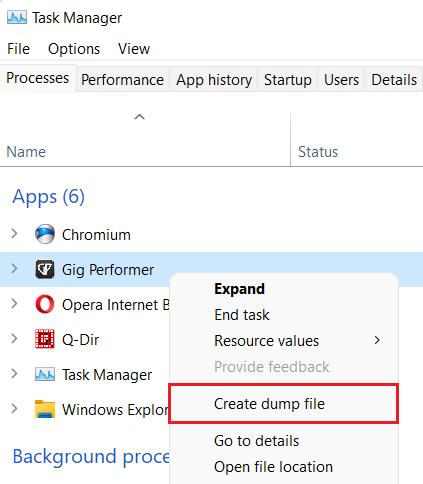
[3] Click Create dump file (or “Create memory dump file” on more recent Windows builds)
The result will be a very large DMP file. Make sure that you compress it (ZIP, RAR, etc.) as it typically has a very good compression ratio:

Since the resulting compressed file is still very big to upload it to the forum, make sure to upload this compressed to a file sharing service or your cloud account and share the link. Alternatively, you can use a service such as WeTransfer.
–
Notes:
- this detailed report is useful for the devs to see the values of variables being passed around.
- it is typically used for hard to reproduce issues.
- you must do this while the application is still in memory; if Gig Performer crashes, then do the procedure above immediately when you see the crash dialog.
- needles to say, you can do this procedure for any process. It is very convenient to analyze snapshots, especially if an application freezes or is stuck.