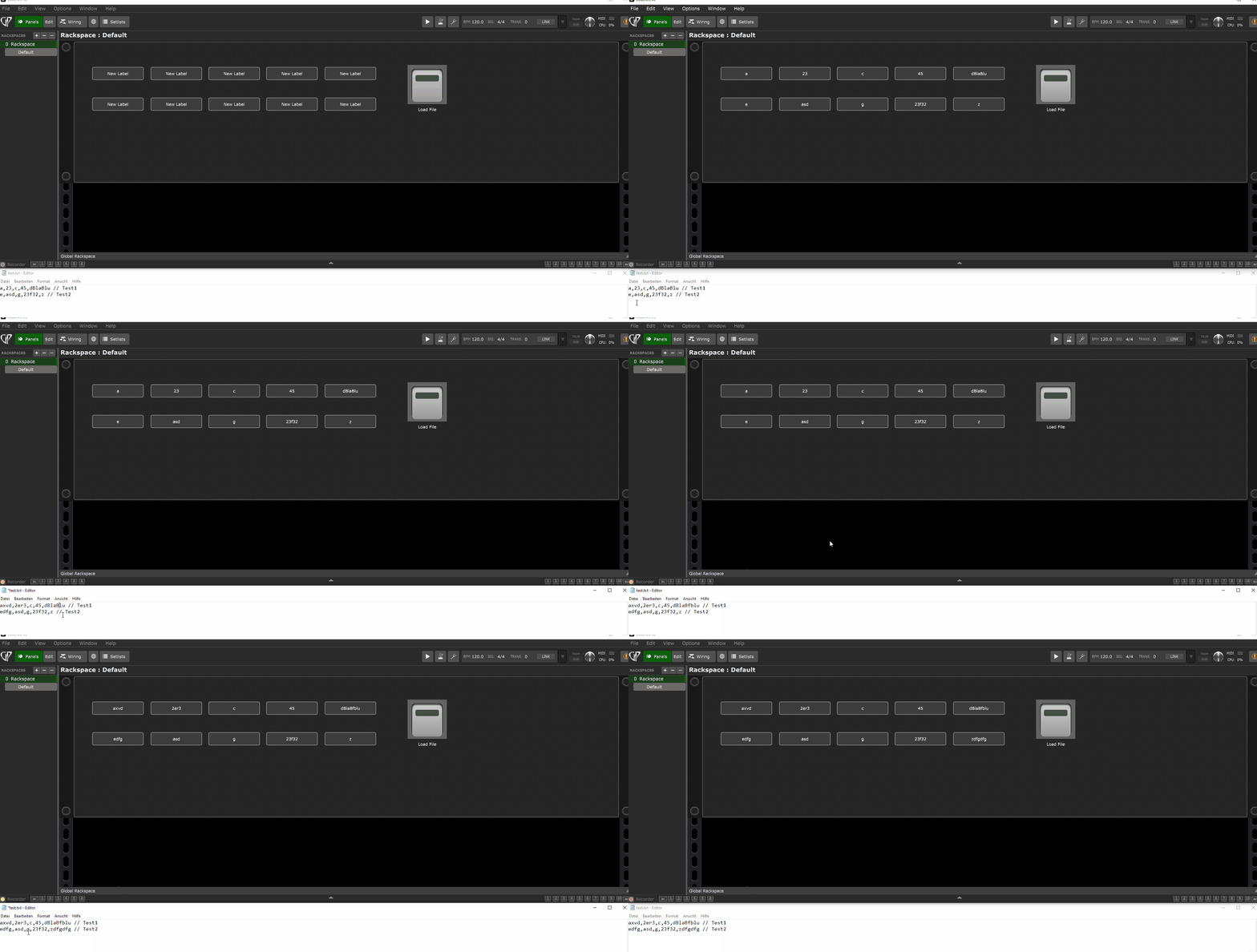
In looking at ways to display external data in GP, the only one I have found is to use scripting and in particular: LoadStringFromTextFile
Which I found in the System Functions doc System Functions List.
Unfortunately this is labeled as experimental and unsupported.
My goal is to be able to use a button and a label widget to display content from this external file.
The file will get updated on demand (outside of GP) and I want to pull the data in for display whenever I click the button.
I have found some similar cases in the community but those were more around song charts/cheat sheets/etc.
Has anyone been successful at anything like this and if so can you please share/point me to how you did it?
Details of what I am trying to accomplish (which may help cure some of your insomnia ) Stop reading here unless you want to know all the details.
I have a couple of MOTU audio interfaces in my studio. They are interconnected with AVB and are used to get my HW and SW sounds into my mixer and then on into Logic Pro for multi track recording.
I have figured out (thanks to the help of some folks here) how to use GP and OSC to make changes to the MOTU mixer settings that I care about - i.e., faders, aux sends, mutes, etc. The challenge is that the OSC communication for MOTU is one way with OSC, meaning I can send OSC commands in but I can’t get any info back out to keep my GP widgets in sync with the MOTU mixer settings. MOTU makes this clear in their documentation so I am not surprised but it would be cool of them to make it 2 way - but I digress.
In looking at my options, the only way to get updates is to use the MOTU API which uses JSON and HTTP. Since there is no way that I am aware of to build out a capability in GP to use the API, I plan to create some external scripting that will be able to get the status of the MOTU items I care about, drop that content into an external file, and then (hopefully) pull content from that file into GP for display.
Now you may ask at this point, “why not use the MOTU provided web access or iPad remote app?”. I certainly could do that (and I have been a user of the web access for years) but I would like to be able to have that status info displayed in GP so I am not switching screens. In a perfect world there would be 2 way comms between MOTU and GP but it’s not a perfect world. Now if anyone has any influence at MOTU I am happy to help ‘encourage’ with input or beer or whatever would work…
If you’re still with me at this point, thanks for sticking around. If you have any suggestions or better ways to look at this I am all ears. Happy to provide more details as warranted too.
This is because it was added on a request but has not had sufficient testing for us to be able to state that it’s reliable and won’t crash or hang the system.
For example we haven’t tested what happens if the file you want to load is missing, corrupted, binary, absurdly large, etc
I have been using LoadStringFromTextFile for years without any problems. How is the text file formatted? Can you share a sample file, then it would be easier to implement with GP scripting.
(Without really understanding the longer execution of your “problem” :-))
Maybe writing an extension would be more suitable. In an extension you can do c++ as much as you desire. You can check for existing widgets and update their labels with the text you want to display.
I haven’t created the text file just yet but it will be about 48 rows with about 6 values per row. Likely comma separated with each row having a channel number, fader status, mute status, and a couple of aux send statuses.
I know there is also a csv string option in GP but in my mind I was thinking first let me get the general ability to import any text understood and working, then after I finish sorting out the scripting that will populate my specific text file, I should be able to update this initial import flow. I hope that makes sense?
Oh how I wish I was even remotely good enough to write an extension - I am a coding Neanderthal at best. I like the idea though and maybe somewhere along the way I might be able to partner up with someone to get it done.
@LeeHarvey would you be willing to share the scripting you use for this? Seeing a working example should help me to better understand how it works. If not, no worries.
The Text-File: Put this in the GigPerformer documents folder test.txt (68 Bytes)
var

    lbl1_1, lbl1_2, lbl1_3, lbl1_4, lbl1_5 : Widget
    lbl2_1, lbl2_2, lbl2_3, lbl2_4, lbl2_5 : Widget
    btnLoad : Widget

    arr_lbl_row1 : widget array = [lbl1_1, lbl1_2, lbl1_3, lbl1_4, lbl1_5]
    arr_lbl_row2 : widget array = [lbl2_1, lbl2_2, lbl2_3, lbl2_4, lbl2_5]


function LoadFile()
   var
    i, ii: Integer
    row : String
    rows, rowItems : String Array
    newline : String = <<<
>>>
    textfile : String


	textfile = LoadStringFromTextFile (GigPerformerDocumentsFolder () + "test.txt")

	while textfile <> "" do  // Move through the file one row at a time and store rows in the array rows
		row = StringUpToFirstOccurrence(textfile,newline,false,false)
		row = StringUpToFirstOccurrence(row,"//",false,false)  // Remove any comments from the end of the
		if row <> "" then rows <-- row end
		textfile = StringAfterFirstOccurrence(textfile,newline,false,false)  // Move to the next line
	end

	// Create an array (rowItems) for each column (row by row)
	for i = 0; i < Size(rows); i = i + 1 do
		rowItems = ParseCSVString(rows[i])  // Split all comma-separated fields in the row
		for ii = 0; ii < Size(rowItems); ii = ii + 1 do
		    select
		        i==0 do // row 1
		            SetWidgetLabel(arr_lbl_row1[ii], rowItems[ii])
		        i==1 do // row 2
		            SetWidgetLabel(arr_lbl_row2[ii], rowItems[ii])
		    end
		end // next ii
	end	// next i
end


// Called when a single widget value has changed
On WidgetValueChanged(newValue : double) from btnLoad
    if (newValue==1.0) then
        LoadFile()
    end
End
@dhj@LeeHarvey
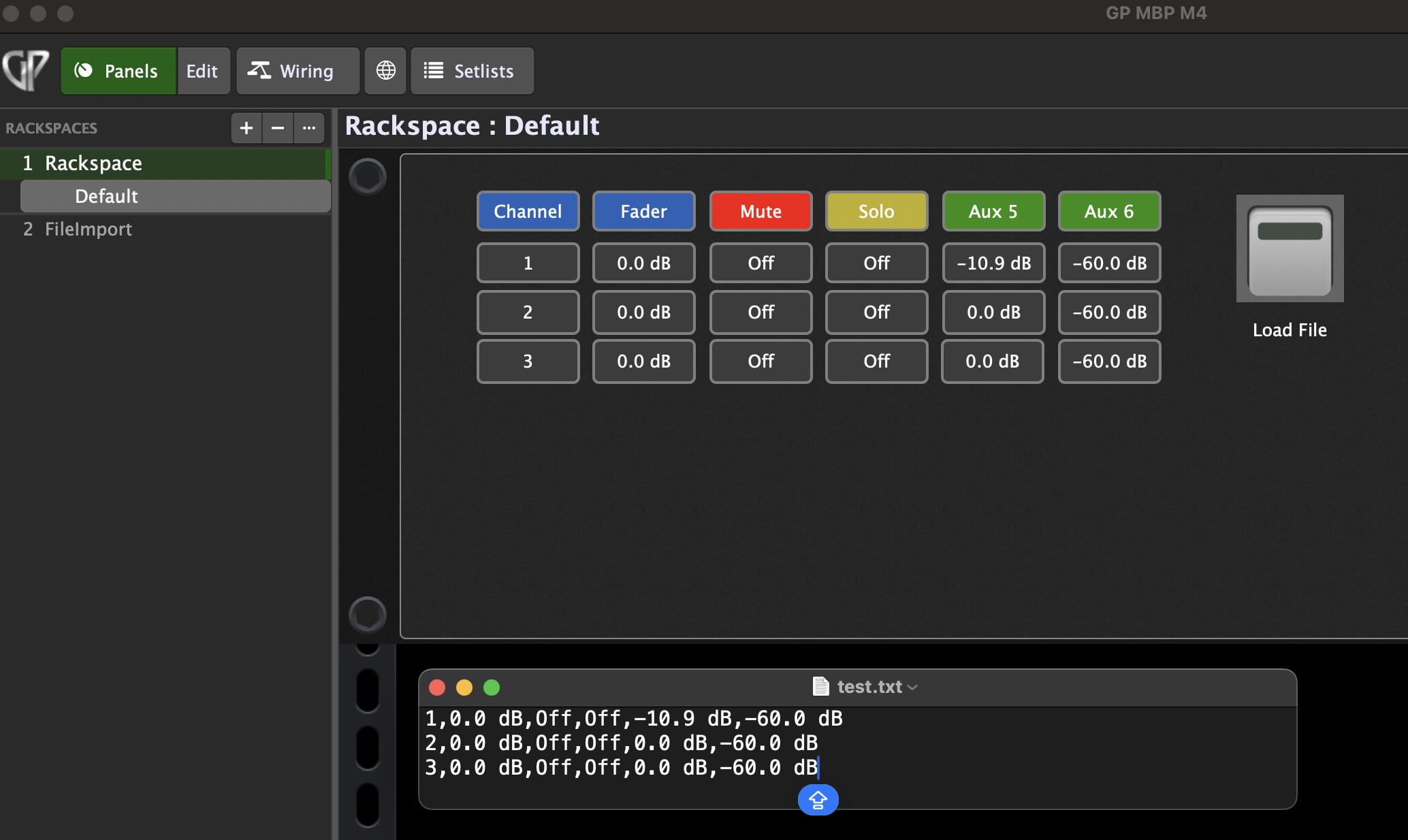
Quick update. Thanks to the scripting logic and the gig file that LeeHarvey was gracious enough to send along, I now have a pretty viable solution in progress.
I have a data collection script that polls the MOTU interface, converts the raw values from the MOTU datastore to more useful values, and writes it to a text file. I have this collection on a loop so it keeps the text file up to date.
I am building out in GP the rest of the stuff needed to display the content but here is a pic of the working prototype.
If anyone is interested, here is the MOTU collection script I have going so far (will be updating so this is not final but sharing to capture progress)
#!/bin/zsh

# Set the IP address of your MOTU AVB device
DEVICE_IP="10.0.0.88"

# Output file
OUTPUT_FILE="motu_values.txt"

# Convert MOTU 0–4 scale to continuous dB
convert_to_db() {
  local value="$1"

  if [[ -z "$value" ]] || ! [[ "$value" =~ ^[0-9.]+$ ]]; then
    echo ""
    return
  fi

  local db
  if (( $(echo "$value < 0.0" | bc -l) )); then
    db="-inf"
  elif (( $(echo "$value <= 1.0" | bc -l) )); then
    db=$(echo "-60 + ($value * 60)" | bc -l)
  elif (( $(echo "$value <= 4.0" | bc -l) )); then
    db=$(echo "(($value - 1.0) / 3.0) * 12.0" | bc -l)
  else
    db="+inf"
  fi

  printf "%.1f dB" "$db"
}

# Extract "value" field from JSON
extract_value() {
  echo "$1" | sed -n 's/.*"value":[[:space:]]*\([^}]*\).*/\1/p'
}

# Convert mute/solo values: 0 → Off, 1 → On
convert_on_off() {
  case "$1" in
    0|0.0|0.000000) echo "Off" ;;
    1|1.0|1.000000) echo "On" ;;
    *) echo "" ;;
  esac
}

# Main loop
while true; do
  echo "Channel,Fader_dB,Mute,Solo,Aux5_dB,Aux6_dB" > "$OUTPUT_FILE"

  for i in {0..23}; do
    CH_NUM=$((i + 1))

    FADER=$(extract_value "$(curl -s "http://$DEVICE_IP/datastore/mix/chan/$i/matrix/fader")")
    MUTE=$(extract_value "$(curl -s "http://$DEVICE_IP/datastore/mix/chan/$i/matrix/mute")")
    SOLO=$(extract_value "$(curl -s "http://$DEVICE_IP/datastore/mix/chan/$i/matrix/solo")")
    AUX5=$(extract_value "$(curl -s "http://$DEVICE_IP/datastore/mix/chan/$i/matrix/aux/4/send")")
    AUX6=$(extract_value "$(curl -s "http://$DEVICE_IP/datastore/mix/chan/$i/matrix/aux/5/send")")

    FADER_DB=$(convert_to_db "$FADER")
    AUX5_DB=$(convert_to_db "$AUX5")
    AUX6_DB=$(convert_to_db "$AUX6")
    MUTE_STATUS=$(convert_on_off "$MUTE")
    SOLO_STATUS=$(convert_on_off "$SOLO")

    echo "$CH_NUM,$FADER_DB,$MUTE_STATUS,$SOLO_STATUS,$AUX5_DB,$AUX6_DB" >> "$OUTPUT_FILE"
  done

  echo "[$(date)] Data written to $OUTPUT_FILE. Sleeping 5 minutes..."
  sleep 300
done```
 ) Stop reading here unless you want to know all the details.