I got a song into audio player and hit record and played along with it. Is there a way for that song to be there when I go the folder containing the wav and midi files from my playing? Thanks
The GP record feature will record the inputs only. So to get that feature to record the audio file player to the same folder, you would need a loopback audio port that would allow you to route the audio file player to a loopback port on your interface output (which loops it back to an input).
On Mac, the Blackhole virtual audio port provides this feature. There are similar things for Windows. Otherwise, you could use a DAW to record everything.
Or you could just connect it to the free MRecorder plugin.
Further, until GP provides the ability to record outputs, you could just route all audio from your rackspaces to the global rackspace and insert an MRecorder there to record your outputs.
Not perfect but a reasonable workaround for the short term.
Appreciate the replies. Win10 is my system. I use Reaper as my DAW. I’m not able to open GP and Reaper at the same time. Reaper gives a message that it can’t get midi in or out from my midi device.
Good and easy solution when your audio interface has no multiclient driver.
Furthermore, MRecorder is in a free bundle containing excellent plugins.
Another alternative for Windows systems: Gig Performer | How to record Gig Performer's outputs via Gig Performer's Record feature on Windows
I’m using a Focusrite 6i6 1st Gen interface. I don’t mind using Reaper by itself to record (without GP). I’ve used it recording VST’s being triggered by Edrums before but lately have been getting a bunch of static like noise which I’m not getting on GP. Either I’ve inadvertently changed a setting in Reaper or a new VST is causing problems. I’m trying to get a better understanding of the latency settings. I’m attaching my Reaper settings vs the one I found in GP.
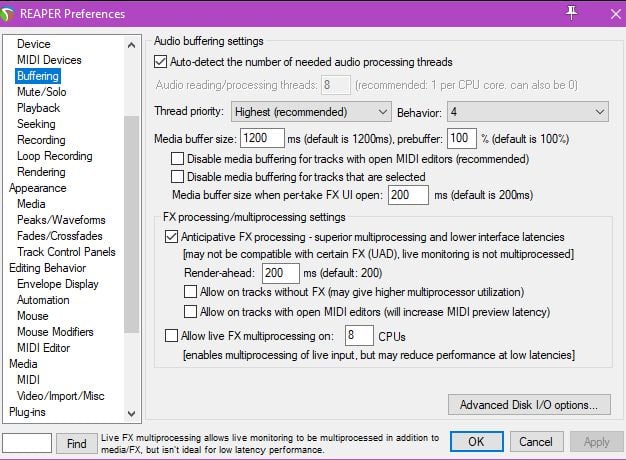
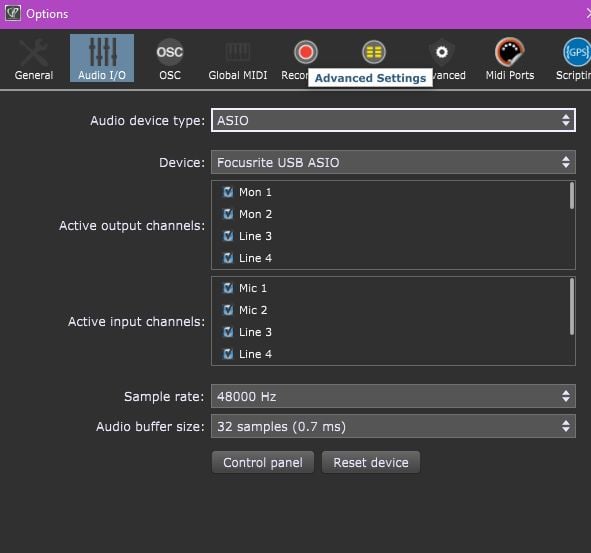
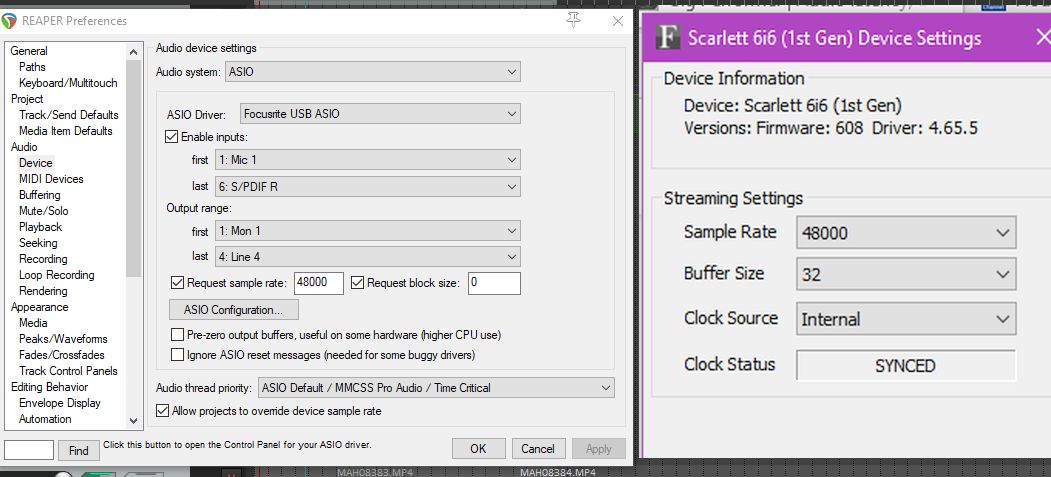
About the buffer size, I use 128 samples in GP ans 1024 in Reaper at 44100 Hz without any latency issues.
Your buffer size in GP is 32 s. : you certainly have a very powerful processor in your computer!
And in Reaper you have 0 s. buffer size request … I think there is a problem with that.
In Reaper open the Asio Configuration window below “request sample rate”, look at the sample rate and check that it is the same in Reaper and GP. About Reaper buffer size, 512 is a good starting value.
I now remember how I got to those settings. Quite a while back I was on Reaper Forum because I was playing a drum module and hearing it’s sounds but they weren’t in sync with the VST sounds. I ended up doing loop back tests shown here: Adjusting Recording Latency (Loopback Test) in REAPER - YouTube Recording Latency Manual Offset in REAPER - YouTube
From those videos and that forum I ended up with block to 0 and turning “manual offset” off and got 435 samples difference in the test. Then I put 435 in “input manual offset”. I’ll try changing those settings you mentioned. Thanks!