Someone help me out please. How can i extract the patch names from Halion 7, that it would auto populate the text labels in GP? So if i switch between rack variations, the patch names would accordingy change based on the loaded GP preset.
Unless the plugin exposes the preset name as a parameter you probably can’t do that, at least with the plugin’s preset system. And while you could do something similar using GP’s preset system (which works with all plugins), it’s unclear that this is a best practice. Your rackspaces and variations should really display what you’re doing (e.g, SongX, Tremolo, Phase, Verse 2, etc)
Consider that you will normally have more than one plugin in a rackspace (multiple synths, multiple effects, etc) and so a preset name of a single plugin doesn’t really make much sense.
I’m piggy backing on this 1 year old post b/c I have the same question. My plugin DOES expose the preset name parameter and the text label does display it ONCE, but it does not update when I change presets. Is it possible to update every time the preset is changed?
At first, the label shows the correct preset name:
That was simple and beautiful as well as beautifully simple! hehe Thank you! Works like a charm! I monkeyed around with scripting it, but I was missing the txt part. Learning! Thanks again!
Taking this a little further, how would you shoot this over to another instance? The plugin and knob that is linked to the preset parameter name is in instance A and if I wanted the label to be in instance B? I don’t my normal OSC linkup in the widget properties advanced tab is going to do it. I’m guessing the OSC has to be in the script? But since the widget in instance B cannot be mapped to the plugin parameter, I’m failing to grasp how that would work?
Awesome, glad to see there is a way! My sending instance is in the global rackspace, so I added /GlobalRackspace before the “/lbl” so it looks like: “/GlobalRackspace/lbl”. Is that right?
I’m getting this error on the sending end:
GLOBAL RACKSPACE (Script Entity: GlobalRackspace) - - Syntax Error in “Main”: Line 46, Col 20: Unexpected or unrecognized token:
Token recognition error at: ‘â’
Here is what’s on that Line 46:
OSC_SendString(“/GlobalRackspace/lbl”, txt)
On the receiving end, its the same error:
TweedDLX NDX (Script Entity: Rackspace) - - Syntax Error in “Main”: Line 5, Col 47: Unexpected or unrecognized token:
Token recognition error at: ‘â’
Line 5:
On OSCMessageReceived(m : OSCMessage) Matching “/GlobalRackspace/lbl”
Do I need to give more info about the OSC IP address and/or port?
In this example. you don’t have to add /GlobalRackspace to the outgoing OSC address because you are simply generating an OSC String message called /lbl in the script itself. It’s not tied to a rackspace, the callback is just saying ‘when the knob turns, send a message called /lbl with a string value via OSC’.
Therefore, you also don’t have to add /GlobalRackspace on the receiving end of that OSC message either.
Add the scripts as I wrote them and see what happens.
I’m guessing the Syntax error is coming from the “ “ in the pre-formatted text. Copy/paste the scripts into a text editor first, then copy/paste the scripts into your gig from there.
Its “working” BUT something interesting is going on. Its 1 off… Meaning, in instance A if preset 1 is selected, it’ll send the name of preset 2 to instance B and “cycles” one name ahead. So if I had 4 presets in total, it looks like this:
Actually it seems random depending on if I am clicking forward or backward. Not sure if there is a consistent pattern yet… So its the correct names, but in different order.
Is the communication between the global and local rackspaces/widets via script withing the SAME instance similar to between instances? I started a new post here in the scripting category and I don’t mean to double post, but it occurred to me that the same code used here might work, but I couldn’t get it to work. Trying to update the caption of a widget from GRS to the caption in the LRS.
I really need to mark all those functions as deprecated. I think everyone has forgotten that there is built in support in the language itself for this.

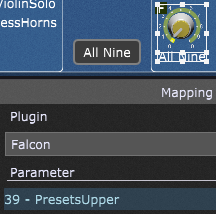
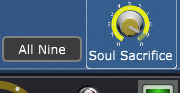
 hehe Thank you! Works like a charm! I monkeyed around with scripting it, but I was missing the txt part. Learning! Thanks again!