Help with Workflow

There is a lot to this app, which is very cool, however, due to its ability to do just about everything under the sun, there are times where I feel that many of the features feel disconnected.

I am writing this for two reasons - as a co-founder of a non-music related open-source project, it is tough sometimes to see 20 years of hard work with fresh eyes as a first-time user. In that case, I personally LOVE to hear the struggles new users face. That said, hopefully this will be helpful for the dev’s.

The second reason is because I am truly confused as to how to approach the setup that I am looking for and don’t want to put all kinds of time into stuff that takes me down the wrong road to the wrong destination (or rather, walk through lava to get to the gig, when there was a nice path around it :slight_smile: )

I am a guitarist and singer, looking to have my own one-man gig’s where I play along with MP3 files, that have everything but vocals and guitar. While I know all the lyrics to the songs, I also know that when I was in a band years ago, there are rare times that you forget the next verse coming up, so seeing it on the screen would be helpful. I think. I also don’t want to look like some chump using a screen to gig with. LOL.

So looking through GP, I think this is how I would go about this:

  • Media Streamer for the songs.
  • Markers for the Rackspace changes.
  • Markers for Song list advancements.

Now, when I go about this, I am confused by a couple things, which makes me wonder if I am approaching this the wrong way:

  • It appears this approach has nothing to do what-so-ever with Set Lists. As a new user, I would think that as a glance, Set List’s is where I would want to build my list of songs, but the 3 things above seem separate from Set Lists altogether. Am I missing something?

  • Audio Streamer seems so odd to get to after I open my file in GP. After I open GP, I guess I would expect opening up my song list would be right there in my face, but I find myself having to click on Global, and then Wiring, oh but that turns off Global so I click Global again, and then I have to find the Audio Streamer and double click on it to open. It just seems disconnected.

  • And then we have Chords and Lyrics. Window > Song Lyrics / Chords.. Again, I find it odd that I have to hunt all over the menu to dig this out. Plus, it seems that every time I go to open that, I have to pick the file to load instead of it being a part of the gig file. Again, it just an odd, way too many steps approach to get what I need for the gig and be ready for showtime. Then there’s also the question as to ā€œdo I put all the songs in the Media Streamer under one master Lyric file, and just use markers to jump around to the different songs in that one master list?

  • And then I reflect of the magic of Setlists - I believe Setlist provide you the ability to easily pick and choose songs that you want to play during a gig, because maybe this gig is more of a country audience, whereas yesterdays were more of a 70’s rock crowd. It makes me feel that my 3 steps approach outlined above isn’t flexible enough to easily change or edit my setlist.

Am I approaching this the right way? Am I missing the proper workflow for a one-man band guitarist singer? It seems like Setlists are more for keyboardists than someone playing along to an MP3. Am I right by coming to that conclusion? Am I right to feel that Setlists is where I should be though?

Also, is there a way to open all the components at the time of opening the file? For example, when I open the GP file, it would automatically open the Media Streamer and the Chord Lyrics, so I don’t have to manually dig them all out?

Thanks for your patience, your responses, and listening to my feedback. :slight_smile:
Yes, there is definitely a learning curve.

To my mind, set list mode almost always makes sense. It just make it easier.

I would put the streaming audio player in the Global Rackspace.

For my way of learning, it helped to watch every video I could get my hands on. I guess start with more recent ones, ones that are beginner oriented, and ones referencing the streaming audio player. If the video is related to what you are doing, try to make the changes in your (duplicate) gig file while watching the video. Maybe make notes. (Note that some videos are referencing older versions of GP, which may be different in some respects).

There are some recent started videos that were create. Maybe start there?

Don’t get me wrong, the manual is very comprehensive and well written, but I am not so great at learning by reading manuals (everyone has a different learning style).

Guitar, keyboard, whatever. I don’t think that impacts your solution much. I can tell you how I solved similar problems.

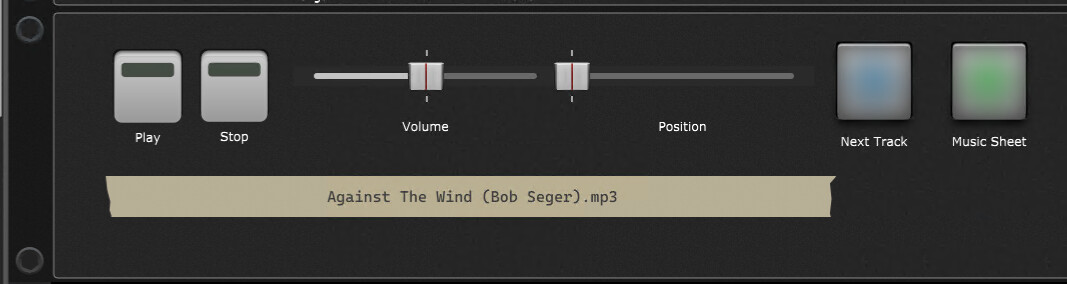
I create a song for each song I would ever want to play. In each song, I have a streaming media player that has backing and.or practice MP3s ready to play for that song. I have a panel I import into every song and connect widgets for play, stop, position, volume and next track along with the currently selected track that I connect to the streaming player. I have a cheap ($100) Arturia 2 octave keyboard that has buttons for things like play, stop, etc. For each widget in this MP3 player panel, I ā€œlearnā€ the MIDI actions for each of the widgets in that panel. I can now select any song and hit the play button and play along with the MP3.

I keep all of my songs in alphabetical order so I can easily go directly to any of them. I have exported songs I don’t play a lot. They can be imported quickly and easily if/when needed. I use the set list as a temporary ordering of the songs in the order I intend to play them. Things change sometimes and I can easily switch back to song list and select each as needed. The advantage of setlist is I can program a button on that Arturia keyboard that moves to the next song. So I have control of song changes in the order I desire pressing a single button. Then I can press the play button to start the backup/practice MP3.

Also note that I have a button for music sheet. Gig Performer supports chord pro files. I prefer PDF. So, I have a widget in the panel that will load the PDF and I have a button on the Arturia that will press that button and the PDF will be displayed for the current song.

In my case (keyboard player), I set up a rackspace for each song. Every song has subtle differences and sometimes not so subtle differences (entirly different instrumentation) and I get the changes I need almost instantly when I change songs. For a guitar player, you might do the same. Or, you might have a rackspace for clean, another for distorted, etc and each song can be associated with the appropriate rackspace. The downside of this would be that if you import archived songs, you might have to deal with duplicate rackspaces.

If you want to use that panel, here it is
StreamingFilePlayer3.gppanel (84.7 KB)

If you want to use the PDF button (windows version, not MAC), put this in the rackspace script. To use this, I will rename the PDF to match the MP3 file name with .PDF extension. So, I can have multiple versions of MP3 and matching PDF for a song. You may also need to change the path to match the location of your MP3/PDF files.
image

// ----------------------------------------------------------
// rehersal track and PDF file handling
// ----------------------------------------------------------
var
    LoadPDF : widget
    TrkNameTape : widget

On WidgetValueChanged(w : Widget, curindex: integer, newValue : double) from LoadPDF
var s : string
    if newValue == 1 then
        s = Shell("C:/Windows/explorer.exe file:///C:/Users/larry/Desktop/Music Rehersal Tracks/" + GetWidgetLabel (TrkNameTape) + ".pdf")
    end
End
// ----------------------------------------------------------

I’ll share my general workflow, for what it’s worth.

Regardless of my instrument, I start by creating a Rackspace to produce the particular sound I’m looking for. For guitar it will generally involve an amp sim or two, a cabinet, blah blah. I’ll create a number of those for my core ā€œsoundsā€. Clean, crunch, etc.

If there is something that I want to remain consistent across sounds I’ll put that in the global rackspace. Things like backing tracks or global effects generally go there. I usually throw an instance of Superior Drummer there since I’m often using midi file based drum loops.

If I’m going to playing a specific Song, I will create that as a Song. To the extent it requires different sounds, I will create Songparts for those parts. If I want to use a lyrics or chords file with that song I will create that and associate it with the song.

It’s pretty much the same regardless of the instrument I’m doing it for.

I don’t really do live gigs where people are paying to see me, so I don’t worry at all about setlists. I tend to have all my Songs in one Gigfile and if it takes me a minute to find my next song my dog just has to wait. He’s cool with that, but if he got impatient or harassed me about it I’d probably put together a Setlist before I dragged him down to the basement.

There’s no single best answer, in my opinion, for backing tracks. Personally, I use SongMaster Pro and OSC to control which parts I want to hear and which parts I’m playing. Before that I did the same thing with Virtual DJ and sent MIDI from GP to VDJ to control things. If I were doing this in front of humans for money I’d probably have the backing tracks set up within GP. There’s more than one way to bore a dog.

I was in a bar the other night where a one-man act was doing singing and playing an instrument along with backing tracks. He played some keyboard, some guitar, and some other hand-held instrument at some point that I couldn’t entirely make out from where I was sitting. I walked behind him to see what he was doing and it looked like he was running it all out of a DAW.

Compared to most other software that I use, I find GP pretty intuitive for the level of complexity and breadth of workflows it supports. I drop the VSTs I want to use on a canvas and draw the signal chain. That seems way more intuitive, flexible, and simple to me than anything I used before it. The idea of creating Songs that would allow me to predefine which Rackspaces I want immediate access to also seems pretty intuitive to me.

As for lyrics and chord charts, I’m not sure what else I would want to link them to other than a Song. I get the idea of embedding them into a Gigfile, but I think there are pros and cons to that. I don’t have a strong opinion on that one.

2 Likes

:rofl:

Basically there are two general ā€œmodesā€ how GP is to be used, either in rackspace mode or in setlist mode:

  • Rackspaces dont know anything about your setlist or the containing songs, nor do they automatically connect to a lyrics/notes sheet (except you decide to actively take measures to break that paradigm)… rackspaces are ā€œsound-centeredā€, so if you need a diffrent sound, you’d choose a diffrent rackspace (or variation).
  • Setlists are ā€œsong centeredā€, a setlist holds a number of songs which each can consist of various song parts. A song part is always connected with a corresponding rackspace (variation). This offers the benefit that the same rackspace (i.e. your favorite Wurli-Piano) can be used in many diffrent songs/song parts (without the need of being loaded that many times). Songs also have an ā€œautomaticā€ connection to a corresponding lyrics/note sheet file. That means, choosing a song from the setlist will call the needed rackspace (or variation) and also will load the connected lyrics.

You can also have the current local rackspace and the global rackspace panel visible together!
GP can remember your windows setting, and also if you formerly left the program in setlist or rackspace mode.

For each of the steps you wanted do do (open the media player, switch to global rackspace, open the lyrics window, and many more) there is an inbuilt function which you can call through the ā€œsystem actionsā€ block by using widgets to connect to the particular function. These widgets can be placed on any rackspaces panel, but if they have to be present any time, you should place them into the global rackspace. That widgets can also be connected to a midi controller (or OSC), so you have everything available by just pressing a button.

Use widgets! They are the flesh and bone of GP and can make life so much easier!
With widgets you can set parameters, switch audio files in your media player (which most probably sits best in the global rackspace), display text, visualize a song counter position, have start/stop/next/prev/open directly available on your panel, advance through your setlist… not to speak of the benfits you can get by using radio buttons, grouping widgets, scaling value curves…
This all might be a bit overwhelming for a beginner but i personally think that most of all this is quite logical, intuitive and makes perfect sense… well, most of the time. :slight_smile:

Don’t try to do and master every aspect of everything, because you might easily get lost in all the possibilities… start to explore things in a small scale first, then when you got that working, expand your project to the next step.

Oh… and if you have questions: Ask! :clinking_beer_mugs:

3 Likes

Thanks everyone for the replies. I’ve been picking away at this since you’ve all responded, and I currently have this setup:

Global Wiring: This is where I put my media streamer, because I get the general feeling that is the best place for it to live, even though I have songs created in a setlist?

Panel (Global): In my playing around, I created a simple ā€˜tape deck’ to play songs in the media streamer located above. I am curious as to why there are no buttons that look like tape deck buttons (like FF, rewind arrow buttons, pause, etc). This acts oddly however - If I simply open the app and go here, it plays the MP3 file, however, it won’t change any of my rackspace changes during the song that I tagged in the Media Streamer, unless I manually open the Media Streamer as well. Is that expected behavior? Is there some way I can have that Media Streamer automatically open at the time that I click to play button? The same question for the lyrics? Heck, maybe I am not even approaching this the ideal way. :slight_smile:

image

Setlist: I guess I’m still a bit confused with setlist and how they work alongside Media Streamer. Maybe I put the cart in front of the horse when I started using this app, by going directly to racks and media streamer, but it is what it is - I started my journey jumping right into the Media Streamer because it was crazy obvious how to add markers at certain spots and edit them to execute any changes I wanted. I just don’t see where to do any of that stuff in Setlists. As a new user of this app, it seemed the logical approach was to:

  1. Create Rackspace’s.
  2. Add music that I wish to play along with, and after research, it appeared that the Media Streamer was the only place to do this where I can:
  3. Add markers to the MP3 file to where the Rackspace’s change (rhythm guitar, lead guitar, solo, etc).

That being said, now I have created a setlist song, with Verse, Chorus, Lead1, Lead2, but yet that all seems disconnected to what I already created above. As a new user, I would think to see options in setlist/songs, where everything I need for that song, is ā€˜bundled’ within that song. For example:

Song

  • MP3 File
  • Lyrics
  • Racks
  • Panels

So in other words, I simply create a setlist of songs that I’ve already created. I put those songs in the order I want to play them, and I have a master tape deck panel that I can use to navigate the songs and play stop them if needed. When the song loads, it has everything I need bundled within it and the lyrics open. I don’t even think I need to see the streaming media player open because what good does that do when playing live, as long as it executes my markers and rack changes as needed, I’m good with it remaining closed (I think of Media Streamer as the editor but not really needed when gigging).

Anyway, I’m making progress, but I still feel like there is a disconnect going on here in my test environment, and that is mainly with the setlists, because I don’t see any of the options within setlists that I would expect to see when I right click on the song or its parts (add media, add lyric for example). I always right click and poke at options but never seem to find what I expect to find.

I’m still forging forward though! I’ll get there, and hopefully my words above can help the dev’s because like I said before, seeing your creation with fresh eyes is tough when you’ve been working on it for many years. Now you have –> this users’ ← fresh eyes. :slight_smile:

Thanks!

For me, watching as many videos as I can (and maybe creating rackspaces, etc. while doing so) was very helpful. (Be aware of the date of the video and version of GP used).

You can think of songs/songparts (in Setlist mode) as empty shells that link to whatever rackspace variation you want. But, with some settings you can save for that song or song part. ā€œCapture variations ā€œ (aka, snapshots) are a biggie. You can look it up, if not sure).

