GP Relayer instance-to-instance

My searches of the forum have found lots of posts about using GP Relayer with other DAWs, but haven’t specifically found anything about this question:

Can GP Relayer be used to send audio from one running instance to another? And if so, can I have one instance in “receive” mode and several instances simultaneously transmitting in “send” mode: will the receiving instance simply receive a sum of all the audio from the sending instances?

In GP4 on Windows, as far as I know, the only ways to send audio from one instance to another would be to use a loopback audio device, such as a 3rd-party app or perhaps the “loopback” feature on my audio interface. So, using GP Relayer for this task would be a big win in terms of simplicity and portability. In fact, this would compel me to update right away, because I’m just on the verge of plunging into multi-instance usage.

Yes, it can.

There are 10 distinct relays available at current for GP Relayer, so there would be no need to have simultaneous sends on the same relay, unless of course you really wanted to. In that case, the answer to the second question is yes, the audio is merged when there are multiple sends using the same relay number.

Indeed - that was the original reason this plugin was created

Great. Take my money! :smiley:

Ah, even better. And how many channels of audio does each relay carry?

It’s a stereo pair per relay. You can also transmit MIDI data through each relay.

Example 107

Perfect. Thanks!

You have to send it to us!!!

Done and done. :slight_smile:

What is the latency of audio in GP Relayer supposed to be? When I mouse over the plugin block it claims to be zero-latency, but in my experiments today I’m finding the latency to be so high as to cause frustration while playing.

The situation is that I’ve moved my piano plugins to a secondary instance, and I’m using Relayer to send MIDI events from the main instance to a secondary instance and to send audio data from the secondary instance back to the main instance. The roundtrip delay (as compared to having the piano back in the main instance) is about 1040 samples (24ms at 44,100).

I’m definitely at the point where both my CPU and my RAM are struggling; in fact, my CPU troubles are the reason I’m delving into instances in the first place. So maybe my poor resource management is also what’s causing the Relayer latency? What settings can I look at to try to improve this?

Solomon

There’s barely any latency whatsoever in GP Relayer.
Are both of your GP instances using the same sample rate and buffer size?

Normally the latency between audio Apps is defined by the sample buffer size you are using.

The above measurement (1040 samples) was done on my old Windows 10 machine, with both instances at the same sample rate (44,100) and the same buffer size (256 samples if I recall correctly).

I later did two further trials on my Windows 11 machine, at 48,000: with a buffer size of 64 samples i get a delay of 308 samples, and with a buffer size of 512 samples I get a delay of 1426 samples. It seems in all cases that the roundtrip latency is about 3-4 times the buffer size.

Okay, it’s been a couple years, and this latency issue has been plaguing me the whole time. I’ve got to get this figured out or else I think I’ll have to go back to just using one instance.

Here’s my issue. I have all of my commonly-used instruments, as well as some metering and effects, in the global rackspace. Furthermore, I’ve moved the actual instrument plugins themselves into separate instances. The global rackspace in the main instance sends MIDI to the secondary instances, and the instances send audio back to the main instance for processing, mixing, and metering.

I’m finding the roundtrip latency to be a problem. I pretend it’s not a problem, but then whenever anyone else comes to play my piano they look at me and say “I don’t know how you manage with this crazy latency!”

I’m aware that @edm11 and @pianopaul are claiming that there should be “barely any latency” or at most “the sample buffer size you are using”, and I would love to see a demonstration that this is the case for you! Can either of you create a pair of small gig files that shows this?

I’ve created a very simple two-instance test demo to show the problem I’m having. If you load “test_main.gig” in one instance and “test_secondary.gig” in a second instance, you’ll see that I have two identical instances of KeysOfThe70s, one in each GP instance, and I’ve wired everything up so that the main instance sends its output to the left channel and also sends MIDI to the secondary instance, and the secondary instance sends its output back to the main instance, which then routes it to the right channel. If you turn on the recorder, play some MIDI inputs in the main instance, you should get a stereo recording where the main-instance audio is on the left channel and the secondary-instance audio is on the right channel.

Load this audio into a DAW, zoom in close, and you can measure the latency. On my system, with a 64-sample buffer, i’m seeing about 770 samples of latency. This is on a ThinkPad P16s Gen 4 AMD running Windows 11, and GP Pro 5.1.6.

So, based on this, and in spite of the fact that I’ve been using it this way for two years now, I think I’m concluding that the Relayer is unusable for my use case. Presumably it would work better if I had both instances send their audio straight out to the audio interface instead of having one instance forward its audio to the other instance, but the reason I haven’t tried this is that all of my metering, mixing, and global effects are in the main instance. Therefore, I’m thinking I have to move everything back into one instance and just hope that this doesn’t cause any CPU problems.

I’d love to hear any other suggestions, and again, I’d love to see a demo to back up the “barely any latency” claims! I know that multi-instance functionality is a great strength of Gig Performer and I wish I could take advantage of it.

Solomon

test_secondary.gig (17.2 KB)

test_main.gig (17.3 KB)

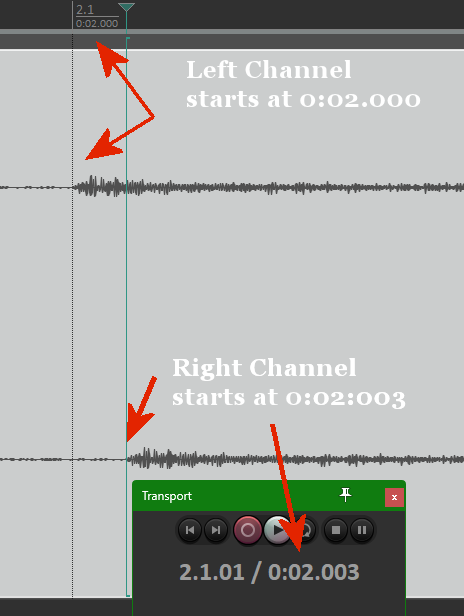
I used your gig files in 2 instances, played some notes, recorded the result in the main instance. My system was set to 44.1khz 128 samples.
The result was a 0.003 second difference.
So, yes. Barely any latency. :slight_smile:

Wow! That’s amazing. You’ve renewed my hope… but now I need to figure out how to configure my system to achieve that.

I did already go through all the recommended BIOS and Windows tweaks (when I first configured my machine) so I’m frankly not sure where to start in tracking this down.

Any suggestions would be most welcome!

Solomon

What are you using for an audio interface?

Scarlett 18i8 3rd-gen, connected directly to a USB-C port on the laptop.

And it is mutli-client ASIO capable? You are able to select that interface as the Audio Device in both GP instances?

I’m wishing I could figure out a way to avoid allowing the secondary instances to access the interface at all, but yes, the driver allows multiple clients (though sometimes using non-ASIO clients at the same time as an ASIO client seems to result in glitches, but this is hard to replicate.)