Hi, new to GP Essentials (Win 10 if that matters), full of hope until I hit the wall of transposition. I did everything as should be but there is nothing clear about how to set the increment/decrement steps. I just need -12 and +12. I spent an hour trying every widget possible, but even after I click on Transpose Amount, I see nothing inviting me to enter values.
How do you set a global transpose for all the instruments?
That’s a safety setting of the forum-software, to prevent spamming…
As a new user you first have to write and read a certain number of posts before you’re allowed to completely take part of the forum-life.
I manually raised your user level, so in theory you now should be able to append images and files.
And the latter you should do, because just a screenshot of a nice panel tells exactly nothing about your actual issue - please upload your gigfile, so that we can have a look at how you set up your stuff.
For the handling of the above mentioned “Global Transpose”, you probably should use the “System Actions” plugin and then “parameter learn” a knob widget to the “Global Transpose” parameter of that “System Actions” plugin. That enables you to set the transpose by turning that knob widget - either manually via mouse or via MIDI (if you “midi learned” a controller to that widget).
See manual:
Thank you Erik, usually I take care of transposing during rehearsals as this is when we find out of it’s needed. So if I use the Transpose function from the toolbar, I should be fine then, it seems.
AUDIO? I re-opened GigPerformer Essentials trial just now to look at the solutions I was given. One new mystery: I see the MIDI signal in the top toolbar, but no audio.
Is there a pre-flight list of things I need to do each time, or is there something I missed so that once it’s set up I don’t need to revisiting? I could hear audio last night while setting this up.
I uploaded my gig file as recommended. I’ll have to modify it now that I don’t need to add a transpose function.
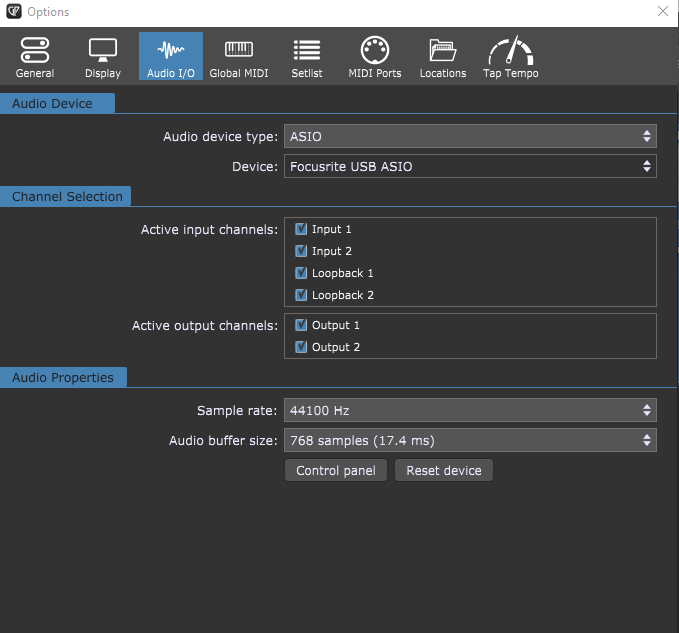
Can you please show us a screenshot of the audio settings (Menu: Options/Audio Setup)?
Do you have a dedicated audio interface, if yes: Which one, and does it run with a valid ASIO driver (Sample rate and buffer settings)?
Looks OK so far - the buffer size might be a bit to big, which results in higher latency, but at least you should hear sound anyway.
I opened your gig file and i saw that you use a MIDI-Transpose block which was set to -127
Maybe the plugins you use dont support this low midi notes (and thus stay silent)?
Just a guess, since i don’t own any of them.