I have not found any way to do so. I switched to Enso Looper because of that.
I sort of found a workaround for that.
I added a new parameter to the scriptlet for turning overdubbing on or off. If overdub is off, then when pressing the Rec/Over/Play button it stops the player first and then emulates another press on the Rec/Over/Play button.
It doesn’t work awfully reliably though. Sometimes it works as intended, sometimes it just stops the player. It works better when the TH-U plugin window is open for some reason.
I haven’t had time to debug it properly yet, I’m not a frequent looper user, but I do plan to look into it and do some cleanup. Like, I have absolutely no use for 2 looper “channels”, so I want to completely remove that part of code, parameters I don’t need etc. Maybe I’ll also remove the overdub functionality completely as I don’t ever need it.
Anyway, here’s the modified code in case someone wants to take a look.
// Declare various kinds of parameters
var
   /*a : Continuous Parameter = 0.5 // A parameter that can range from 0.0 to 1.0 initialized to 0.5
   b : Subrange Parameter 1..16 = 4 // A parameter that can range from 1 to 16 initialized to 4
   c : Discrete Parameter "Yesterday", "Today", "Tomorrow" = "Today" // Discrete named parameters*/

   looper_1_recordplay ("Ch1 Record/Dub/Play") : Parameter = 0.0
   looper_1_stop ("Ch1 Stop"): Parameter = 0.0
   looper_1_undo ("Ch1 Undo"): Parameter = 0.0
   looper_1_clear ("Ch1 Clear"): Parameter = 0.0
   looper_1_recording ("Ch1 Recording"): Parameter = 0.0
   looper_1_playing ("Ch1 Playing"): Parameter = 0.0
   looper_1_memory ("Ch1 Memory"): Parameter = 0.0
   looper_1_state ("Ch1 State") : Discrete Parameter "Cleared", "Stopped", "Recording", "Overdubbing", "Playing" = "Cleared"
   looper_1_level ("Ch1 Level") : Parameter 1..128 = 113

   looper_2_recordplay ("Ch2 Record/Dub/Play") : Parameter = 0.0
   looper_2_stop ("Ch2 Stop"): Parameter = 0.0
   looper_2_undo ("Ch2 Undo"): Parameter = 0.0
   looper_2_clear ("Ch2 Clear"): Parameter = 0.0
   looper_2_recording ("Ch2 Recording"): Parameter = 0.0
   looper_2_playing ("Ch2 Playing"): Parameter = 0.0
   looper_2_memory ("Ch2 Memory"): Parameter = 0.0
   looper_2_state ("Ch2 State") : Discrete Parameter "Cleared", "Stopped", "Recording", "Overdubbing", "Playing" = "Cleared"
   looper_2_level ("Ch2 Level") : Parameter 1..128 = 113

   global_stop ("Stop All") : Parameter = 0.0
   global_clear ("Clear All") : Parameter = 0.0

   midi_learn ("MIDI Learn Mode") : Parameter = 0.0
   overdub_on ("Overdub On") : Parameter = 0.0

   ch1_rec_play_vel, ch2_rec_play_vel : integer = 0
   ch1_memory, ch2_memory : double = 0.0

   ch1_init, ch2_init : boolean = true

//   gPostOverdub : ExternalWidget


Function set_memory(action : string) returns double
var mem_state : double

    Select
        action == "Clear" do
            mem_state = 0.0
        action == "Set" do
            mem_state = 1.0

    End

    result = mem_state

End

Function set_channel_memory(channel : integer, action : string)

    Select
        channel == 1 do
            ch1_memory = set_memory(action)
        channel == 2 do
            ch2_memory = set_memory(action)
    End

End

Function velocity_flipper(current_velocity : integer) returns integer
var new_velocity : integer

    if current_velocity > 64 then
        new_velocity = 1
    else
        new_velocity = 127
    end

    result = new_velocity


End

Function send_stop(channel : integer, velocity : integer)
var note : integer = 2

    if channel == 2 then
        note = note + 10
    end

    SendNow(MakeNoteMessage(note, velocity))

End

Function send_record_play(channel : integer)
var note : integer = 1
    msg : MidiMessage
    vel : integer
    msg_int : MidiMessage
    note_int : integer = 2
    vel_int : integer = 127

    Select
        channel == 1 do
            vel = velocity_flipper(ch1_rec_play_vel)
            note = note
        channel == 2 do
            vel = velocity_flipper(ch2_rec_play_vel)
            note = note + 10
    End
    msg = MakeNoteMessage(note, vel)
    msg_int = MakeNoteMessage (note_int, vel_int)
    If (looper_1_state == "Recording" or looper_1_state == "Playing" or looper_1_state == "Overdubbing") and overdub_on == 0.0 Then
        SendNow(msg_int)
        SendLater(msg, 2)
    Else
        SendNow(msg)
    End
End


Function send_clear(channel : integer, velocity : integer)
var note : integer = 3

    if channel == 2 then
        note = note + 10
    end

    SendNow(MakeNoteMessage(note, velocity))

End

Function send_undo(channel : integer, velocity : integer)
var note : integer = 4

    if channel == 2 then
        note = note + 10
    end

    SendNow(MakeNoteMessage(note, velocity))


End

Function check_other_channel(channel : integer, desired_state : string) returns string
/* Checks if the other channel is recording/overdubbing and sets channels accordingly

| Current State       |  Desired State      |   Other State     | New State        | Other New State    |
|---------------------|---------------------|-------------------|------------------|--------------------|
| Stopped             | Recording           |  Recording        | Overdubbing      | Playing            |
| Stopped             | Recording           |  Overdubbing      | Playing          | No Change          |
| Playing             | Overdubbing         |  Overdubbing      | Overdubbing      | Playing            |


*/
var new_state : string
    current_state : string
    other_state : string
    new_other_state : string

    Select
        channel == 1 do
            current_state = looper_1_state
            other_state = looper_2_state

        channel == 2 do
            current_state = looper_2_state
            other_state = looper_1_state

    End

    new_other_state = other_state

    if current_state == "Cleared" && desired_state == "Recording" then
        if other_state == "Recording" then
            new_state = "Overdubbing"
            new_other_state = "Playing"
        elsif other_state == "Overdubbing" then
            new_state = "Playing"
        else
            new_state = desired_state
        end
    elsif current_state == "Playing" && desired_state == "Overdubbing" then
        if other_state == "Overdubbing" then
            new_other_state = "Playing"
        end
        new_state = desired_state
    else
        new_state = desired_state

    end

    Select
        channel == 1 do
            looper_2_state = new_other_state

        channel == 2 do
            looper_1_state = new_other_state
    End


    result = new_state

End

Function looper_cleared(channel: integer, action : string) returns string
// Actions when looper is in a cleared (and stopped) state
var new_state : string = "Cleared"

    Select
        action == "RecordPlay" do
            new_state = check_other_channel(channel,"Recording")  // Set new state value
            //send_record_play(channel) // Send MIDI
            set_channel_memory(channel, "Set")// Set Memory
    End


    result = new_state

End

Function looper_stopped(channel: integer, action : string) returns string
// Actions when looper is stopped but not cleared
var new_state : string = "Stopped"

    Select
        action == "RecordPlay" do
            new_state = check_other_channel(channel,"Playing") // set new state value
            //send_record_play(channel)// Send MIDI

        action == "Clear" do
            new_state = "Cleared"// set Cleared state
            //send_clear(channel)// Send MIDI
            set_channel_memory(channel, "Clear")// Update memory value

        action == "Undo" do  // Keeps same state
            //send_undo(channel)// Send MIDI


    End


    result = new_state

End


Function looper_recording(channel: integer, action : string) returns string
// Actions when looper is recording
var new_state : string = "Recording"

    Select
        action == "RecordPlay" do
            If overdub_on > 0.0 Then
                new_state = check_other_channel(channel,"Overdubbing")
                //send_record_play(channel)
            Else
                new_state = check_other_channel (channel, "Playing")
            End
        action == "Stop" do
            new_state = "Stopped"
            //send_stop(channel)

    End

    result = new_state

End

Function looper_overdubbing(channel: integer, action : string) returns string
// Actions when looper is overdubbing
var new_state : string = "Overdubbing"

    Select
        action == "RecordPlay" do
            new_state = check_other_channel(channel, "Playing")
            //send_record_play(channel)

        action == "Stop" do
            new_state = "Stopped"
            //send_stop(channel)

    End

    result = new_state

End


Function looper_playing(channel: integer, action : string) returns string
// Actions when looper is playing
var new_state : string = "Playing"

    Select
        action == "RecordPlay" do
            If overdub_on > 0.0 Then
                new_state = check_other_channel(channel,"Overdubbing")
                //send_record_play(channel)
            Else
                new_state = check_other_channel(channel, "Playing")
            End
        action == "Stop" do
            new_state = "Stopped"
            //send_stop(channel)

        action == "Undo" do
            //send_undo(channel)

        action == "clear" do


    End


    result = new_state

End

Function set_recording_led(channel : integer, state: double)

    Select
        channel == 1 do
            looper_1_recording = state
        channel == 2 do
            looper_2_recording = state
    End

End

Function set_playing_led(channel : integer, state : double)

    Select
        channel == 1 do
            looper_1_playing = state
        channel == 2 do
            looper_2_playing = state
    End

End

Function set_memory_led(channel : integer)

    Select
        channel == 1 do
            looper_1_memory = ch1_memory
        channel == 2 do
            looper_2_memory = ch2_memory
    End

End

Function set_state_leds(channel : integer, new_state : string)

    Select
        new_state == "Cleared" do
            set_recording_led(channel, 0.0)
            set_playing_led(channel, 0.0)
            set_memory_led(channel)

        new_state == "Stopped" do
            set_recording_led(channel, 0.0)
            set_playing_led(channel, 0.0)
            set_memory_led(channel)

        new_state == "Recording" do
            set_recording_led(channel, 1.0)
            set_playing_led(channel, 0.0)
            set_memory_led(channel)

        new_state == "Overdubbing" do
            set_recording_led(channel, 1.0)
            set_playing_led(channel, 1.0)
            set_memory_led(channel)

        new_state == "Playing" do
            set_recording_led(channel, 0.0)
            set_playing_led(channel, 1.0)
            set_memory_led(channel)

        End

End

Function set_looper_state(channel : integer, current_state : string, action : string) returns string
/*
Move to a new looper state based on a button action. Actions are:

- Stop
- RecordPlay (Record/Overdub/Play)
- Clear
- Undo

*/
var new_state : string

    Select
        current_state == "Cleared" do
            new_state = looper_cleared(channel, action)
        current_state == "Stopped" do
            new_state = looper_stopped(channel, action)
        current_state == "Recording" do
            new_state = looper_recording(channel, action)
        current_state == "Overdubbing" do
            new_state = looper_overdubbing(channel, action)
        current_state == "Playing" do
            new_state = looper_playing(channel, action)
    End

    /*if current_state != new_state then
        set_state_leds(channel, new_state)
    end*/

    result = new_state

End

// ++++++++++++++++++++++++ INITIALISATION CALLBACK ++++++++++++++++++


    // Display a message at the bottom of the scriptlet window
Initialization
   SetDisplayMessage("Looper Control for Overloud THU - click info button for instructions")
   SetInfoMessage("Map the Record/Dub/Play, Stop, Clear, and Undo parameters to momentary widgets. Map Recording, Playing, Memory, and State to widgets as you like - these are read only controls.")

   ch1_init = true
   ch2_init = true

   /*looper_1_state = "Cleared"
   looper_1_memory = set_memory("Clear")
   set_state_leds(1, looper_1_state)

   looper_2_state = "Cleared"
   looper_2_memory = set_memory("Clear")
   set_state_leds(2, looper_2_state)*/

End


// ++++++++++++++++++++++++ PARAMETER CALLBACKS ++++++++++++++++++

On ParameterValueChanged matching looper_1_recordplay

    if looper_1_recordplay > 0.5 then
        send_record_play(1)
        if midi_learn < 0.5 then
            looper_1_state = set_looper_state(1, looper_1_state, "RecordPlay")
        end
    end


End


On ParameterValueChanged matching looper_1_stop

    if looper_1_stop > 0.5 then
        send_stop(1, 127)
        if midi_learn < 0.5 then
            looper_1_state = set_looper_state(1, looper_1_state, "Stop")
    end
    else
        send_stop(1, 1)
    end


End

On ParameterValueChanged matching looper_1_clear

    if looper_1_clear > 0.5 then
        send_clear(1, 127)
        if midi_learn < 0.5 then
            looper_1_state = set_looper_state(1, looper_1_state, "Clear")
        end
    else
        send_clear(1, 1)
    end

End

On ParameterValueChanged matching looper_1_undo

    if looper_1_undo > 0.5 then
        send_undo(1, 127)
        if midi_learn < 0.5 then
            looper_1_state = set_looper_state(1, looper_1_state, "Undo")
        end
    else
        send_undo(1, 1)
    end


End

On ParameterValueChanged matching looper_2_recordplay

    if looper_2_recordplay > 0.5 then
        send_record_play(2)
        if midi_learn < 0.5 then
            looper_2_state = set_looper_state(2, looper_2_state, "RecordPlay")
        end
    end

End


On ParameterValueChanged matching looper_2_stop

    if looper_2_stop > 0.5 then
        send_stop(2, 127)
        if midi_learn < 0.5 then
            looper_2_state = set_looper_state(2, looper_2_state, "Stop")
        end
    else
        send_stop(2, 1)
    end


End

On ParameterValueChanged matching looper_2_clear

    if looper_2_clear > 0.5 then
        send_clear(2, 127)
        if midi_learn < 0.5 then
            looper_2_state = set_looper_state(2, looper_2_state, "Clear")
        end
    else
        send_clear(2, 1)
    end


End

On ParameterValueChanged matching looper_2_undo

    if looper_2_undo > 0.5 then
        send_undo(2, 127)
        if midi_learn < 0.5 then
            looper_2_state = set_looper_state(2, looper_2_state, "Undo")
        end
    else
        send_undo(2, 1)
    end


End


On ParameterValueChanged matching looper_1_state

    set_state_leds(1, looper_1_state)

End

On ParameterValueChanged matching looper_2_state

    set_state_leds(2, looper_2_state)

End


On ParameterValueChanged matching looper_1_level

    SendNow(MakeControlChangeMessage(5, looper_1_level))

End

On ParameterValueChanged matching looper_2_level

    SendNow(MakeControlChangeMessage(15, looper_2_level))

End

On ParameterValueChanged matching global_stop

    if global_stop > 0.5 then
        SendNow(MakeNoteMessage(7, 127))
        if midi_learn < 0.5 then
            looper_1_state = set_looper_state(1, looper_1_state, "Stop")
            looper_2_state = set_looper_state(2, looper_2_state, "Stop")
        end
    end

End

On ParameterValueChanged matching global_clear

    if global_clear > 0.5 then
        SendNow(MakeNoteMessage(7, 127))
        if midi_learn < 0.5 then
            looper_1_state = set_looper_state(1, looper_1_state, "Stop")
            looper_1_state = set_looper_state(1, looper_1_state, "Clear")
            looper_2_state = set_looper_state(2, looper_2_state, "Stop")
            looper_2_state = set_looper_state(2, looper_2_state, "Clear")
        end

    end

End
That thingie is completely mysterious to me, I couldn’t even figure out how that trigger button works. Sometimes it goes to recording mode but doesn’t record, sometimes it does other strange things.
Wow, that is a lot of work on the THU looper!
Regarding Enso, it only works properly for me if Gig Performer is already set to Play mode. If you hit the trigger button without activating Play, Enso starts blinking (as if it were recording) but doesn’t actually work.
Because of that, I mapped both actions (GP Play and Enso Trigger) to a group.
See if that works for you!
Yeah, that was the first thing I tried, it still does strange things with that trigger, so I dumped it
Finally figured out how to turn the damn overdub mode off and on.
Hi there,
I have issues, finally i solved the problem with the vst version, cause i don’t have the vst3 version
But i still have nothing that goes to the looper, everything seems to work in panel view, record, overdub etc.. but in thu nothing happens…is there something i need to do in thu?
@speed12 is the author of this gig file, maybe he’ll give some info 
Hello.
I’m new to GP and came across this script to control the looper. I use a Nektar Pacer footswitch. I opened one of the stock GP Guitar rigs (for noobs) and played around with the MIDI learn and was able to use my expression pedals and foot switches to turn off various effects and get the master volume and swells to work, i.e. the Pacer is communicating with GP.
I downloaded and loaded up the script files to control the TH-U plugin. First, I noticed the plugin CC mapping is in the range of 50, i.e 49 is chan 1 rec/play/stop, etc. I could not determine how to change this in the plug. I did however change my Pacer mapping and use the learn feature in the edit window for the plug panel created by @speed12. So I push the Nektar pedal and I see the corresponding panel blinking in the GUI on GP. I can see that the TH-U plug notes MIDI is there because it momentarily “blinks” at the bottom of the plugin. However, nothing happens at all? I feel I’m close here but something is still not communicating. Any help from the user base is appreciated.
Thank you.
Jed
As an update. I was able to get it working using EDM’s workaround to force the script to recognize the VST version of the plugin, which appears the default that installs with GP.
So, is there a way to save this updated script into the script folder to be accessed by other rack spaces? I copy/pasted to another gig file and it worked but would rather right click and load from the User bank.
Thx,
Jer
save it as a preset
I couldn’t figure out how to do that. When I right click the midi plugin it doesn’t give that option.
Not having much luck testing this. I have the Rec/dub/play, Stop,Clear and Undo buttons mapped and working (they light up and back off when I use the assigned midi controls; and the Rec, Play and Mem indicators seem to light up appropriately to reflect the state). But I don’t hear any looping going on. I play notes on my keyboard and the Guitar sound plays (with delay too), but no looping no matter what I try. So, like if I click (again, using the mapped button on my controller keyboard) Rec, then the Rec button turns red and the green text label changes to “Recording.” In Wiring (for the GR), I can see the MIDI data flowing from the “From rackspace” block into the “Guitar Post Looper” block, then the audio going from out of that to my Audio Out block but the Guitar Post Looper Control block never lights up or sends MIDI out into the Looper block to which it is connected, so I never hear any looping happening. I try clicking the Rec/Dub/Play button twice more, which changes the green label first to “overdubbing” then to “playing” and, again, the read-only ”Play” button lights up green but I don’t hear any loop playing. Any hints as to what I’m missing?
Hey all! What a creative approach to this, kudos!
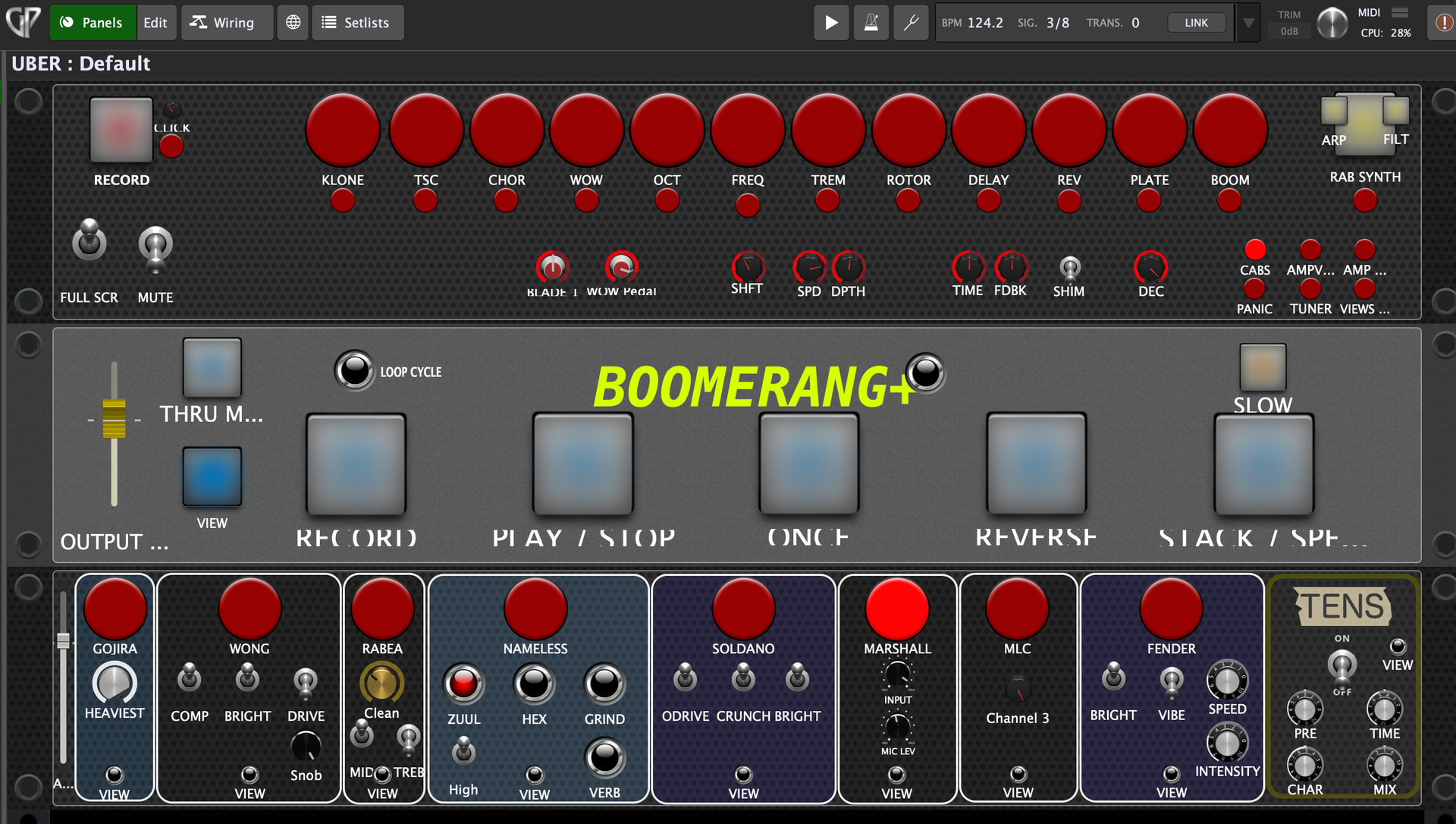
I happen to have built a simple-but-powerful looper plugin, emulating the classic Boomerang “phrase sampler” pedal.
I have it set up in GP and it works perfectly. I’ll be sharing the custom panel for it ASAP!
Check it out here: GitHub - MC-Music-Workshop/boomerang-plugin: VST/AU plugin based on the Boomerang+ Phrase Sampler. · GitHub
I would be really interested in the custom panel once you finish it. Thanks in advance.
thanks! i’m not sure what i’m waiting on. I’ve never posted a panel/rack before so i’m sure there’ll be issues, but i should just do it. Looking forward to your feedback!
I figure i’ll take a shot right here before posting in the main panels/gig file threads. Do these work for you in any way? What’s broken?

boom.gppanel (182.5 KB)
Presumably you’ll have to download Boomerang: (either link works)
- Release v2.0.0-rc2 · MC-Music-Workshop/boomerang-plugin · GitHub
- Boomerang: Live Looping & Time-Based Audio Effect
GPScript required:
BOOMERANG.gpscript.zip (531 Bytes)
Might as well demo my Uber Rig gig file. How can any of these work without having exactly the same plugins? But the design of the panels is interesting, i think.
The script is required for most of it to work. I’ll have to write up all the functionality - there’s probably some wacky stuff in here that seems natural to me.
UBER.gig (1.9 MB)
UBER Script.gpscript.zip (1.6 KB)