Finally getting started with Gig Performer. The GP setlist asks for PC, Bank, MSB, LSB. Where/how do I get this info? I want the setlist to launch scenes, which is Roland-speak for a mix of instruments and settings for a song. Thanks
Can you please explain what do you want to do in detail?
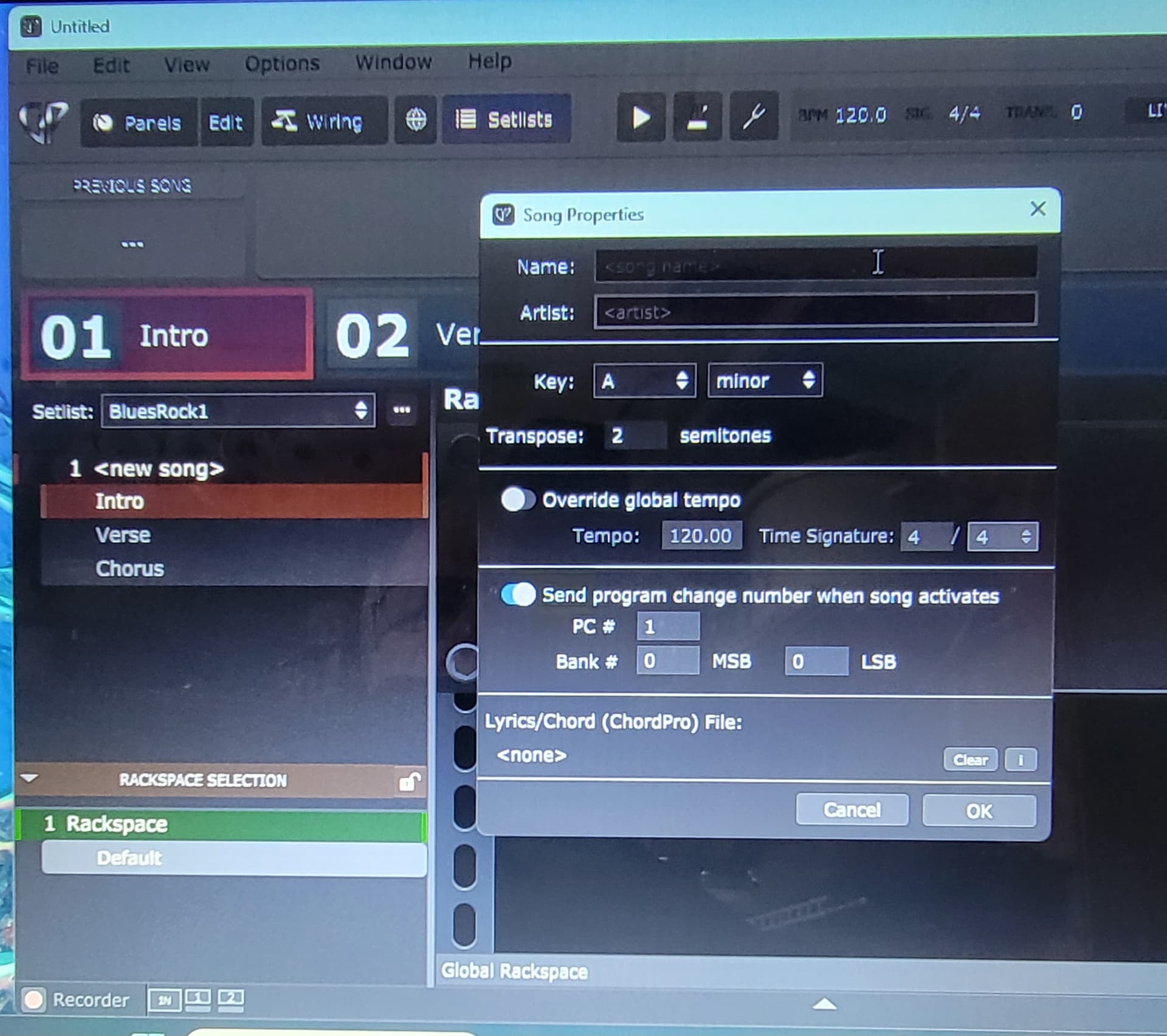
Also please create a screenshot of the “GP setlist asks” dialog.
The setlist doesn’t ask for anything.
You can define a program change (and bank switch values) for a song part in a song.
If you want a song part to trigger something in your external synth (Fantom) then add actions to the song part to send out the desired MIDI messages
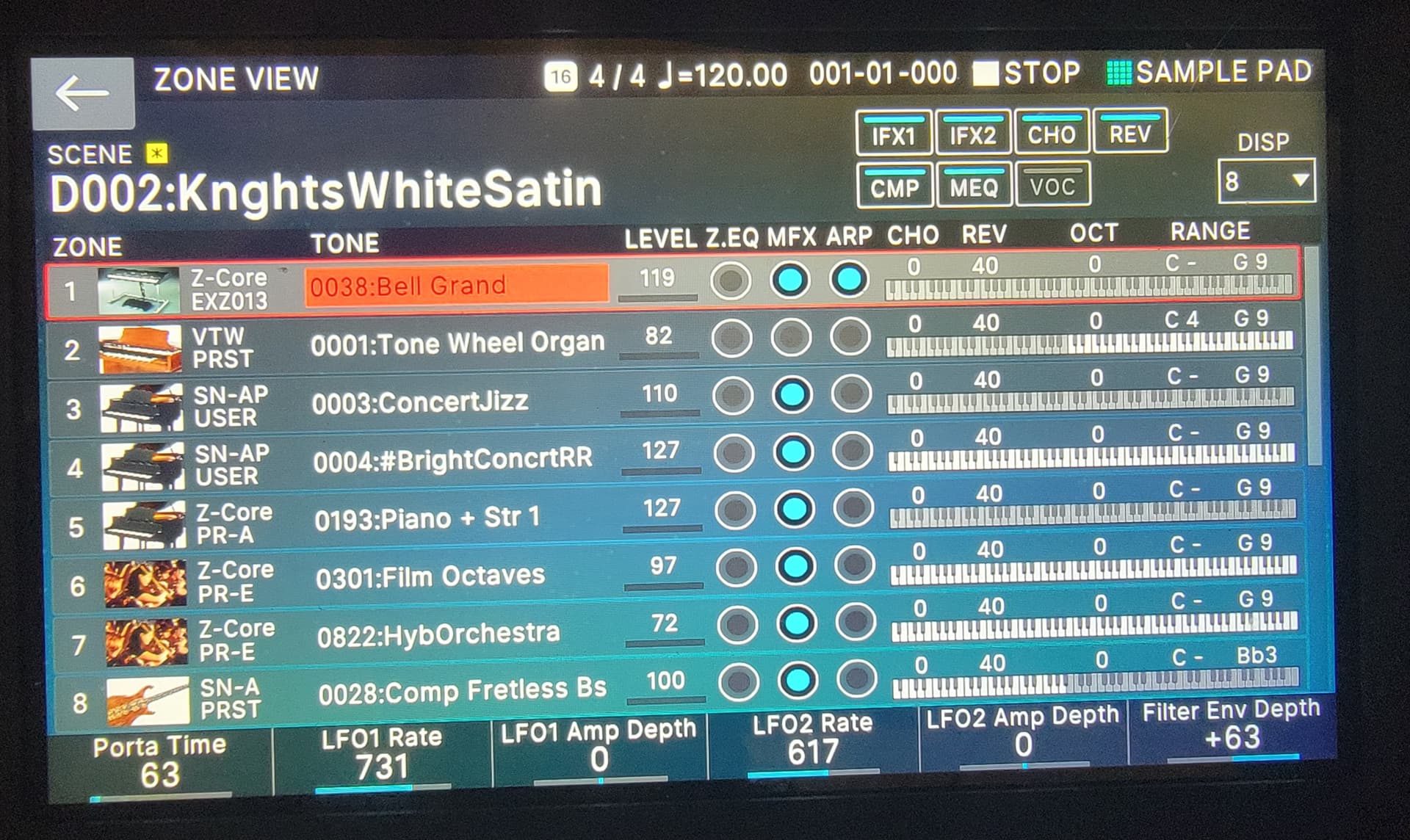
How do I tell Gig Performer to launch the song I posted in the Roland window, which is D002-KnghtsWhiteSatin. I was assuming I needed to fill in the MSB, LSB info, but maybe not.
Or maybe I could first set up my songlist in the Fantom-0’s chain function, then get Gig Performer to launch each scene from the chain. Hmmm.
Oh, what version of GP are you running?
Yes, just enter the designed program change number and bank numbers in that dialog.
As to what the values should be, they should match whatever you have defined for your patch on the Roland.
Gig Performer 5 Pro for Windows.
I’m running 5.0.40
“They should match whatever you have defined”….. If I defined the values, I didn’t know I was defining it, and I don’t know how to retrieve that information.
So it seems reasonable to assume the Bank # window would be D002.
You need to find this information in the Roland documentation.
A quick google reveals that you could try this:
- MSB 85
- LSB 3
- PC 2
The MSB is always the same. The LSB corresponds to your Fantom bank (e.g. 0 is Bank A, 1 is Bank B etc).
Note that I do not have this controller so there are no guarantees this is correct! 
I doubt it – that’s just the name that Roland is giving to a particular bank. There has to be an underlying bank number - or pair of bank numbers depending on how many banks are actually supported.
You’ll have to look at the Roland manual or ask on Roland forums.
Thanks
Randy, congratulations on selecting Gig Performer (GP). Although I don’t have the Roland Fantom-0, I do have the Fantom 8 EX, which has a lot of similarities.
Because of the way that “patches” and tones are set up on the Fantom, the use of the PC, Band, MSB & LSB may not accomplish what you are hoping for. As you are probably aware, the hierarchy of the Fantom is: Scene → Zone/Track → Tone. The zones/tones in a scene can be “linked” together to create layers or can be selected independent of each other by selecting the specific zone. In addition, as an added feature, you can configure your pads to use “Keyboard Switch Group Mode” to select specific zone(s).
Because of this design layout, I found the way that works best for me in addressing my scene and zone changes with remote applications (ie. Gig Performer, MIDI Designer) is to use the Fantom’s SysEx commands instead of trying to use the basic PC, Band, MSB & LSB commands.
As an example, if I want to select Bank A/Scene 1, I can add a SysEx code, such as FA 41 10 00 00 00 5B 12 01 00 00 01 00 00 40 F9, to the GP Set List Song Part Properties. Please note that there is a unique SysEx code for each Bank/Scene option.
In addition, the Fantom allows you to select the specific zone/tone from a Scene directly from the Scene or by using pads that are assigned to a switch group. Because I extensively use switch groups, I add another SysEx command to the GP Set List Song Part Properties to select the switch group that is used for a specific part of a song. For example, Switch Group #1 (Pad #1) is…
F0 41 10 00 00 00 5b 12 01 00 00 13 00 00 00 00 2E F9
If I remember correctly, there is also a way to select the specific zone in a Scene using SysEx, but because I use Switch Groups, I don’t have an available example.
For more info about using SysEx in song parts, here is a previous community discussion…Send sysex to external MIDI - #14 by idan-keys
The part of the discussion that becomes pertinent starts at the Jan 2019 post by EnjoyRC.
I hope this info is useful. I think one of the things you will really like about Gig Performer is its flexibility and ability to do things that most other apps can’t or won’t do. More important, there is a lot of great support from the developers and the GP community.
The issue that you will have is that “KnghtsWhiteSatin” on your Fantom is a scene, not a patch or tone. To select it, you will need use a SysEx message.
After writing my last response, I started having second thoughts about not being able to use MSB, LSB & PC numbers to select a scene. After more research it turns out that you can. But…to get the Bank Select number, you need to calculate (MSB*128 + LSB).
Thankfully, someone created an online database resource for the Roland Fantom 06/07/08 that you should be able to use as a guide. It includes the codes for the tones, scenes & user tones. The URL is… Roland Fantom-0-series tone database with MSB, LSB, ProgramChange and BankSelect
I hope this is helpful.
Yes - but the need for this totally depends on how a particular instrument (synth) makes the bank select number visible. Most systems will present the bank select as two values, MSB and LSB rather than as a single number which is why we use that same model.
Unfortunately, manufacturers can choose how they want to use these values.
For example, if the synth only supports (up to) 128 banks, then they will generally use the MSB to specify the bank number (a value between 0 and 127) and the LSB will always be 0.
However, they could use the LSB instead, in which case the MSB would always be zero and the bank number would be in the LSB
So in general, you always need to check with the manufacturer’s documentation.
I have a fantom 8 and I use GP. Not sure if this is the same thing you want to do, but I use the scene selection on the fantom to change the scene on GP. But, I only use rackspaces. I don’t use the setlist option. Basically whatever my scene number is on the Fantom, IE: scene c25, GP uses the same number, 25, for the scene change. This is the PC number in the “send program change number when song activate” box in your pic above. Not sure if it works both ways, but this is how I link the scenes from GP to my fantom.