Hello, just a quick question,
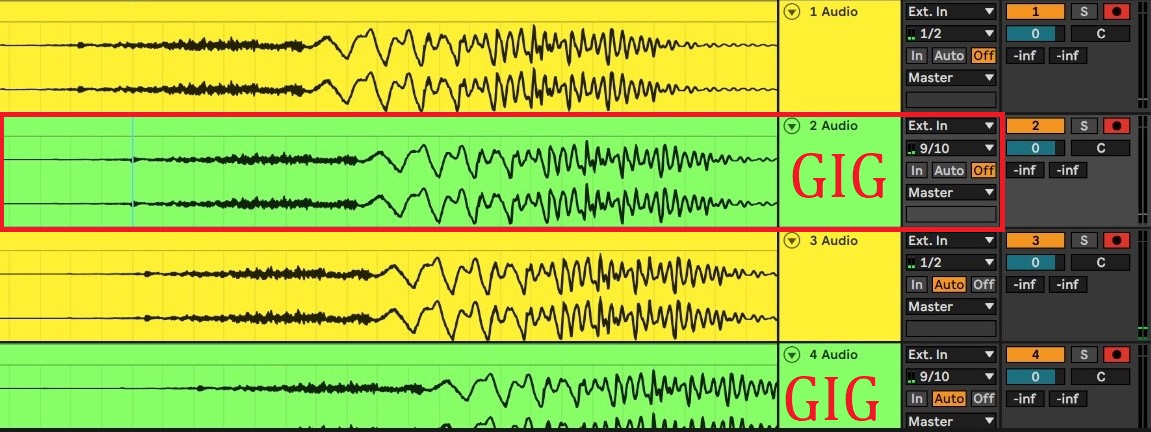
as you can see via my pictures, Gigperformer is adding 10ms+ Latency in Ableton when recording Audio.
Is that normal?
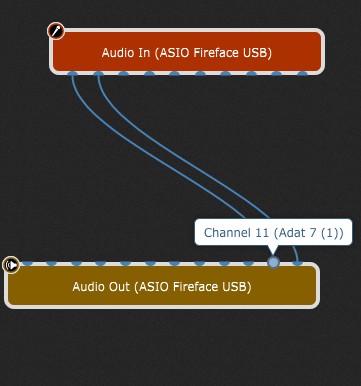
I didnt even load a plugin into Gigperformer, just going straight to the ADAT of my RME Interface, and to the Output of my RME to have monitoring.
Same result when i disconnect the Monitoring in Gigperformer though.
The Result:
1 Audio = Microphone going straight to Ableton (Ext.in 1/2), Ableton Monitoring OFF
This Track represents the “REAL” recording timing
2 Audio = Gigperformer routing the Microphone to ADAT which is set to Loopback, so Ableton can access it (Ext.In 9/10), Ableton Monitoring OFF
This Track is delayed due to Gigperformer
3 Audio, 4 Audio are just out of interest, to see the amount of latency Ableton adds when Monitoring is ON.
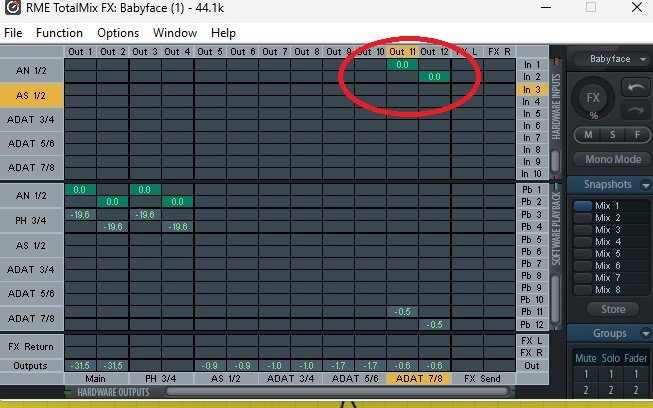
When i directly go from Microphone to ADAT Loopback via the RME Matrix (red circle shows what i activate to do so), then there is no Latency in Abletons recording:
That is normal as you go through ASIO In and ASIO out, that adds latency.
And Loopback with RME is the way to go.
But you could record all your sound from Gig Performer within Gig Performer and then use that recorded files in your DAW.
When just wanting to hear dry signals, i would monitor myself via RME directly.
But i was trying to find a workaround of Abletons NASTY Monitoring latency. (there’s a huge difference between Tracks with Monitoring ON and OFF)
I thought, maybe via Gigperformer i could monitor the wet FX Signal with less resulting recording-latency in Ableton.
But as far as i know now, it won’t help, because of the latency necessarily added because of the re-routing (Asio in, asio out)
to be more precise: it won’t help much. It helps a little bit, as can be seen in the picture in my first post
(comparison between 2 Audio = Gigperformer sending to Ableton, and Abletons Monitoring OFF
and 3 Audio = Microphone going to Ableton, with Abletons Monitoring ON.)
There is a slight improvement with Gig Performer, but not the amount i was hoping for.
It seems I can’t edit posts, lol. Is this deactivated for new users, too, or did I overlook the button?