I am using the fcb1010 to use as a sustain pedal in gig performer but I can’t get the korg kronos to recognise the sustain. I made a midi in block with the fcb1010 to an out midi block to the kronos but I can’t get it to work.
Make sure the right midi channel is being used.
It is the same midi channel. It is sending the signal to the midi out block. I added a midi cc 64 event to the out block but nothing happens in the kronos, maybe I have to use a midi cable instead of an usb cable?
I used Google AI and got this, in case it helps:
Yes, the Korg Kronos can
accept and process MIDI sustain messages (Control Change #64) from an external controller. This functionality is a standard part of its MIDI implementation and can be configured within the instrument’s Global and Combi/Sequencer modes to determine which sounds or tracks respond to the messages.
Configuration Steps
To ensure the Kronos properly receives and uses external sustain messages, you’ll need to check a few settings:
-
Physical Connection: Ensure your external controller is physically connected to the Kronos via a standard 5-pin MIDI cable (from the controller’s MIDI out to the Kronos’ MIDI in) or via USB.
-
Global MIDI Channel and Settings:
-
Go to the GLOBAL menu on the Kronos.
-
Navigate to the MIDI settings page.
-
Verify the Kronos is set to receive MIDI on the appropriate channel(s) that your external controller is transmitting on. The default global channel is often 1.
-
Check for a MIDI Filter tab/page within the Global settings, and ensure that the “Damper” (sustain) message is not being filtered out globally.
-
-
Combi/Sequencer Mode (for multi-part setups):
-
If you are using sounds in COMBI or SEQUENCER mode, you can filter the sustain message for specific Timbres (Combi) or Tracks (Sequencer).
-
In the MIDI Filter tab for a specific Combi or Track, a red box usually indicates that the control message is active. To make only certain sounds respond to the sustain pedal, you must deselect the damper box for the other sounds/timbres/tracks.
-
-
External Controller Settings:
-
Ensure your external controller’s sustain pedal is plugged into the correct port and functioning properly. If the sustain is inverted (stays on when the pedal is up), check if the pedal has a physical polarity switch and flip it.
-
Confirm your external controller is transmitting on the same MIDI channel(s) that the Kronos is set to receive on for the desired sounds.
-
By default, the Korg Kronos should be set up to receive common MIDI control changes, including sustain, without deep configuration. The primary adjustments will likely involve ensuring the correct MIDI channels are used and that no specific filters are accidentally enabled. The Korg website provides the full KRONOS Operation Guide and other documentation for detailed instructions.
[So, look what is says above about Midi channel 1]
The external sustain controller is not directly plugged into the kronos but into gig performer and for the rest I checked all the other recommandations
Then to diagnose the problem, we need to first see what is being sent into GP from that controller - open the global MIDI monitor and then tap/release the sustain pedal a few times and post a screen shot of the global MIDI monitor
Next we need to see how you are routing the expression pedal to the MIDI Out block associated with the Kronos - so lets see a picture of the wiring diagram showing that
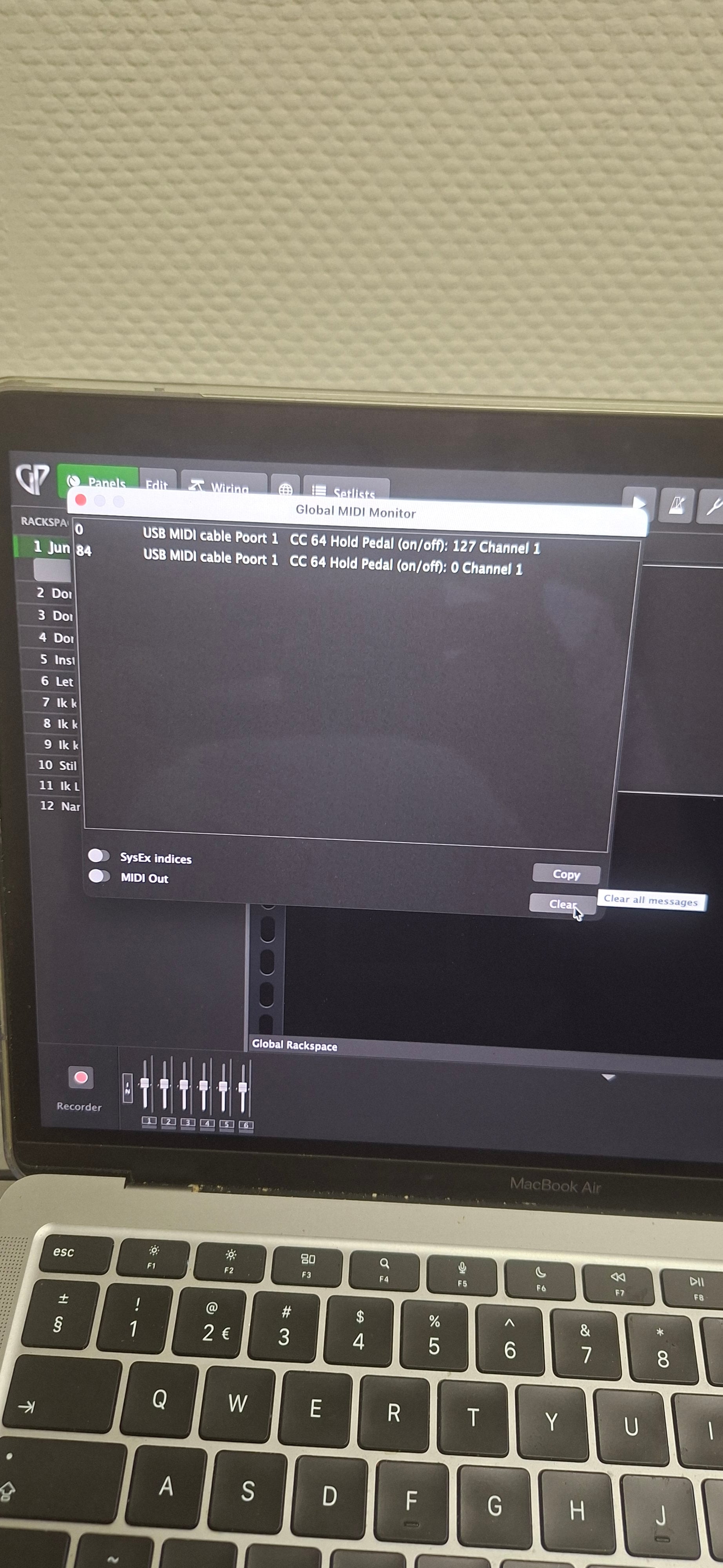
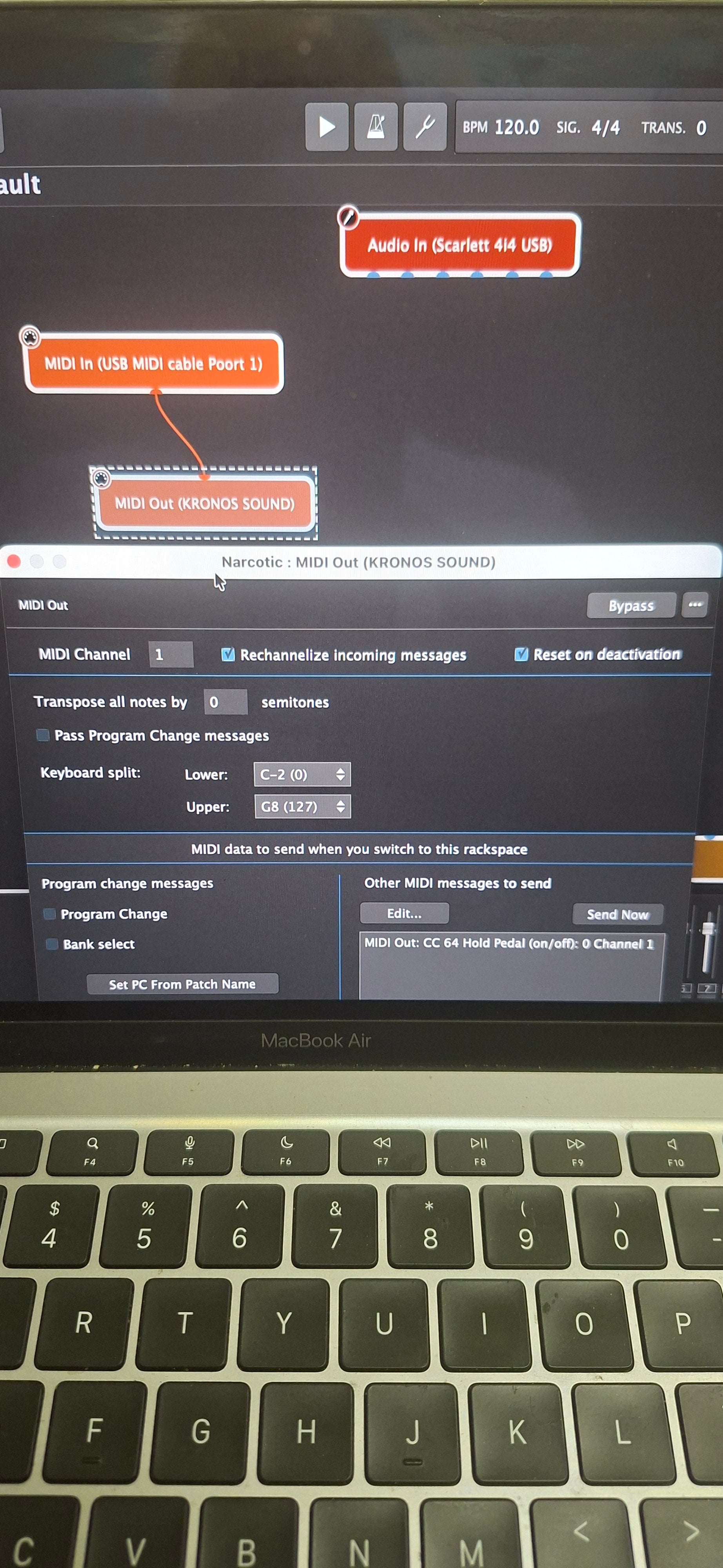
Before going any further, delete that “Other Messages to Send” entry - that shouldn’t be there.
Ok done that.
Is that not showing midi out messages?
Does the MIDI Out switch on the bottom have to be turn on? (Sorry if I am causing more confusion than help).
Do you know for sure that the messages are being received by the Kronos? If you play notes on your controller, does the Kronos play them? If you are using USB, do you have Kronos drivers installed? I know older versions of the Kronos were not class compliant
I will try that tomorrow and come back to you.
Maybe my last thought is sustain pedals are so inexpensive (around $20). Maybe just take the easy route?
The sustain pedal is clearly working. We should understand why the Kronos is not responding to it….hence my next test to play notes.
My kronos is only responding to program changes even when I directly connect a controller to the kronos it won’t respond to the notes I’m playing on my controller
How do you directly connect your controller? If the Kronos is only responding to program change messages, then something is configured wrong with the Kronos - it’s certainly not a GP issue
It isn’t a gp issue it is indeed a kronos issue so I am going to try and find out if I can solve that on the korg kronos forum. Thank you very much so far David.
What Kronos is it? And how did you physically connect your controller to it?
Are you trying to control a single program or a COMBI?
Kronos 2 with usb b - usb a cable from nektar lx 88 into the kronos to play some notes. I even tried to connect the fcb1010 directly to the kronos for the sustain. I trying to control a combi
Try to control a program first. Also, my bet is that USB won’t work without a device driver, which of course requires a computer, So try with MIDI cable