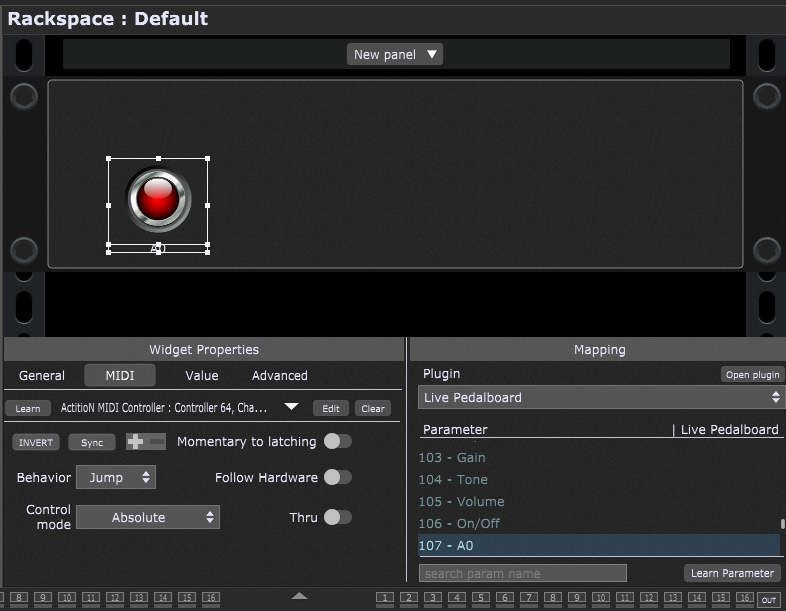
A newbie here with Gig Performer, but already highly impressed! I’m now in the process of transforming my live rig to a fully GP based setup.
A question that I couldn’t find answered (or asked) in any of the tutorials. I have a MIDI footswitch (Hotone Ampero Control), and I would like to use that to toggle on/off VST effects (say a Lost in the 70s Live Pedalboard). In the wiring view, however, I’m not able to wire the Hotone to the VST effect, as it accepts audio inputs only. How should I wire the Hotone so that it would control the VST effect?
Yeah I know, there’s probably a very simple answer to this, but bear with me!
You don’t even need to add a MIDI In block for controls you will map to widgets. You can Learn them directly from the Widget Properties dialog area you see in my example above.
An advance oprion will using the midi in (omni) to send all the midi inputs to the connected vsts on wire view, is not that complicated and in some cases will be even better, for instance a midi keyboard connected to kontackt via this midi in block. But it depends the needs
I don’t understand how you can connect a footswitch using a Midi Block and what the point of that would be instead of using automation, which is designed to do this more easily and more reliably.
You don’t connect it. Midi in omni receives all midi in messages from a midi controller connect it to a computer. There might be some scenarios i think. As i mentioned , how would you connect a midi keyboard (with All its keys) to a kontakt sample ? There is an option to select the controller within kontakt even when you use it standalone. You could select it also in GP or bypass the midi messages with the midi block. Why would you use automation to do key by key when you can just select the midi device? I always think out of the box and maybe there are more scenarios so I wouldn’t say is not useful this approach
@pianopaul
Ok, to be honest, i haven’t tried that. I assume that if it could be done in standalone, it could be done within gp, but if not, then more power to me. Idk what other way could be possible without automation in a fast way. I am using the free version, the kontakt player, so any other version i assume should be the same