Slow learner here (81 years old!!) I recently bought a Surface Pro 10 for business with 64 gig of ram. Due to its faster processor, I am experimenting with predictive loading settings and I am using 3 at this stage.
Question 1. If the “green loaded” wording appears bottom left, then quickly changes to “red -
loading,” and finally changes back to “green loaded” again, does that mean that I
should be able to play the moment the first “green loaded” sign appears?
Question 2: Is there any way to automate the predictive setting via midi sent from an iPad? The
reason being, if I want to play a very large set of say 400 songs, then I would like to
have predictive automatically revert to 1 for random song choosing for a live crowd.
Then, if I was playing a smaller set for a concert audience, I would like to have it revert
back to predictive 3. Any opinion welcomed. Many thanks. Cheers.
Since you have a new system with a lot of memory: how is the performance with predictive loading disabled? Because that would be the smoothest way to use GP - long loading time on startup but after that instant switching between songs. Predictive loading is an option for systems with little memory to be able to use a lot of rackspaces / large setlists.
Question 1: I recall that green means ‘ready to play’ but I do not remember that it briefly switches back to red.
Thanks for the responses. I tried with predictive turned off, but memory reached 100% used as the set loaded. I use drums, bass and two or three other instruments in my rackspaces, and even though there was only 22 in the set, I really do need predictive on. I have a gig today so will try setting predictive on 3 and perform the set in order. For the larger set with 400 rs, I will go down to 1 for ramdom selection.
I also have a large pool of songs from which my band’s set lists are assembled. I have experimented with predictive loading in the past, and as a capability found it to be very good indeed.
That said, for over a year I have been using a very basic ‘1 song per .gig file’ approach, for the following reason:
- → Whilst GP is bullet-proof, some plugins are not. I’ve had occasional issues with Kontakt (and other plugins) crashing at various times during a gig. Reloading a 1-song .gig file for me was a lot quicker than a 40-song .gig file, even with predictive loading enabled.
Hitting Command + O and typing the first two characters of the next song + Enter takes about 2 seconds, so the approach doesn’t introduce any noticeable delay between songs when at the gig.
You do need to ensure that the plugins in each .gig aren’t ones that like to ‘call home’ every time they’re opened, so I’ve swapped out any of those.
I use a template .gig file as a starting point and import previously exported Rackspaces as re-usable entities to avoid duplicating configuration.
There are some cons of course with this approach, as there are with all approaches, but for me this is the most low-risk, reliable, and flexible way of being able to pull up a song when ordering is not always known (e.g audience member makes a request).
I have a lots of songs and rackspaces in my big Gig file. I have 120 GB of ram. Thankfully, I think I have every sampled sound in my gig that I need and the ones I use most are in the Global Rackspace.
So, I have been able to re-use them instead of adding a new sampled sound. (I have experimented with Kontakt purging too, but I have some questions about it when I save the Gig file after I hit notes that outside of the purge range, etc.)
With physically modeled sounds (including all synth sounds), I give myself more leeway to add new sounds. Thankfully, this uses far less ram than sampled sounds.
So, in this way, I am hoping to get a few years with all my sounds (my full large Gig file) available without Predictive Loading. (I do have a long load time at start up, but songs/rackspace change almost instantaneously).
If I felt like I was maxing out on ram, my next step would be to separate my gig files by band/genre.
So, I figure that would buy me a few more years.
By then, I would think there will be standard laptops with 1 TB of ram (or maybe ram will be replaced with some other technology with the same speed (new SSDs?).
But, I will be dreading reinstalling in new laptop(s). But, that’s another story…
For a 1 hour show at a lifestyle village, I use a set of 25 songs. I set predictive to 3 and the Gig file loads in less that 20 seconds. For a 3 hour gig at a farmers market, I reset predictive to 1. I load my large Gigfile of 400+ songs which takes about 3 1/2 minutes. Setting to 1 allows random song choosing of about 10 or so seconds for the song to load. This setup is working ok for me. Loading time per song is about the same in both setups. With 64 gig of and a Surface Pro 10 for Business, It’s had to believe I started using GP with only 8 gig ram on my (at the time,) Surface Pro 4.
Yes I am. I was advised in the early days to use a seperate rackspace for each song. 95% of my songs use bass and drums, and each new song uses a different drum kit and a different bass. This wouldn’t work using set lists within GP.
It seems that methodology really uses up memory, especially loading in different instances of drum kits, which can really use up the ram. But if it works for you, that’s all that matters.
I would probably approach things differently, probably putting a drumkit or two (maybe 3 if necessary) into the Global Rackspace and maybe using IK’s MODO bass (physically modeled). (Or maybe putting a few sampled basses in the Global Rackspace).(I know IK’s drumkits are "semi-physically modeled, so I do not know how ram intensive they are–or how good they sound).
But, everyone has their own way of using GP. All good.
Here’s a quick summary of my experience after a year with GP:
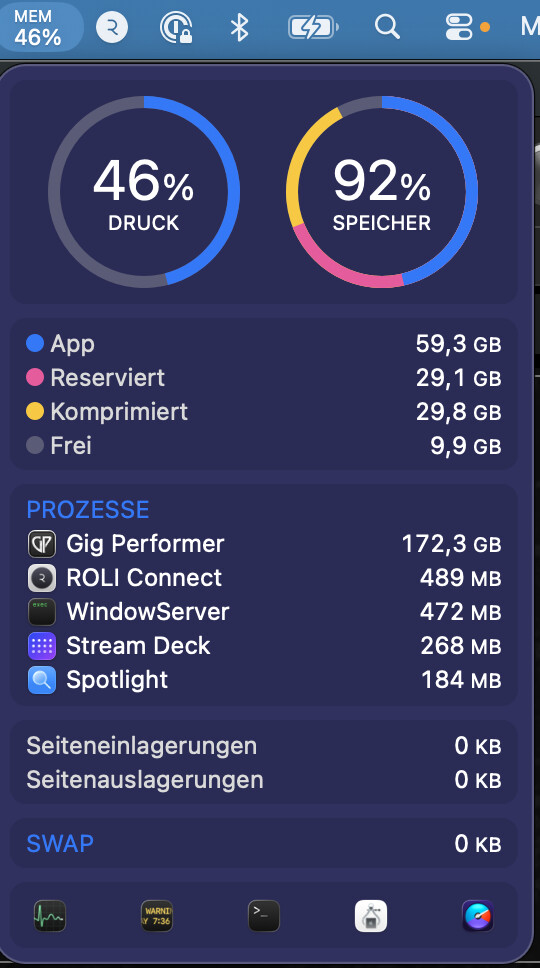
I currently have about 150 songs. My MacBook Pro M3 with 32GB couldn’t handle it. Now I have a MacBook Pro M5 with 128GB. GP runs very well on it at the moment. Memory pressure is at 46%, and memory usage is at 93%—even though GP itself is sitting at 172GB! (Whatever that actually means). The gig file takes about 4 minutes to load. I’ve turned off “predictive loading” because I need to switch quickly between songs. I’m in a cover band, so long pauses aren’t ideal. I’ve been using GP live for about 3 months now (around 15 gigs). Before that, I spent about 9 months programming and learning the ropes. I’ve had a few live crashes—three, I think. Once during a song, and the others while switching to a different song. Pinpointing the cause is difficult because, in the heat of the moment, I’ve never generated a crash report. Right now, I restart GP after every set during the break. When I do this, I haven’t had a crash in the subsequent set. It might just be in my head, but it helps me stay mentally at ease.
For me, my setup (loading everything into RAM) is the best option. I used to handle things the way jwdnty describes back when I used Logic. That always took a long time, too, because Logic reloads the entire program structure every time. Of course, that approach is safer and faster if a crash occurs.
For now, the 128GB setup works fine, though maybe my next computer will have 256GB.
I use a digital guitar playing Real Guitar VST as my main instrument. I also have a 49 note keyboard for soling. I also use Ujam auto bass, also with Ujam strummer guitar when soloing.
I think its worth repeating that I use my set up as an arranger keyboard would be used i.e. strum a digital chord on my PS 3 Rock band controller and the bass, strummer, vocal harmonies etc all follow along. The setup works as an arranger keyboard works. So there are usually several vsts involved.
I don’t think that has anything to do with how I am running the ship! Do you think that the drummer on stage doesn’t play in different styles? Or different tempos? Or use brushes or hot rod sticks? I play mostly pop songs from the 50’s to the 90’s, with some songs much earlier and others into the 21st century. Suppose I perform a bluesy version of ”Route 66.” Not fast like the Rolling Stones, but laid back 4/4 tempo a bit like Nat Cole. I need to choose a drum kit with a rock sound that uses sticks. Then I need a bass with an edgey sound that has a walking pattern like 12 bar blues. Then I need a sharp EP for a solo in the middle and a Real Guitar sound to play for comping. How am I going to get all that into a GP set list? The very next song I want to play could be “Annies song” by J Denver. This has a brush kit, and a 3/4 waltz time, strings and tremolo mandolin. Does that all go into the GP set list too? I have read many times that GP is NOT made for changing programs in the VST itself. It is always better (so I have read on the forum) to have your gig file set to the sounds you want. If you are a keyboard/synth/organ player in a four piece band, then you may have several acoustic and electric pianos, many pads, strings etc,etc, and all you need to do is load them into a GP set and call up the one you need for the next song. This is easy when you don’t have drums and bass in your set because other band members play them for you. I am a solo player and I need what I need. Loading a gig file takes only seconds and works for me.
I’ve been thinking about doing this for a while. I have feeling that GP under Windows (and I know that you have a Mac - interesting that they crash too!) may get ‘Clogged up’. I know that if I am editing a song at home, and I want to load a new song, when I click over the load icon, the next song will not load. To fix the issue, I have to go into the Task Manager where I find that the previous GP instance is still sitting in there, and the old instance needs to be deleted before the next one will load. I have mentioned this issue on the forum, and even asked if there was a script that could be written to force the automatic removal of the old song. If I have a multi-set gig, I will now seriously consider rebooting between sets.