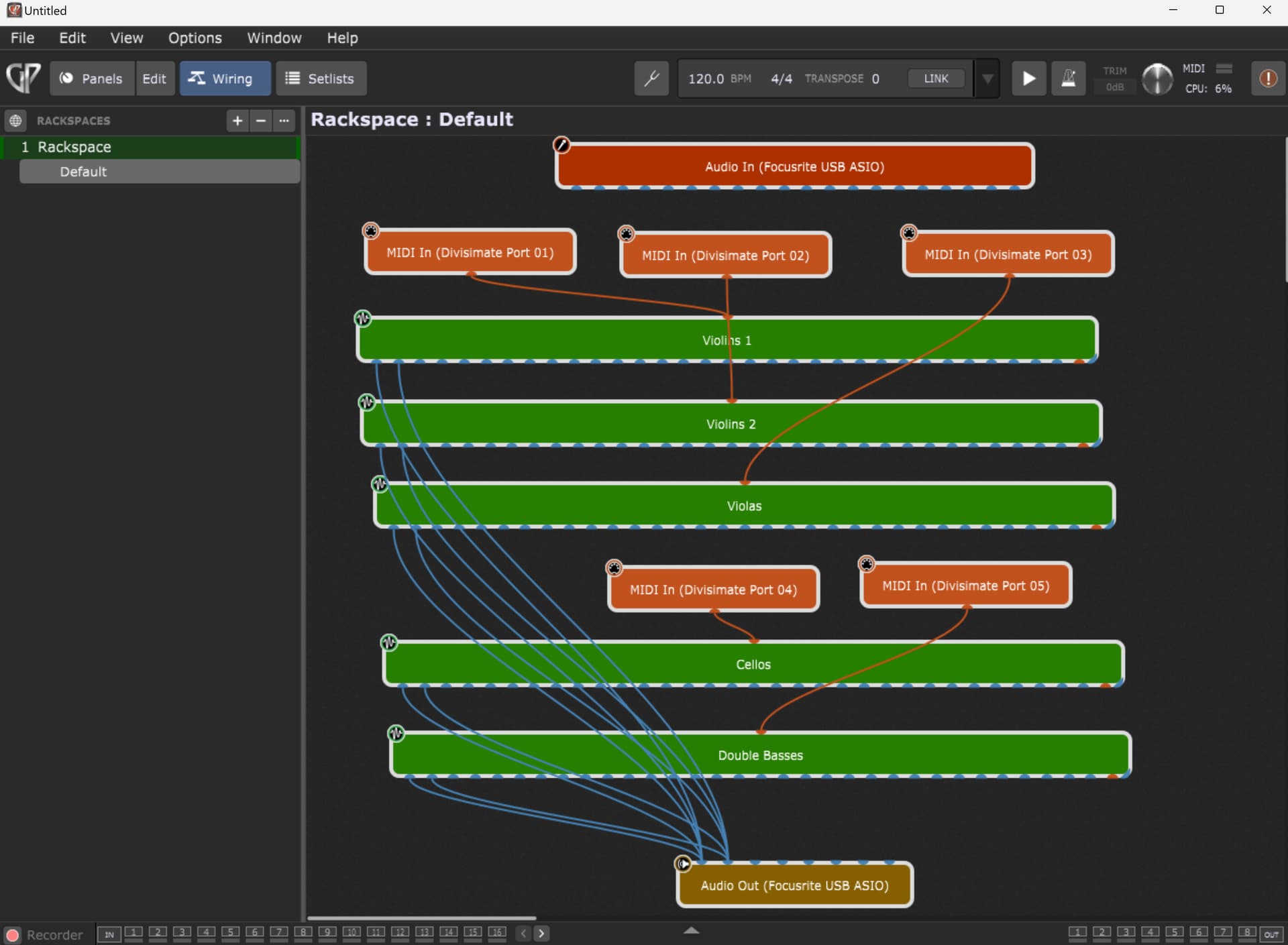
Are there anyone using Divisimate with GP? I’m having a lot of pops and clicks with Divisimate, which ended up with BSOD once! I’ve played around with the buffer settings to no avail. Still getting a lot of pops and clicks.
When using Divisimate with my DAW, it has no problems whatsoever, which made me think it’s a compatibility issue between Divisimate and GP.
I’m using a 12th gen i9 laptop with 32 GB RAM. Running only 5 voices from Divisimate, so nothing extensive. Using Kontakt as my main sampler.
@dhj Divisimate sends midi instructions via virtual midi outputs. E.g. if I play 5 notes, Divisimate can send each of the notes to separate midi tracks. In GP, I select individual virtual midi input from Divisimate (midi 1 to 5) - each one sending connected to an instance of Kontakt. This is exactly how Divisimate works with DAW software as well - and it works pretty seamlessly without latency or hiccups. For GP, I’m getting lots of pops and clicks and it’s very unstable.
@pianopaul, Divisimate gives me more control. For example - my setup is for 5 voices: violins 1, violins 2, violas, cellos and double basses. I set up violins 1 and 2 as “melody”, and I transpose violins 2 an octave lower. So when I play a single note melody, I get violins 1 and 2 playing in octaves. Violas, cellos and double basses are sent to 3 separate tracks, and I transpose double basses an octave lower. So if I play a triad with the left hand, I get an open chord with violas, cellos and double basses. Technically, I can send these to multiple orchestral instruments (and set some instruments to play the 6th or 9th note etc).
OK. Will post a screen shot once I can. I’ve changed the sample rates and buffer sizes around, from 44.1Khz to 48Khz, from 96 to 256 samples - getting the same problem irrespective.
This should work absolutely fine (though I’m not sure why you are creating multiple instances of Kontakt rather than a single instance with multiple instruments, each on a different channel. (Doesn’t matter from a technical perspective, just easier to manage)
Kontakt is very lightweight so would not be contributing to a problem, and if GP’s CPU meter (which only measures audio processing) is only at a few percent, it is definitely not a GP problem.
I do see that you’re not using a mixer and just throwing 5 sets of audio outputs directly into your audio interface … any chance you’re not just overloading your audio interface?
Yeah, never thought about one instance of Kontakt. Will try that out. But as you said, that’s probably not the problem as this is a very similar workflow to connecting Divisimate to my DAW.
I’m not sure how this will stress the audio interface. But I can try routing to a mixer. Any other possible problems I can try to troubleshoot? Really appreciate this.
I don’t understand? What do you think will stress the audio interface?
The thing is, it’s hard to know from your description of “pops and clicks” what is really going on? If you’re sending the output of 5 Kontakt instruments, all at full volume, directly to your audio interface, you may be just clipping and getting lots of distortion. In that case, using a mixer to reduce the output of each Kontakt synth will help. Also, you should expose the audio mixer output panel at the bottom of the GP window and see if the meters are indicating an overload
I see what you mean. No, it’s definitely not my audio peaking or clipping, if that’s what you meant. The pop and clicks are similar what we get when the buffer settings are off. It feels as if the system is being maxed out and can’t handle 5 instances of Kontakt - which shouldn’t be the case since I’ve had >20 instances of Kontakt in my DAW. Which is why I suspect the issue may lie with compatibility between GP and Divisimate.
Well, GP has no problems if I’m triggering the midi directly from my keyboard midi controller via my audio/midi interface - even with multiple instances of Kontakt + various other softsynths. It only happens with Divisimate. Furthermore, Divisimate has no issues with multiple instances of Kontakt if run though my DAW software. I can’t see any other reason why this is happening. Perhaps it’s how GP handles Divisimate virtual midi? A little stuck here - because that will mean I can’t use Divisimate and GP together in a live performance situation (or any situation for that matter…).
It’s erratic with Divisimate. Sometimes it’s ok. But usually after playing for a while, the system seems to be taxed to the max and I’m getting drop outs. Did your GP work with Divisimate?
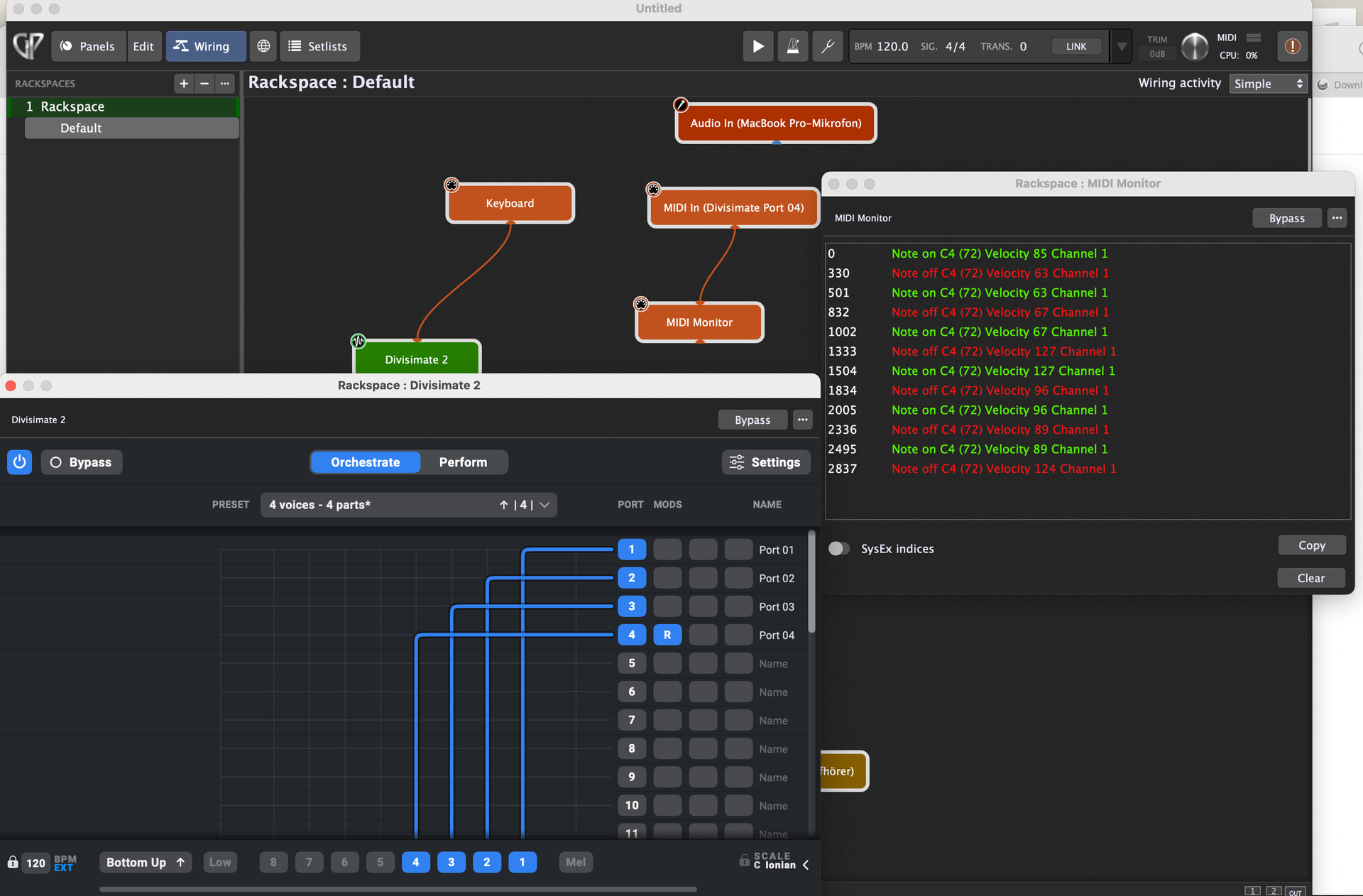
How do you make your midi keboard controll your plugIns. Since the midi in is divisimate2 and not your keyboard. When I do the same connection, it doesn’t sound…
It is available as a standalone and in AAX, VST3 and AU formats
So your controller is sending MIDI to MIDI In Plugins and then you wire from the MIDI In plugin to Divisimate.
When Divisimate is loaded in the wiring view there are new MIDI In Plugins are available.
Now you use one of this new MIDI In plugins and just wire from that to your plugins.