I have multiple plugins loaded into the global rackspace, where they can be bypassed using the plugin persist scriptlet. I’m using a guitar to midi controller, which, depending on the plugin/preset chosen, needs to be set to different pitch bend ranges. For example, for piano and organs where no pitchbend should be used, it is 0. For, other synth lead sounds, its a higher number. I have a knob that sets the pitchbend range messages to my controller. Basically, they are just PC message 0,1,2,3 etc…
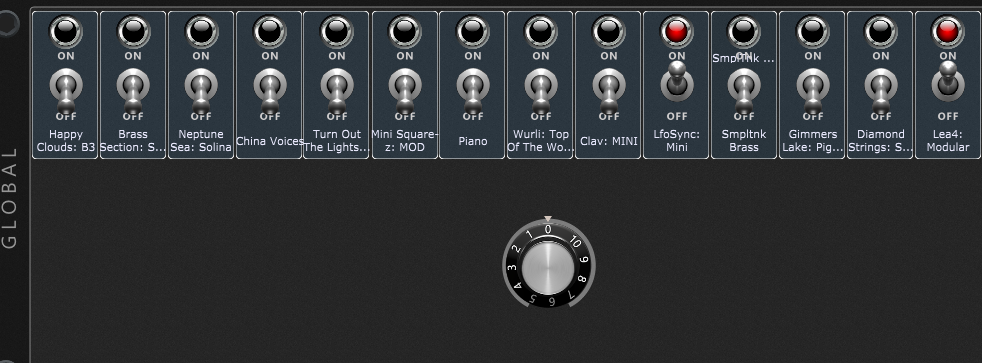
When using variations, I can of course set this knob to its local rackspace mapped widget and it will change accordingly. However, often, when improvising live, at will I want to turn off one plugin and activate another. So, this is in the global rackspace, the plugin (bypass) switches are on top and underneath it is a knob that controls the picthbend range.
How do I control the knob with each plugin (bypass) switch? I want some switches to turn the knob to value of 0, some to 1, some to 2 etc … Is this possible without scripting or is scripting the only way? Thanks!
It would be great, if widgets could be set via the midi helper tool to send out midi messages similar to the way song parts can. I wouldn’t even need the knob then. Each switch on top, besides doing its main job (bypassing/activating), it could also send out the midi message needed for pitch bend. Perhaps this could be a useful feature to consider?
So you want the knob to control the pitchbend range for only the widgets not bypassed? I’m pretty sure this would need scripting but I’ll hold off to see what the experts say.
Exactly. Each plugin activating switch would set the knob to the correct value. Yeah, I’m pretty sure you’re right about needing scripting. As I mentioned before, I wish a (secondary) midi message could be sent when activating the switches.
Good question! You’re thinking 2 steps ahead! LOL I’d want it to follow the setting for the piano (0, which means no bend at all), since the piano sounds stupid with a pitch bend. Truthfully, this is more of an issue when using lead sounds. For anything that I would couple with a piano type sound, I would set them all to be the same value. BUT(!!), should I accidentally layer two sounds that have two different values, I do have a way to manually send an override message from my hardware mounted to my guitar. But this would be an extremely rare occurrence. Again, mostly when I chose a lead type of sound and I want to bend, and I would like that to be automated.
Why are you changing the pitchbend range on the controller? Why not just set your controller to maximum range and then use a simple script to scale the incoming pitchbend values from the controller to the desired range for the synth?
In some of those Gig files we worked on together you should find some examples of both the widget arrays and the On WidgetValueChanged callbacks that listed multiple widgets. They will lead you in the right direction.
I’m using the Fishman TriplePlay. I didn’t want to give TMI, but its more than just pitchbend “range”. Its the way the midi converter / controller responds and interprets the analog guitar into midi when being asked to drive a piano type sound vs bend sounds. Its an accuracy issue, not to trigger weird, false glitches. If I set the guitar to be my maximum (12 steps) and put the piano to 0, I get more glitches than if I put the controller into “trigger” mode. Trigger mode handles piano type sounds with much more accuracy, but sends no pitchbend. Not sure what its doing, but its doing more than just turning the pitchbend to 0.
In addition, those PC messages set the controller into poly vs mono (sending each string on its own channel vs all on single channel). So ideally, sending those program change message to my controller is a nice option, depending on the plugin(s) I’m using it for. Basically the plugin doesn’t need to know anything, or be changed in any way. Its how my analog to midi conversion is best for that particular sound. Trust me. You guys (keyboard players) have it easy! Midi for guitars is more tweaking! LOL However, when tweaked right, it works amazingly!
Well, I defined them as (only 1 for now as a test):
Syn1 : Widget
TPmidiout : MidiOutBlock
Hoping to send a PC change message out the TPmidiout block. So I put:
On WidgetValueChanged(newValue : double) from Syn1
PC = MakeProgramChangeMessage(0)
SendNow(TPmidiout, PC)
End
I get an error: GLOBAL RACKSPACE (GlobalRackspace) - Semantic error in “Main”: Line 979, Col 9: Types are not compatible. This is line 979: SendNow(TPmidiout, PC)
Does this not work on midi out blocks or something else is the problem?
Yeah, I figured out that it doesn’t work on midi outs blocks, so I put a midi in in front of it. Got it to work but actually the PC message in the TriplePlay midiout block is being used as something else by TriplePlay itself. Its showing up as multiple midi messages in the global midi monitor, so I’m going back to the widget mapped to the TP midi out block’s PC parameter and let it do its thing. Got the switch to control the widget via scripting. Thanks for the push @rank13 !
Not at all, it is the right time to think about it.
Automating anything requires establishing rules that cover all possible situations. It’s best to have a clear picture of this before you start implementing a solution.
Here you should be able to define which pitchbend mode has to be chosen for any bypass switch combination.
 .
. Makes sense though…
 In some of those Gig files we worked on together you should find some examples of both the widget arrays and the On WidgetValueChanged callbacks that listed multiple widgets. They will lead you in the right direction.

