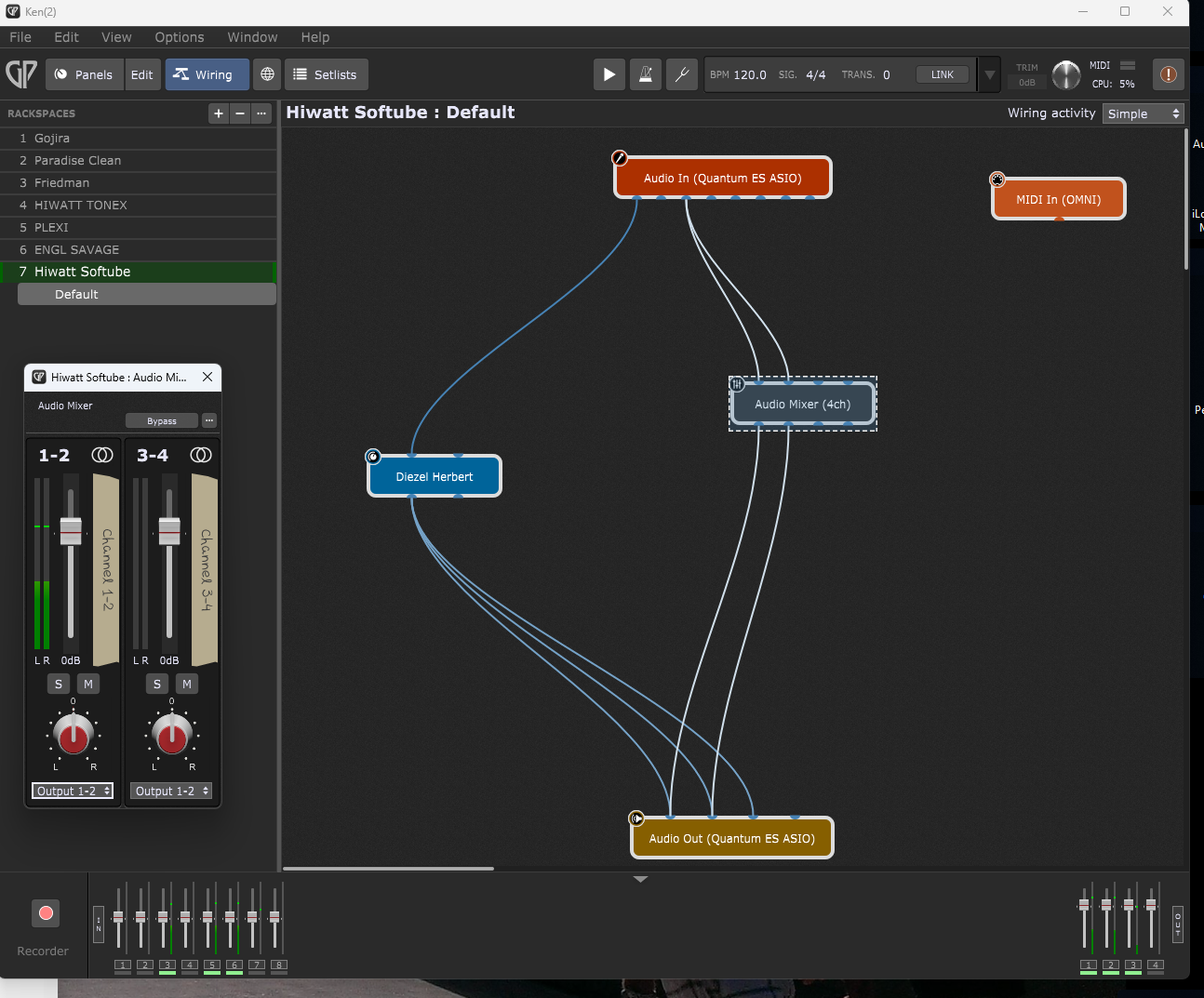
Apologies if this has been covered before. I am trying to figure out how to add an external effects loop into Gig Performer, I currently have an external reverb unit I am trying to integrate in my rack space. I just can’t figure it out.
I have the reverb unit connected, Out > Input 3 on my interface , Output 3 On Interface to Input on Reverb unit.
I am sure I need to use an Audio Mixer in GP to get this all going but I can’t figure out the wiring.
I have a simple Rackspace setup with just 1 ampsim plugin.
Audio In Interface > Amp Sim
Amp Sim Outputs to > Interface Audio out
I assume I need to send the ampsim output to the audio mixer as well, but from here I get lost.
I think I am confusing the audio mixer I/O with my interface I/O, I’m not really sure where to send the in’s and out’s of the audio mixer to get this working.
Replying to my own thread as this never really worked as it should , you end up with an additional input signal coming through, it’s not like a proper effects loop.
Anyone out there have a full proof way of integrating external effects?
This is trivial. Customers (including many FoH engineers) do this quite often but you need to have multiple ports on your audio interface. So lets assume you have at least 4 input and 4 output audio channels on your mixer. Use ports 3 and 4 for your external effect.. The output ports from your audio interface go to the input of your external effect and the output of your external effect go to input ports 3 & 4 of your audio interface.
Here’s an example where I am sending a piano to an external effect and then receiving the processed piano back into GP
Thanks for the reply, But it’s not for internal software synths.
Using a guitar as an input. Below is a close as I have come to a proper type FX loop on an amp sim, but the output is getting 2 inputs which even when mixing very low it still colors the sound too much.