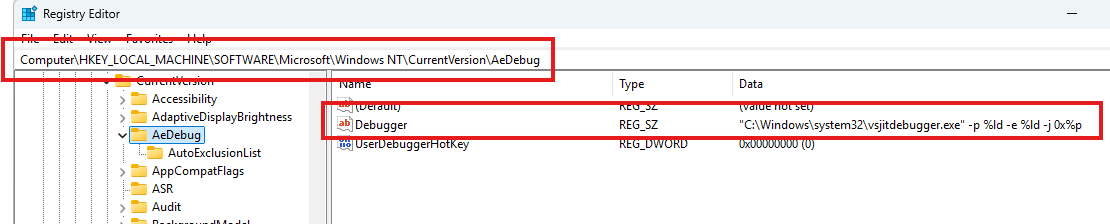
I’ve been experiencing GP crashes (in Win 11) with no dump (or UI) being produced.
Crashes have happened upon: clicking an LED widget, leaving Edit mode, other things. I mention because it doesn’t seem offhand like 3rd party plugins would be the cause, but of course a crash dump is how to get better actual insight.
Is there a way I can ensure that a crash dump takes place in all cases so that it can be submitted for potential diagnosis? (I have SysInternals and thus Procdump available, FWIW)
I take this to indicate I have no automatic debugging currently installed, yes?
I found these articles:
that seem they would be relevant. Alternative debuggers are presented. I know that I have at least WinDbg and Procdump available here as possibilities.
I don’t know where GP’s crash handling fits into the scheme. That would be good to understand.
Also, any successful experiences where someone can say “I attached (this particular) debugger, like so, got the dumps I needed when GP crashed, and was able to successfully diagnose the cause(s) of the crash in my setup.” would be very helpful as a guide to replicate here.
Well, @dadi 's example refers to the Visual Studio Just In Time debugging handler.
But you should probably have the windbg entry - not sure why you have “value not set”
GP is automatically crashing when detecting a debugger attached to it. Looks like both of these crashes are a result such case.
This is by design in order to protect GP and you cannot attach a debugger.
If a regular crash happens then a dump file should be created by Windows even if no window popped out. You can try to use application like Everything from voidtools which is indexing the whole file system to immediately locate the created dmp file wherever it is (great utility in any case).
I now have one specific observed no-dump scenario:
I downloaded Everything, used it to help cleanup old .dmp files, and then used it to watch for a new .dmp as I used GP.
I was saving a patch name in U-he Diva (inside of Unify, inside of GP), got a dialog complaining of incorrect characters in the patch name, and then a crash. No .dmp was generated.
I know it is a wishful future “if”, but if GP could sandbox plugins, would/could something like this have been caught and handled without GP crashing? Or is it the case that a crash lower in the hosting chain always carries the possibility of crashing the parent, despite all efforts?
Having a better crash handler is always good and this is a good report!
We will check this internally to find better ways to handle such crashes of 3rd party plugins.
In general, moving plugin processes into a different process is problematic as it will create latency when synching the real-time audio buffers between the processes. But catching synchronized exceptions might be able to be improved. We need to investigate this further.
Regarding the crash you mentioned, let try to find the root cause of it and resolve it so you can move on.
Did you get a new dump file (try using Everything)?
Do you get a crash when using Diva without Unify?
If not then the problem is probably inside Unify and we need to sync Unify developers with this information.
Here is a different observation that I’ve seen several times lately, incl. this morning -
Start file playback in the SAFP. The file plays (sounds OK), but all UI to GP is lost. Mouse and/or keyboard actions have no effect. Nothing I’ve tried so far will make the UI responsive again. The file will play to the end, if I let it, but reaching the end does not change the situation.
So, ultimately, I quit GP via the Task Manager (End Task). No crash dump is created (per Everything).