My laptop is always plugged in so the following is more of a curiosity than a problem.
Even though my laptop is on the High Performance power plan and the CPU is set for 100% for both plugged in and battery mode, the CPU is still throttled on battery mode.
My laptop is a Lenovo Thinkpad X1 Extreme. Perhaps there is a hidden tweak or bios setting?
Think it’s the same by me.
My old HP ProBook handles thing great when plugged in. When on battery, the crackling begins in rackspaces that are a little bit heavy.
As you, I have the same settings for both plugged in and batttery power.
edm11
August 22, 2026, 2:39pm
3
Onboard battery power and high performance audio applications don’t mix well together, nor were they ever meant to.
npudar
August 22, 2026, 4:04pm
4
dwhitejazz:
bios setting?
Yes, please review your BIOS/UEFI settings.
ztones
August 24, 2026, 5:09am
5
Most of the time (in my experience) they’re not even exposed in the BIOS settings. Manufacturers do not want to allow you to adjust it.
npudar
August 24, 2026, 5:36am
6
Definitely needs some experimentation, different options are available for different models.
https://support.lenovo.com/ch/en/solutions/ht512798-thinkpad-thermal-performance-overview
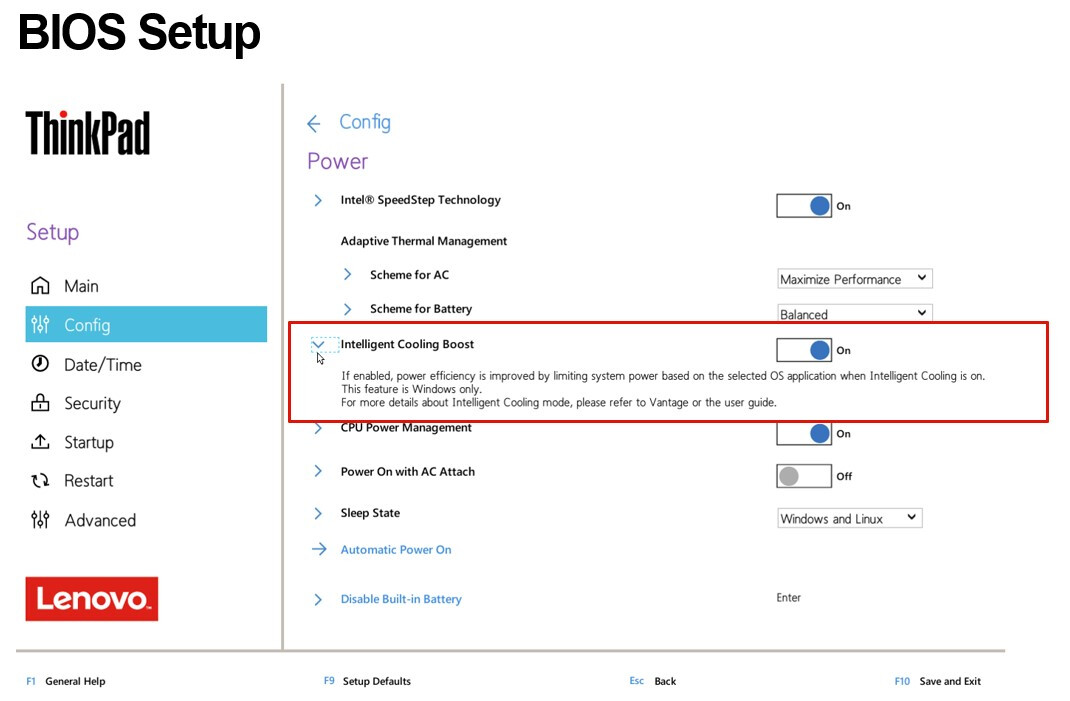
In my case the settings are in the bios, not from the Windows OS or Lenovo Vantage app. There are different settings for AC and battery:
Intel SpeedStep:
Mode AC: Maximum Performance
Mode Battery: Battery Optimized
Adaptive Thermal Management:
Scheme AC: Maximum Performance
Scheme Battery: Balanced
CPU Power Management: Enabled
So the mystery is solved. Thanks.