Hi everyone. I’m a complete newbie to GP5 on a macbook pro. I have a few questions about functions I’m having problems with. But I’ll be dealing with them one at a time (you’ll no doubt be glad to hear).
I will be using GP live, with 2 controller keyboards (1&2, set to midi channels 1&2, but possibly more channels if I need to use splits). I will be using patches (presets? songs?) comprised of 2 or more plugins. So, say, a Jupiter-8 and an OP-X will make up a patch. One will be triggered by keyboard 1, the other by keyboard 2. I can figure out adding and wiring the plugins ok. It’s how to set the midi channel number of each plugin I can’t figure out. I will be working with a minimum of 5 plugins. So, how do I assign midi input channels to my plugins?
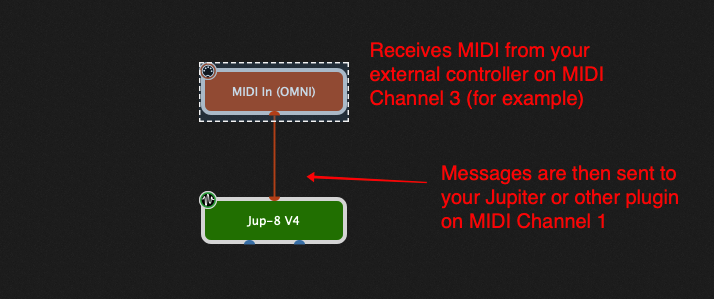
Don’t do that. Create MIDI In Blocks that receive only from your keyboards. For example, here’a MIDI In block that only accepts messages arriving on MIDI channel 3 and it will CONVERT those messages so that they use MIDI channel 1. Your plugins just always be on MIDI channel 1.
Note that once you have configured such a MIDI In block you can save it as a preset to make it easier to create new ones as needed without having to configure everytime (see the documentation)
Ah, so I add a midi block to my Jupiter-8. That block receives midi channel 1. But it converts the incoming midi data to whatever channel I like, and that determines the midi input channel of the Jupiter-8. Very smart. And very logical when you think about it. Thank you very much for your help guys. It’s invaluable.
Now I can start to get my head around program changes and creating individual songs.
You add MIDI In Blocks in Gig Performer. That block can convert MIDI messages coming from external hardware into what plugins are connected to your MIDI In blocks.

 Use multiple MIDI In blocks and do your splitting inside Gig Performer. Leave your MIDI controller on the same channel ALWAYS.